






• Buy Followers
    • Instagram Services
      • Buy Instagram Followers
      • Buy Instagram Likes
      • Buy Instagram Views
      • Buy Instagram Comments
    • YouTube Services
      • Buy YouTube Views
      • Buy YouTube Subscribers
      • Buy YouTube Likes
      • Buy YouTube Comments
    • TikTok Services
      • Buy TikTok Followers
      • Buy TikTok Likes
      • Buy TikTok Views
    • Facebook Services
      • Buy Facebook Page Likes
      • Buy Facebook Followers
      • Buy Facebook Post Likes
      • Buy Facebook Views
    • Twitter Services
      • Buy Twitter Followers
      • Buy Twitter Likes
      • Buy Twitter Retweets
  • Blog
  • Categories
    • Instagram
    • YouTube
    • TikTok
    • Facebook
    • Twitter
  • Contact
No Result
View All Result
Zeru
  • Buy Followers
    • Instagram Services
      • Buy Instagram Followers
      • Buy Instagram Likes
      • Buy Instagram Views
      • Buy Instagram Comments
    • YouTube Services
      • Buy YouTube Views
      • Buy YouTube Subscribers
      • Buy YouTube Likes
      • Buy YouTube Comments
    • TikTok Services
      • Buy TikTok Followers
      • Buy TikTok Likes
      • Buy TikTok Views
    • Facebook Services
      • Buy Facebook Page Likes
      • Buy Facebook Followers
      • Buy Facebook Post Likes
      • Buy Facebook Views
    • Twitter Services
      • Buy Twitter Followers
      • Buy Twitter Likes
      • Buy Twitter Retweets
  • Blog
  • Categories
    • Instagram
    • YouTube
    • TikTok
    • Facebook
    • Twitter
  • Contact
No Result
View All Result
Zeru
No Result
View All Result

Popular Services

Buy YouTube Views
Buy TikTok Followers
Buy Twitter Followers
Buy Facebook Followers
Buy Instagram Likes
Buy TikTok Likes
Buy Instagram Views
Buy TikTok Views
Buy Instagram Comments
Buy YouTube Likes
Buy Twitter Likes
Buy YouTube Comments
Buy Facebook Views
Buy Facebook Page Likes
Buy Twitter Retweets
Buy Facebook Post Likes
Buy YouTube Subscribers
Buy Instagram Followers

How to Clear Facebook Search History

Lizzie Yates by Lizzie Yates
in Facebook
3 min read
61
How to Clear Facebook Search History
13
SHARES
1.3k
VIEWS
Share on FacebookShare on Twitter

Contents

  • How to Clear Facebook Search History
  • Clear searches
  • Tap Confirm
  • Tap Off-Facebook Activity

How to Clear Facebook Search History

how to clear facebook search history

You can clear your Facebook search history by clicking on the three-dot symbol under your profile picture. This will open a menu and your activity log will be displayed. The log shows the activities you’ve carried out on the site, as well as any searches you’ve performed. To clear specific entries, click the symbol next to the search term you want to delete. If you want to delete the entire log, go to Settings > General.

Clear searches

One way to get rid of your Facebook search history is to go into your account settings and clear your browsing history. You can clear this history individually or all at once. Read also : How to See Video Views on Facebook. In either case, you need to delete the cookies that Facebook stores on your device. Here are some tips that will help you clear your search history:

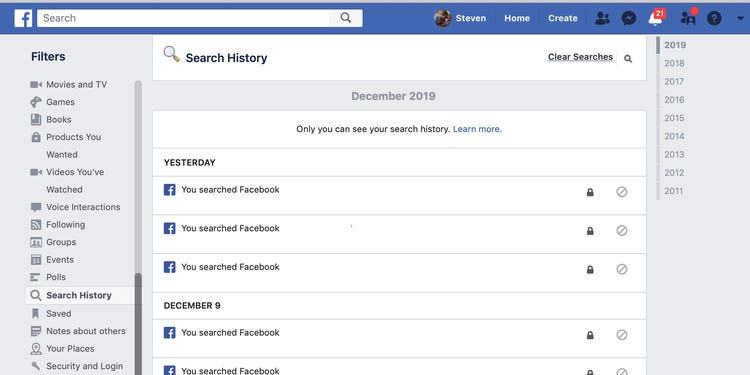
Go to your profile page and tap on “Activity log”. Here you will find the Logged actions and other activities section. Scroll down and you will see “Search history.” Tap on “Clear all” to delete all your search history. Alternatively, you can delete specific entries by tapping the three-dot icon. You can also delete all your history by deleting your account. If you do not want to delete your browsing history, it is best to delete it all at once.

You can also choose to delete specific searches. To do this, click on the Search History link under your profile photo. Click on the three-dot symbol next to the search term. This will bring up a list of the searches that you have conducted on the platform. Delete specific entries or clear all. You must confirm the deletion to delete your search history. You can also choose to delete your search history in bulk. Just keep in mind that once you delete your search history, you won’t be able to recover them.
This may interest you :
How to Get an Email Address From a Facebook Url
How to Get an Email Address From a Facebook Url Want to…

Tap Confirm

You can also delete your search history on Facebook. Facebook uses your search history to better show you relevant results, collect information about you, and more. To delete your entire search history, tap the ‘Clear search history’ button. On the same subject : Why Is Facebook Dating Not Working For Me?. This won’t disable search logging on Facebook, but it will let you know that all searches have been deleted. To do so, tap the ‘Clear all searches’ button and confirm.

Once you have confirmed the deletion, open the Activity Log screen in Facebook. Then, tap the three-dot icon at the bottom of the screen. On the activity log screen, you can view all searches and tap “Nothing to Show.” When you’re done, you’ll see ‘Nothing to Show’ in the search bar. Tap this button to delete each individual entry. Then, tap ‘Clear all searches’ again to restore the previous history.

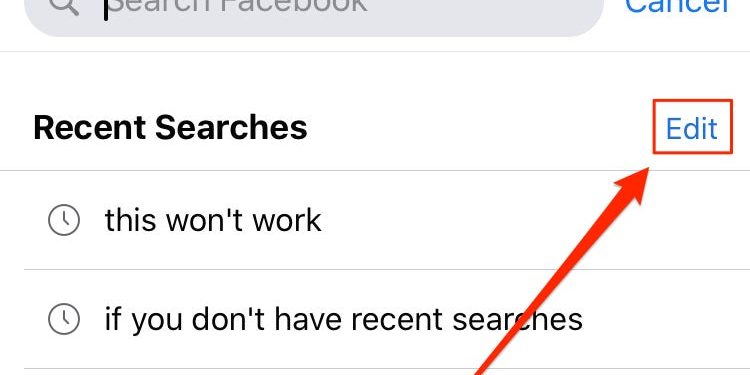
Alternatively, you can access the Facebook app on your mobile device. Tap the icon in the bottom left corner of your screen. This will take you to your News Feed. Tap the “Search Facebook” box in the top-right corner of the screen. Click on ‘Clear search history’ and confirm the action. To delete the search history on Facebook, you must have a Facebook account. You can access your account information through your smartphone or computer.
To see also :
5 Easiest Ways to Earn Money From Your Facebook Page
5 Easiest Ways to Earn Money From Your Facebook Page If you…

Tap Off-Facebook Activity

Off-Facebook Activity is an overview of the third-party websites you visit on a regular basis. It allows you to clear your browsing history by disabling the tracking features that Facebook uses to keep track of your movements. This tool is available on some countries, including Ireland, South Korea, and Spain. See the article : How to Change My Name in Facebook. It will be rolled out to all users globally in the coming months. Alternatively, you can use the Facebook browser to clear your browsing history.

From the settings page, tap Off-Facebook Activity to clear your Facebook search history. Tap “Clear History” on the second option down from the bold title. In the small box next to the description, tap the blue button to clear your history. You can also turn off future off-Facebook activity. To stop future tracking, tap on the Off-Facebook Activity option and tap “Clear History” to stop receiving off-Facebook messages and activity.

Off-Facebook Activity is a section of Your Facebook Information. In order to manage this activity, you need to enter your password. This page shows the data providers and sites that have shared your Facebook account information. To clear your Facebook search history, you should choose the option that allows you to manage your activity. To remove your Facebook search history, you should first clear your personal data in Facebook. You can use this option to delete information that has been stored in your profile.

Read also :
Do I Need Streaming Software For Facebook Live?
Do I Need Streaming Software For Facebook Live? If you want to…

Related Posts:

  • How to Delete Search History on Facebook
  • How to Delete YouTube Search History
  • How to Clear Facebook History
  • How to Delete Facebook Search History
  • How to Clear Search History on Instagram
  • How to Clear Instagram Search Suggestions
Was this article helpful?
YesNo

You might also like

Troubleshooting Instagram Posting Issues

Troubleshooting Instagram Posting Issues

How to Post Multiple Photos on Instagram Without Cropping – The Ultimate Guide

How to Post Multiple Photos on Instagram Without Cropping – The Ultimate Guide

How Do I View My Instagram Likes on My PC?

How Do I View My Instagram Likes on My PC?

How to Pause Reels in Instagram

How to Pause Reels in Instagram

How to Make Instagram Bio Center

How to Get Verified on YouTube: How to Speed Up the Process

How to Get Verified on YouTube: How to Speed Up the Process

Categories

  • Facebook
  • General
  • Instagram
  • LinkedIn
  • Marketing
  • Pinterest
  • Social Media
  • TikTok
  • Twitter
  • YouTube


Making Your Brands Popular.

(347) 875-0972

[email protected]

© 2024 Zeru.
All Rights Reserved.

DMCA.com Protection Status

Instagram Services

  • Buy Instagram Followers
  • Buy Instagram Likes
  • Buy Instagram Views
  • Buy Instagram Comments

YouTube Services

  • Buy YouTube Views
  • Buy YouTube Subscribers
  • Buy YouTube Likes
  • Buy YouTube Comments

TikTok Services

  • Buy TikTok Followers
  • Buy TikTok Likes
  • Buy TikTok Views

Facebook Services

  • Buy Facebook Page Likes
  • Buy Facebook Followers
  • Buy Facebook Post Likes
  • Buy Facebook Views

Twitter Services

  • Buy Twitter Followers
  • Buy Twitter Likes
  • Buy Twitter Retweets

Quick Links

  • FAQ
  • Blog
  • Contact
  • About
  • Terms and Conditions
  • Privacy Policy
No Result
View All Result
  • Buy Followers
    • Instagram Services
      • Buy Instagram Followers
      • Buy Instagram Likes
      • Buy Instagram Views
      • Buy Instagram Comments
    • YouTube Services
      • Buy YouTube Views
      • Buy YouTube Subscribers
      • Buy YouTube Likes
      • Buy YouTube Comments
    • TikTok Services
      • Buy TikTok Followers
      • Buy TikTok Likes
      • Buy TikTok Views
    • Facebook Services
      • Buy Facebook Page Likes
      • Buy Facebook Followers
      • Buy Facebook Post Likes
      • Buy Facebook Views
    • Twitter Services
      • Buy Twitter Followers
      • Buy Twitter Likes
      • Buy Twitter Retweets
  • Blog
  • Categories
    • Instagram
    • YouTube
    • TikTok
    • Facebook
    • Twitter
  • Contact

© 2023 Zeru. All Rights Reserved.

Welcome Back!

Login to your account below

Forgotten Password?

Create New Account!

Fill the forms bellow to register

All fields are required. Log In

Retrieve your password

Please enter your username or email address to reset your password.

Log In






