






• Buy Followers
    • Instagram Services
      • Buy Instagram Followers
      • Buy Instagram Likes
      • Buy Instagram Views
      • Buy Instagram Comments
    • YouTube Services
      • Buy YouTube Views
      • Buy YouTube Subscribers
      • Buy YouTube Likes
      • Buy YouTube Comments
    • TikTok Services
      • Buy TikTok Followers
      • Buy TikTok Likes
      • Buy TikTok Views
    • Facebook Services
      • Buy Facebook Page Likes
      • Buy Facebook Followers
      • Buy Facebook Post Likes
      • Buy Facebook Views
    • Twitter Services
      • Buy Twitter Followers
      • Buy Twitter Likes
      • Buy Twitter Retweets
  • Blog
  • Categories
    • Instagram
    • YouTube
    • TikTok
    • Facebook
    • Twitter
  • Contact
No Result
View All Result
Zeru
  • Buy Followers
    • Instagram Services
      • Buy Instagram Followers
      • Buy Instagram Likes
      • Buy Instagram Views
      • Buy Instagram Comments
    • YouTube Services
      • Buy YouTube Views
      • Buy YouTube Subscribers
      • Buy YouTube Likes
      • Buy YouTube Comments
    • TikTok Services
      • Buy TikTok Followers
      • Buy TikTok Likes
      • Buy TikTok Views
    • Facebook Services
      • Buy Facebook Page Likes
      • Buy Facebook Followers
      • Buy Facebook Post Likes
      • Buy Facebook Views
    • Twitter Services
      • Buy Twitter Followers
      • Buy Twitter Likes
      • Buy Twitter Retweets
  • Blog
  • Categories
    • Instagram
    • YouTube
    • TikTok
    • Facebook
    • Twitter
  • Contact
No Result
View All Result
Zeru
No Result
View All Result

Popular Services

Buy YouTube Views
Buy TikTok Followers
Buy Twitter Followers
Buy Facebook Followers
Buy Instagram Likes
Buy TikTok Likes
Buy Instagram Views
Buy TikTok Views
Buy Instagram Comments
Buy YouTube Likes
Buy Twitter Likes
Buy YouTube Comments
Buy Facebook Views
Buy Facebook Page Likes
Buy Twitter Retweets
Buy Facebook Post Likes
Buy YouTube Subscribers
Buy Instagram Followers

How to Add Photos to Slideshows in TikTok

Lizzie Yates by Lizzie Yates
in TikTok
3 min read
66
How to Add Photos to Slideshows in TikTok
13
SHARES
1.3k
VIEWS
Share on FacebookShare on Twitter

Contents

  • How to Add Photos to Slideshows in TikTok
  • TikTok Slideshows
  • Adding a photo template
  • Creating a morph template
  • Adding a countdown template
  • Adding stickers
  • Adding emoji

How to Add Photos to Slideshows in TikTok

how to add photos to tiktok

If you want to make videos for TikTok, there are a few ways to do so. To start, you will need to sign up and then follow the steps on the platform. You will need to download the app, and then sign in. Then, you can choose the video or photo templates that you want to use. You can also choose a countdown or morph template. Once you have these templates, you can start creating videos in TikTok.

TikTok Slideshows

If you’re looking for a way to share your pictures and videos on TikTok, you’ve come to the right place. In addition to videos, you can also add photos or still images to your slideshows. This may interest you : When Was TikTok Launched?. Fortunately, TikTok has a lot of features that will help you make the most of your content. Read on for more information on how to upload photos to slideshows in TikTok.

The first step in adding photos to your TikTok content is to select the photos you want to add. To do this, navigate to the gallery on your mobile device and touch the “All” icon to find photos quickly. You can even select multiple photos. To add multiple photos to your video, simply follow the same steps as for videos. Launch the TikTok app and tap the “+” icon at the bottom of the screen to create a new TikTok. Once you’ve added pictures, you can edit your video by adding effects and slight changes.

See the article :
What Are the TikTok Leggings Called?
What Are the TikTok Leggings Called? There are a few different things…

Adding a photo template

If you want to add a picture to your video, you can now do so on TikTok! The video-sharing site is known for its witty and gif-like videos, but it also allows you to add photos to your content. Adding a photo template to your video is simple! To get started, click the Add Template button on your account page. This may interest you : Tips For How to Blow Up on Tik Tok. You can also create multiple templates and use them all at once!

Once you’ve created a photo template, you can select photos to add to your video. You can also add stickers and other visual elements to your video, including green screen backgrounds and music. You can also edit each photo on TikTok using the “edit” option. Once you’ve made changes, tap the red Next button. Your photos will now appear in the slideshow! You can then add them to your video and post it to TikTok!

Read also :
How Do You Unfollow Someone on TikTok?
How Do You Unfollow Someone on TikTok? If you’ve been wondering how…

Creating a morph template

If you’d like to seamlessly transition from one face to the next, you can use the TikTok morph effect. This feature allows you to choose up to five photos, one of which is the face of your subject. To see also : How to Gain More Followers on TikTok. To create this effect, you’ll need to find the morph template in the ‘templates’ section of the create screen in TikTok.

You can select as many photos as you’d like to add to the template. However, if you exceed the number specified in the template, you won’t be able to upload them. Fortunately, there are several templates to choose from that allow you to add text, stickers, and sound effects to your content. You can also use filters to add to the videos, as well.

To see also :
How Much Does Charli Get Paid on TikTok?
How Much Does Charli Get Paid on TikTok? How much does Charli…

Adding a countdown template

If you’d like to add a photo to your TikTok countdown template, you need to follow a few rules. Adding photos is only allowed for portrait-oriented photos. No full-body shots or pictures of objects are allowed. Photos from your library are only allowed – don’t use your phone’s camera. TikTok templates make content creation easy for anyone to join in.

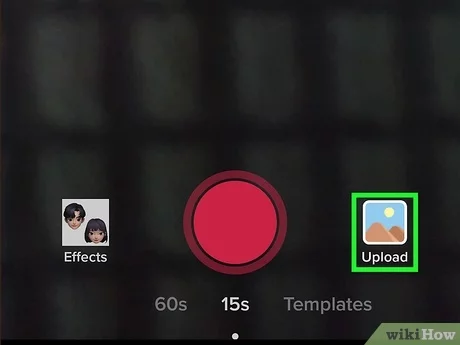
First, you can choose a picture to add. To upload a photo, tap the green photo gallery icon. Next, choose an image to use as your background. Once you’ve chosen a picture, tap the red dot. Repeat recording and your new background will be your uploaded photo. You can also add more than one photo, which is possible with TikTok templates. It is a good idea to choose more than one photo for your template.

Adding stickers

Adding stickers to your videos on Tiktok is easy, especially with the help of a good video editing program. Filme is an ideal solution for beginners, as it has over 100 stickers included. Apart from stickers, it also lets you add various audios, effects, and animations to your videos. After you have installed the app, you can easily start adding stickers to your videos. Here are some tips to make your videos more interesting.

Filme – Download and install this video editing application on your PC. Open the file you wish to edit in Filme, and choose the aspect ratio 9:16 (portrait). Now, drag the video handle onto the timeline, and choose the stickers you wish to add. Once you’re finished, you can share your video with your friends or the whole world. Remember to keep your videos family-friendly, and use stickers that are not objectionable to minors.

Adding emoji

Adding emoji to photos on your social media feeds is easy! You can add these symbols to photos and designs with a simple drag and drop. They can be used in a variety of ways, from hiding your face from the world to creating a fun and engaging edit. Here are some of the most popular ways you can use emoji on your social media. You can also use them as a built-in caption on your photos.

Emoji are specially designed images that show your emotions and reactions. They have been popularly used in social networks to replace text. They are also used in videos to hide flaws or make content entertaining. You can use emojis on platforms like Instagram, Facebook, WhatsApp, and TikTok to add personality to your content. You can also use emojis in your video to create a more personal experience.


Related Posts:

  • How Do I Make a TikTok Video With Pictures?
  • How to Add Pictures to Videos on TikTok
  • How to Make a TikiTok With Photos and Videos
  • How to Add Pictures on a TikTok Video Without Slideshow
  • How to Make a TikiTok Video With Pictures
  • How to Add Photo to TikTok Videos
Was this article helpful?
YesNo

You might also like

Troubleshooting Instagram Posting Issues

Troubleshooting Instagram Posting Issues

How to Post Multiple Photos on Instagram Without Cropping – The Ultimate Guide

How to Post Multiple Photos on Instagram Without Cropping – The Ultimate Guide

How Do I View My Instagram Likes on My PC?

How Do I View My Instagram Likes on My PC?

How to Pause Reels in Instagram

How to Pause Reels in Instagram

How to Make Instagram Bio Center

How to Get Verified on YouTube: How to Speed Up the Process

How to Get Verified on YouTube: How to Speed Up the Process

Categories

  • Facebook
  • General
  • Instagram
  • LinkedIn
  • Marketing
  • Pinterest
  • Social Media
  • TikTok
  • Twitter
  • YouTube


Making Your Brands Popular.

(347) 875-0972

[email protected]

© 2024 Zeru.
All Rights Reserved.

DMCA.com Protection Status

Instagram Services

  • Buy Instagram Followers
  • Buy Instagram Likes
  • Buy Instagram Views
  • Buy Instagram Comments

YouTube Services

  • Buy YouTube Views
  • Buy YouTube Subscribers
  • Buy YouTube Likes
  • Buy YouTube Comments

TikTok Services

  • Buy TikTok Followers
  • Buy TikTok Likes
  • Buy TikTok Views

Facebook Services

  • Buy Facebook Page Likes
  • Buy Facebook Followers
  • Buy Facebook Post Likes
  • Buy Facebook Views

Twitter Services

  • Buy Twitter Followers
  • Buy Twitter Likes
  • Buy Twitter Retweets

Quick Links

  • FAQ
  • Blog
  • Contact
  • About
  • Terms and Conditions
  • Privacy Policy
No Result
View All Result
  • Buy Followers
    • Instagram Services
      • Buy Instagram Followers
      • Buy Instagram Likes
      • Buy Instagram Views
      • Buy Instagram Comments
    • YouTube Services
      • Buy YouTube Views
      • Buy YouTube Subscribers
      • Buy YouTube Likes
      • Buy YouTube Comments
    • TikTok Services
      • Buy TikTok Followers
      • Buy TikTok Likes
      • Buy TikTok Views
    • Facebook Services
      • Buy Facebook Page Likes
      • Buy Facebook Followers
      • Buy Facebook Post Likes
      • Buy Facebook Views
    • Twitter Services
      • Buy Twitter Followers
      • Buy Twitter Likes
      • Buy Twitter Retweets
  • Blog
  • Categories
    • Instagram
    • YouTube
    • TikTok
    • Facebook
    • Twitter
  • Contact

© 2023 Zeru. All Rights Reserved.

Welcome Back!

Login to your account below

Forgotten Password?

Create New Account!

Fill the forms bellow to register

All fields are required. Log In

Retrieve your password

Please enter your username or email address to reset your password.

Log In





