






• Buy Followers
    • Instagram Services
      • Buy Instagram Followers
      • Buy Instagram Likes
      • Buy Instagram Views
      • Buy Instagram Comments
    • YouTube Services
      • Buy YouTube Views
      • Buy YouTube Subscribers
      • Buy YouTube Likes
      • Buy YouTube Comments
    • TikTok Services
      • Buy TikTok Followers
      • Buy TikTok Likes
      • Buy TikTok Views
    • Facebook Services
      • Buy Facebook Page Likes
      • Buy Facebook Followers
      • Buy Facebook Post Likes
      • Buy Facebook Views
    • Twitter Services
      • Buy Twitter Followers
      • Buy Twitter Likes
      • Buy Twitter Retweets
  • Blog
  • Categories
    • Instagram
    • YouTube
    • TikTok
    • Facebook
    • Twitter
  • Contact
No Result
View All Result
Zeru
  • Buy Followers
    • Instagram Services
      • Buy Instagram Followers
      • Buy Instagram Likes
      • Buy Instagram Views
      • Buy Instagram Comments
    • YouTube Services
      • Buy YouTube Views
      • Buy YouTube Subscribers
      • Buy YouTube Likes
      • Buy YouTube Comments
    • TikTok Services
      • Buy TikTok Followers
      • Buy TikTok Likes
      • Buy TikTok Views
    • Facebook Services
      • Buy Facebook Page Likes
      • Buy Facebook Followers
      • Buy Facebook Post Likes
      • Buy Facebook Views
    • Twitter Services
      • Buy Twitter Followers
      • Buy Twitter Likes
      • Buy Twitter Retweets
  • Blog
  • Categories
    • Instagram
    • YouTube
    • TikTok
    • Facebook
    • Twitter
  • Contact
No Result
View All Result
Zeru
No Result
View All Result

Popular Services

Buy YouTube Views
Buy TikTok Followers
Buy Twitter Followers
Buy Facebook Followers
Buy Instagram Likes
Buy TikTok Likes
Buy Instagram Views
Buy TikTok Views
Buy Instagram Comments
Buy YouTube Likes
Buy Twitter Likes
Buy YouTube Comments
Buy Facebook Views
Buy Facebook Page Likes
Buy Twitter Retweets
Buy Facebook Post Likes
Buy YouTube Subscribers
Buy Instagram Followers

How to Stop YouTube Autoplay on Your Browser

Lizzie Yates by Lizzie Yates
in YouTube
3 min read
68
How to Stop YouTube Autoplay on Your Browser
14
SHARES
1.4k
VIEWS
Share on FacebookShare on Twitter

Contents

  • How to Stop YouTube Autoplay on Your Browser
  • Disable YouTube autoplay
  • Clear your browser’s cache
  • Disable YouTube autoplay while scrolling on your phone
  • Disable YouTube autoplay while browsing in fullscreen mode

How to Stop YouTube Autoplay on Your Browser

how to stop youtube autoplay

If you’re wondering how to stop YouTube autoplay on your browser, read this article. This article will explain how to clear your browser cache to fix the issue. It can also be useful if you’re trying to scroll on your phone or you’re browsing in fullscreen mode. You can read the full article by clicking the button below! You’ll have to clear your cache before you can use it again. If you’ve tried all the other methods mentioned here and still have the autoplay problem, try clearing your cache.

Disable YouTube autoplay

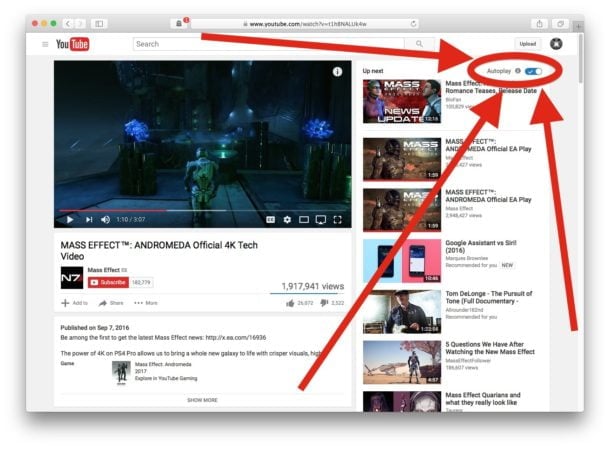
If you have trouble turning YouTube’s autoplay feature off, the problem is probably related to the settings you’ve selected. YouTube automatically turns on the autoplay feature when you’re connected to Wi-Fi, and by default, it’s set to “On”. But what if you want to disable YouTube autoplay? Here’s how. Read also : How Much YouTube Pays Per View?. Follow these steps to disable YouTube autoplay:

The first step is to locate the autoplay option in the video player. Toggle between Yes and No. This will disable the feature on both Android TV and Fire Stick. The next step is to turn on the option again. You can also disable YouTube autoplay in Chrome, Firefox, or Internet Explorer. Once you’ve done this, go back to the play page to see if the issue persists. You can also try disabling the feature on other platforms.

If you find YouTube autoplay annoying, you can disable it in two ways. Toggling the toggle from ON to OFF will prevent autoplay from interrupting any videos that are already in the queue. YouTube will remember your settings when you log out of your account. You can use this toggle to change YouTube’s autoplay behavior at any time. If you’re on a computer, you can use the autoplay toggle to toggle the setting back on. You can also manually disable YouTube autoplay by pressing the toggle. This will not interfere with the autoplay of your current video.

See the article :
How to Make Money on YouTube
How to Make Money on YouTube If you’ve ever wondered how to…

Clear your browser’s cache

You’ve probably noticed that YouTube autoplay is no longer working on your computer. This issue can be caused by several different reasons. In the worst case, your device may not be compatible with the autoplay feature. Read also : How to Disable Comments on YouTube. In this case, your best bet is to clear your cache and try again. If this doesn’t work, you can try downloading the latest version of your browser. This will also fix the YouTube autoplay problem.

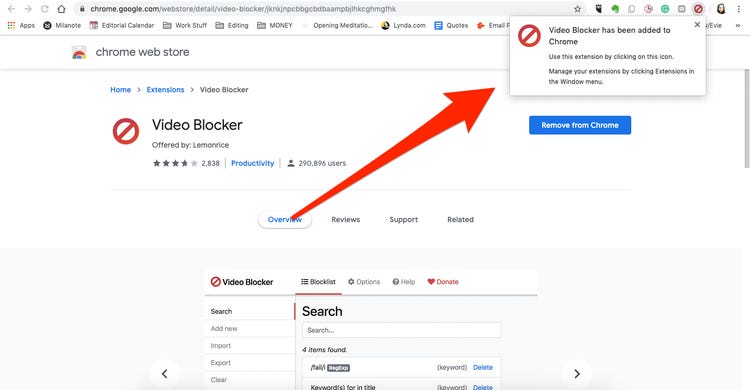
To fix the autoplay issue, you should clear your cache and cookies. This includes all time and cookies. You should also clear your browser’s cache if it contains any extensions. Some browser extensions can bring extra features to websites. If you don’t want the autoplay feature, uninstall any extensions that control video playback. Once the cache and cookies have been cleared, you can try reinstalling the YouTube application.

Read also :
How Can I See My Subscribers on YouTube?
How Can I See My Subscribers on YouTube? How can I see…

Disable YouTube autoplay while scrolling on your phone

You may be wondering how to disable YouTube autoplay while scrolling on your phone. The feature can be found in the Settings menu of your device. Go to “Autoplay” and find the toggle next to Wi-Fi only. To see also : Who Has the Most Subscribers on YouTube?. By disabling this setting, videos will no longer autoplay when you scroll your home feed. Instead, autoplayed videos will be added to your watch history and resume playing from the same position in preview mode.

YouTube autoplay while scrolling can cause problems with your internet connection and data usage. There are some simple steps to disable YouTube autoplay while scrolling on your phone. Go to the YouTube app in your phone. Look for the circle with your profile picture or avatar icon. Click on the circle. Once your phone opens, you’ll see an option to disable autoplay. This option is helpful when you want to watch a video on your phone without it constantly playing.
On the same subject :
How Do I Put YouTube in Desktop Mode?
How Do I Put YouTube in Desktop Mode? Do you wish that…

Disable YouTube autoplay while browsing in fullscreen mode

The YouTube app for Android has added a new feature called Autoplay on Home. By default, this feature plays videos as you browse through the home feed. But you can disable this feature by navigating to the settings menu and selecting “Disable YouTube autoplay while browsing in fullscreen mode”.

To disable YouTube autoplay while browsing in fullscreen mode, you first need to sign in with your Google account. Then, you should go to the “Autoplay” tab. Toggling this option will not interfere with the autoplay of the video you’re watching. It also won’t interfere with autoplaying videos when you switch back to fullscreen mode. Once you’ve turned off autoplay, you can continue watching your videos until you finish them.

If you’re using an iPhone or iPad, you can disable YouTube autoplay by disabling the unlisted privacy setting. In this setting, a user’s MEI is calculated, and if their MEI is high, YouTube will allow autoplay on their desktop. However, some browsers may block autoplay by default. In such cases, you may need to manually disable the autoplay feature on your device or manually enable it in your settings.


Related Posts:

  • Why is Autoplay Not Working on YouTube?
  • How to Stop YouTube Autoplay While Scrolling
  • How to Turn on Autoplay on YouTube
  • How to Turn Off Autoplay on YouTube
  • How to Fix YouTube in the Year 2022
  • How Do I Open YouTube in Browser Instead of App?
Was this article helpful?
YesNo

You might also like

Troubleshooting Instagram Posting Issues

Troubleshooting Instagram Posting Issues

How to Post Multiple Photos on Instagram Without Cropping – The Ultimate Guide

How to Post Multiple Photos on Instagram Without Cropping – The Ultimate Guide

How Do I View My Instagram Likes on My PC?

How Do I View My Instagram Likes on My PC?

How to Pause Reels in Instagram

How to Pause Reels in Instagram

How to Make Instagram Bio Center

How to Get Verified on YouTube: How to Speed Up the Process

How to Get Verified on YouTube: How to Speed Up the Process

Categories

  • Facebook
  • General
  • Instagram
  • LinkedIn
  • Marketing
  • Pinterest
  • Social Media
  • TikTok
  • Twitter
  • YouTube


Making Your Brands Popular.

(347) 875-0972

[email protected]

© 2024 Zeru.
All Rights Reserved.

DMCA.com Protection Status

Instagram Services

  • Buy Instagram Followers
  • Buy Instagram Likes
  • Buy Instagram Views
  • Buy Instagram Comments

YouTube Services

  • Buy YouTube Views
  • Buy YouTube Subscribers
  • Buy YouTube Likes
  • Buy YouTube Comments

TikTok Services

  • Buy TikTok Followers
  • Buy TikTok Likes
  • Buy TikTok Views

Facebook Services

  • Buy Facebook Page Likes
  • Buy Facebook Followers
  • Buy Facebook Post Likes
  • Buy Facebook Views

Twitter Services

  • Buy Twitter Followers
  • Buy Twitter Likes
  • Buy Twitter Retweets

Quick Links

  • FAQ
  • Blog
  • Contact
  • About
  • Terms and Conditions
  • Privacy Policy
No Result
View All Result
  • Buy Followers
    • Instagram Services
      • Buy Instagram Followers
      • Buy Instagram Likes
      • Buy Instagram Views
      • Buy Instagram Comments
    • YouTube Services
      • Buy YouTube Views
      • Buy YouTube Subscribers
      • Buy YouTube Likes
      • Buy YouTube Comments
    • TikTok Services
      • Buy TikTok Followers
      • Buy TikTok Likes
      • Buy TikTok Views
    • Facebook Services
      • Buy Facebook Page Likes
      • Buy Facebook Followers
      • Buy Facebook Post Likes
      • Buy Facebook Views
    • Twitter Services
      • Buy Twitter Followers
      • Buy Twitter Likes
      • Buy Twitter Retweets
  • Blog
  • Categories
    • Instagram
    • YouTube
    • TikTok
    • Facebook
    • Twitter
  • Contact

© 2023 Zeru. All Rights Reserved.

Welcome Back!

Login to your account below

Forgotten Password?

Create New Account!

Fill the forms bellow to register

All fields are required. Log In

Retrieve your password

Please enter your username or email address to reset your password.

Log In





