






• Buy Followers
    • Instagram Services
      • Buy Instagram Followers
      • Buy Instagram Likes
      • Buy Instagram Views
      • Buy Instagram Comments
    • YouTube Services
      • Buy YouTube Views
      • Buy YouTube Subscribers
      • Buy YouTube Likes
      • Buy YouTube Comments
    • TikTok Services
      • Buy TikTok Followers
      • Buy TikTok Likes
      • Buy TikTok Views
    • Facebook Services
      • Buy Facebook Page Likes
      • Buy Facebook Followers
      • Buy Facebook Post Likes
      • Buy Facebook Views
    • Twitter Services
      • Buy Twitter Followers
      • Buy Twitter Likes
      • Buy Twitter Retweets
  • Blog
  • Categories
    • Instagram
    • YouTube
    • TikTok
    • Facebook
    • Twitter
  • Contact
No Result
View All Result
Zeru
  • Buy Followers
    • Instagram Services
      • Buy Instagram Followers
      • Buy Instagram Likes
      • Buy Instagram Views
      • Buy Instagram Comments
    • YouTube Services
      • Buy YouTube Views
      • Buy YouTube Subscribers
      • Buy YouTube Likes
      • Buy YouTube Comments
    • TikTok Services
      • Buy TikTok Followers
      • Buy TikTok Likes
      • Buy TikTok Views
    • Facebook Services
      • Buy Facebook Page Likes
      • Buy Facebook Followers
      • Buy Facebook Post Likes
      • Buy Facebook Views
    • Twitter Services
      • Buy Twitter Followers
      • Buy Twitter Likes
      • Buy Twitter Retweets
  • Blog
  • Categories
    • Instagram
    • YouTube
    • TikTok
    • Facebook
    • Twitter
  • Contact
No Result
View All Result
Zeru
No Result
View All Result

Popular Services

Buy YouTube Views
Buy TikTok Followers
Buy Twitter Followers
Buy Facebook Followers
Buy Instagram Likes
Buy TikTok Likes
Buy Instagram Views
Buy TikTok Views
Buy Instagram Comments
Buy YouTube Likes
Buy Twitter Likes
Buy YouTube Comments
Buy Facebook Views
Buy Facebook Page Likes
Buy Twitter Retweets
Buy Facebook Post Likes
Buy YouTube Subscribers
Buy Instagram Followers

How to Send Messages on TikTok

Lizzie Yates by Lizzie Yates
in TikTok
3 min read
65
How to Send Messages on TikTok
14
SHARES
1.4k
VIEWS
Share on FacebookShare on Twitter

Contents

  • How to Send Messages on TikTok
  • Messages won’t send if you aren’t connected to wi-fi
  • Messages won’t send if user isn’t following you
  • Messages can’t be deleted

How to Send Messages on TikTok

how to send messages on tiktok

Are you wondering how to send messages on TikTok? If you are not connected to wi-fi, Messages won’t send, or the user you are sending them to doesn’t follow you? Despite your best efforts, you might still haven’t received any messages. Here’s what to do:

Messages won’t send if you aren’t connected to wi-fi

This issue can occur in a variety of ways. Sometimes, Messages won’t send if you’re not connected to wi-fi or you’ve reset your network settings. To see also : How to Do a Tiktok Bandana Hairstyle. If this doesn’t work, try turning off Wi-Fi Assist and switching back to cellular data. Your time zone and carrier settings can also affect the ability to send and receive messages.

There are two basic causes for this problem. One is cellular coverage and the other is the iMessage app. In both cases, a cell phone network is required to send text messages. However, if you don’t have a strong cell phone connection, you’ll have to wait longer to get your messages. If you’re unable to make a connection to wi-fi, the problem can be more serious.

Another cause for the problem is blocking important internet ports. If you’re connected to a corporate WiFi network, make sure that you’ve enabled the ports 5228, 5230, and 5231. Google Play Services need to communicate with your phone. Using these ports will allow MightyText to send and receive messages. If the problem persists, check your network settings and turn off Wi-Fi if necessary.

This may interest you :
Can I Watch TikTok Videos Without an Account?
Can I Watch TikTok Videos Without an Account? If you’ve ever wondered,…

Messages won’t send if user isn’t following you

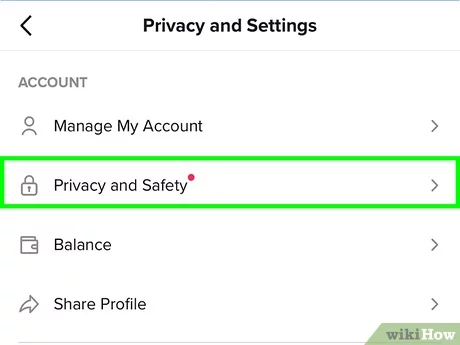
Messages won’t send on TikTok if the user isn’t following you. The privacy settings of TikTok prevent users from sending messages to everyone. To prevent this, users can set their DM settings to “Friends Only. On the same subject : How to Get Views on TikTok Using Hashtags.” This way, they can send messages to their followers only if they follow them back. Otherwise, they can message anyone they’d like. The downside of this feature is that if you’re trying to reach a lot of people with your videos, you’ll need to send three messages before you’ll get a reply.

The easiest way to make sure a user is following you is to check their profile. If a user is not following you, he/she will not show up in the chat section of your profile. If you haven’t followed them, check out their profile and tap on the “Follow” button. This will tell you if they’re following you or not.

Messages won’t send on TikTok if a user isn’t following you on Facebook. It is important to check if the person is following you on Facebook first. If you’ve deleted their post, you’ll be unable to send a message. A red exclamation mark indicates that the message was not sent.

See the article :
How to Buy Followers on TikTok?
How to Buy Followers on TikTok? When you have a social media…

Messages can’t be deleted

Can you delete messages on TikTok? While you can delete the messages you have sent to other users, those messages will not be deleted from your device. However, you can delete them from your device. Delete the messages you have sent to yourself by clicking the “delete” button. See the article : How to Take Off the Filter on TikTok. You’ll be prompted to confirm your action before the message will be deleted. If you have a friend, you can delete the messages they have sent you.

To delete your messages from your TikTok mailbox, you need to select the message that you want to delete. To delete the messages you have sent to your friends, you need to go to your TikTok inbox and right-click the mailbox icon. Once you do this, you will see an option that says “Delete chat.” Click it and confirm your decision to delete the messages.

Once you’ve sent a message, you can delete it to clear up your memory. Unlike other types of messages, however, you can’t delete private messages, which are visible to everyone. You can also delete messages to clear up your storage space. Just make sure you have a backup copy of your phone in case something happens. This is a good way to ensure that you’ll have more space on your device.


Read also :
How to Get More Views on TikTok
How to Get More Views on TikTok If you’re wondering how to…

Related Posts:

  • How to Message People on Tik Tok
  • 3 Reasons Why You Can't Send Messages to Your Friends on…
  • Why Can't I Message on TikTok?
  • How to Text People on Tik Tok
  • Why Can't I Send Messages on TikTok 2022?
  • Why Can't I Send Messages on TikTok?
Was this article helpful?
YesNo

You might also like

Troubleshooting Instagram Posting Issues

Troubleshooting Instagram Posting Issues

How to Post Multiple Photos on Instagram Without Cropping – The Ultimate Guide

How to Post Multiple Photos on Instagram Without Cropping – The Ultimate Guide

How Do I View My Instagram Likes on My PC?

How Do I View My Instagram Likes on My PC?

How to Pause Reels in Instagram

How to Pause Reels in Instagram

How to Make Instagram Bio Center

How to Get Verified on YouTube: How to Speed Up the Process

How to Get Verified on YouTube: How to Speed Up the Process

Categories

  • Facebook
  • General
  • Instagram
  • LinkedIn
  • Marketing
  • Pinterest
  • Social Media
  • TikTok
  • Twitter
  • YouTube


Making Your Brands Popular.

(347) 875-0972

[email protected]

© 2024 Zeru.
All Rights Reserved.

DMCA.com Protection Status

Instagram Services

  • Buy Instagram Followers
  • Buy Instagram Likes
  • Buy Instagram Views
  • Buy Instagram Comments

YouTube Services

  • Buy YouTube Views
  • Buy YouTube Subscribers
  • Buy YouTube Likes
  • Buy YouTube Comments

TikTok Services

  • Buy TikTok Followers
  • Buy TikTok Likes
  • Buy TikTok Views

Facebook Services

  • Buy Facebook Page Likes
  • Buy Facebook Followers
  • Buy Facebook Post Likes
  • Buy Facebook Views

Twitter Services

  • Buy Twitter Followers
  • Buy Twitter Likes
  • Buy Twitter Retweets

Quick Links

  • FAQ
  • Blog
  • Contact
  • About
  • Terms and Conditions
  • Privacy Policy
No Result
View All Result
  • Buy Followers
    • Instagram Services
      • Buy Instagram Followers
      • Buy Instagram Likes
      • Buy Instagram Views
      • Buy Instagram Comments
    • YouTube Services
      • Buy YouTube Views
      • Buy YouTube Subscribers
      • Buy YouTube Likes
      • Buy YouTube Comments
    • TikTok Services
      • Buy TikTok Followers
      • Buy TikTok Likes
      • Buy TikTok Views
    • Facebook Services
      • Buy Facebook Page Likes
      • Buy Facebook Followers
      • Buy Facebook Post Likes
      • Buy Facebook Views
    • Twitter Services
      • Buy Twitter Followers
      • Buy Twitter Likes
      • Buy Twitter Retweets
  • Blog
  • Categories
    • Instagram
    • YouTube
    • TikTok
    • Facebook
    • Twitter
  • Contact

© 2023 Zeru. All Rights Reserved.

Welcome Back!

Login to your account below

Forgotten Password?

Create New Account!

Fill the forms bellow to register

All fields are required. Log In

Retrieve your password

Please enter your username or email address to reset your password.

Log In






