






• Buy Followers
    • Instagram Services
      • Buy Instagram Followers
      • Buy Instagram Likes
      • Buy Instagram Views
      • Buy Instagram Comments
    • YouTube Services
      • Buy YouTube Views
      • Buy YouTube Subscribers
      • Buy YouTube Likes
      • Buy YouTube Comments
    • TikTok Services
      • Buy TikTok Followers
      • Buy TikTok Likes
      • Buy TikTok Views
    • Facebook Services
      • Buy Facebook Page Likes
      • Buy Facebook Followers
      • Buy Facebook Post Likes
      • Buy Facebook Views
    • Twitter Services
      • Buy Twitter Followers
      • Buy Twitter Likes
      • Buy Twitter Retweets
  • Blog
  • Categories
    • Instagram
    • YouTube
    • TikTok
    • Facebook
    • Twitter
  • Contact
No Result
View All Result
Zeru
  • Buy Followers
    • Instagram Services
      • Buy Instagram Followers
      • Buy Instagram Likes
      • Buy Instagram Views
      • Buy Instagram Comments
    • YouTube Services
      • Buy YouTube Views
      • Buy YouTube Subscribers
      • Buy YouTube Likes
      • Buy YouTube Comments
    • TikTok Services
      • Buy TikTok Followers
      • Buy TikTok Likes
      • Buy TikTok Views
    • Facebook Services
      • Buy Facebook Page Likes
      • Buy Facebook Followers
      • Buy Facebook Post Likes
      • Buy Facebook Views
    • Twitter Services
      • Buy Twitter Followers
      • Buy Twitter Likes
      • Buy Twitter Retweets
  • Blog
  • Categories
    • Instagram
    • YouTube
    • TikTok
    • Facebook
    • Twitter
  • Contact
No Result
View All Result
Zeru
No Result
View All Result

Popular Services

Buy YouTube Views
Buy TikTok Followers
Buy Twitter Followers
Buy Facebook Followers
Buy Instagram Likes
Buy TikTok Likes
Buy Instagram Views
Buy TikTok Views
Buy Instagram Comments
Buy YouTube Likes
Buy Twitter Likes
Buy YouTube Comments
Buy Facebook Views
Buy Facebook Page Likes
Buy Twitter Retweets
Buy Facebook Post Likes
Buy YouTube Subscribers
Buy Instagram Followers

How to Post Long Videos on Instagram

Lizzie Yates by Lizzie Yates
in Instagram
3 min read
68
How to Post Long Videos on Instagram
15
SHARES
1.5k
VIEWS
Share on FacebookShare on Twitter

Contents

  • How to Post Long Videos on Instagram
  • IGTV
  • InShot
  • Trimming your video
  • Using your phone’s video editing features

How to Post Long Videos on Instagram

how to post long videos on instagram

If you are wondering how to post long videos on Instagram, you’re not alone. This can be a daunting task – a video can run for nearly an hour without a caption! In this article, we’ll explore the different options available on Instagram, from trimming to auto-generated captions. We’ll also look at how to use your phone’s video editing features to trim videos. Here are some tips to get you started.

IGTV

If you’ve ever wanted to create a video series for Instagram, you can do it with IGTV. The new feature allows users to upload long videos and also lets them view their analytics for each video. See the article : Is a Business Instagram Account Free?. The main benefit of IGTV is its ability to host a series of videos, which you can share with your audience. In this article, we’ll walk you through the process and share with you the benefits of series videos.

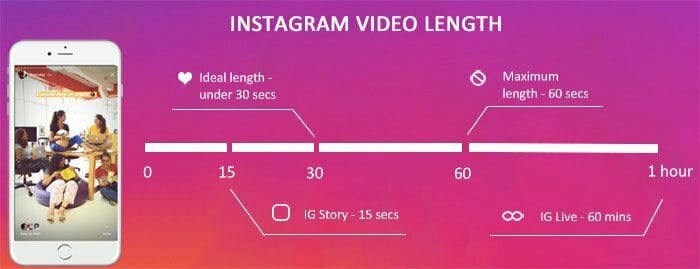
IGTV supports long videos of up to 60 minutes. You must have a verified account in order to upload a 60-minute video. The file size limit is 3.6GB, and you can’t edit your cover photo after you’ve uploaded it. IGTV supports tutorial videos and will encourage more interaction and engagement. However, you’ll need to make sure you have the appropriate file format to post long videos.
Read also :
Is Instagram Not Working Today? Here’s What to Do
Is Instagram Not Working Today? Here’s What to Do If you have…

InShot

If you want to post long videos on Instagram, you may have to download the InShot app on your smartphone. Once downloaded, it allows you to edit videos and photos. Once you have finished editing your video, it’s ready to be posted on social media. To see also : How to Change the Font on Instagram. After selecting the video you want to share, swipe from left to right or up to view your camera roll. Once you’ve selected the video you want to share, click on the “Post” button to post it to Instagram.

If you don’t want to use a third-party application, you can also record audio using InShot. InShot lets you add background music to your videos and use it in other media. You can also edit your video’s audio separately. The process is similar to that of uploading videos to YouTube, but you have to adjust the settings to suit mobile phone requirements. After uploading the video, you can add captions, filters, and hashtags.

On the same subject :
Why Does Instagram Keep Crashing in 2022?
Why Does Instagram Keep Crashing in 2022? If you’ve been wondering why…

Trimming your video

If your video is getting too long for your Instagram story, you may want to consider trimming it. Trimming your video is as easy as trimming your video on your device. This may interest you : How to Write an Effective Instagram Bio. Then, you can either save the clip to your device or to your cloud storage and share it with your audience. To do so, simply tap the Timeline at the bottom of your video and drag the trimming handles inwards.

The limit for the length of videos on Instagram is one minute, but you can trim it to fit your feed. If your video is longer than this, you can try dividing it into four 15-second segments. If your video is under 60 seconds, you should not encounter any issues with the length limit. If it is longer than that, you should experiment with other methods. Once you have a video that fits the Instagram limit, you can use a professional video editor to edit it to cut it into the right length.

This may interest you :
How to Boomerang on Instagram
How to Boomerang on Instagram If you have the Instagram app, you…

Using your phone’s video editing features

If you’d like to post longer videos on Instagram but are limited by the 15-second story limit, you can cut your videos into smaller segments. You can use your phone’s video editing tools to cut a 60-second video into several fifteen-second clips and upload them one at a time. To make this easier, there are third-party apps available for download that have Instagram buttons.

The first step in using your phone’s video editing features to post longer videos on Instagram is to create a new video. If you have a new video, it should be at least 10 minutes long. It is possible to upload videos up to 60 minutes in length through Instagram. The video size must be at least 650MB or 3.6GB. After uploading, you’ll need to choose a video crop size. You can use either the landscape or portrait mode to crop the video.


Related Posts:

  • How to Put Long Videos on Instagram Stories
  • How Long Can an Instagram Video Be?
  • How Long Can Videos Be on Instagram?
  • What is IGTV on Instagram?
  • How Long Can a Video Be on Instagram?
  • How to Post a 2 Minute Video on Instagram
Was this article helpful?
YesNo

You might also like

Troubleshooting Instagram Posting Issues

Troubleshooting Instagram Posting Issues

How to Post Multiple Photos on Instagram Without Cropping – The Ultimate Guide

How to Post Multiple Photos on Instagram Without Cropping – The Ultimate Guide

How Do I View My Instagram Likes on My PC?

How Do I View My Instagram Likes on My PC?

How to Pause Reels in Instagram

How to Pause Reels in Instagram

How to Make Instagram Bio Center

How to Get Verified on YouTube: How to Speed Up the Process

How to Get Verified on YouTube: How to Speed Up the Process

Categories

  • Facebook
  • General
  • Instagram
  • LinkedIn
  • Marketing
  • Pinterest
  • Social Media
  • TikTok
  • Twitter
  • YouTube


Making Your Brands Popular.

(347) 875-0972

[email protected]

© 2024 Zeru.
All Rights Reserved.

DMCA.com Protection Status

Instagram Services

  • Buy Instagram Followers
  • Buy Instagram Likes
  • Buy Instagram Views
  • Buy Instagram Comments

YouTube Services

  • Buy YouTube Views
  • Buy YouTube Subscribers
  • Buy YouTube Likes
  • Buy YouTube Comments

TikTok Services

  • Buy TikTok Followers
  • Buy TikTok Likes
  • Buy TikTok Views

Facebook Services

  • Buy Facebook Page Likes
  • Buy Facebook Followers
  • Buy Facebook Post Likes
  • Buy Facebook Views

Twitter Services

  • Buy Twitter Followers
  • Buy Twitter Likes
  • Buy Twitter Retweets

Quick Links

  • FAQ
  • Blog
  • Contact
  • About
  • Terms and Conditions
  • Privacy Policy
No Result
View All Result
  • Buy Followers
    • Instagram Services
      • Buy Instagram Followers
      • Buy Instagram Likes
      • Buy Instagram Views
      • Buy Instagram Comments
    • YouTube Services
      • Buy YouTube Views
      • Buy YouTube Subscribers
      • Buy YouTube Likes
      • Buy YouTube Comments
    • TikTok Services
      • Buy TikTok Followers
      • Buy TikTok Likes
      • Buy TikTok Views
    • Facebook Services
      • Buy Facebook Page Likes
      • Buy Facebook Followers
      • Buy Facebook Post Likes
      • Buy Facebook Views
    • Twitter Services
      • Buy Twitter Followers
      • Buy Twitter Likes
      • Buy Twitter Retweets
  • Blog
  • Categories
    • Instagram
    • YouTube
    • TikTok
    • Facebook
    • Twitter
  • Contact

© 2023 Zeru. All Rights Reserved.

Welcome Back!

Login to your account below

Forgotten Password?

Create New Account!

Fill the forms bellow to register

All fields are required. Log In

Retrieve your password

Please enter your username or email address to reset your password.

Log In





