






• Buy Followers
    • Instagram Services
      • Buy Instagram Followers
      • Buy Instagram Likes
      • Buy Instagram Views
      • Buy Instagram Comments
    • YouTube Services
      • Buy YouTube Views
      • Buy YouTube Subscribers
      • Buy YouTube Likes
      • Buy YouTube Comments
    • TikTok Services
      • Buy TikTok Followers
      • Buy TikTok Likes
      • Buy TikTok Views
    • Facebook Services
      • Buy Facebook Page Likes
      • Buy Facebook Followers
      • Buy Facebook Post Likes
      • Buy Facebook Views
    • Twitter Services
      • Buy Twitter Followers
      • Buy Twitter Likes
      • Buy Twitter Retweets
  • Blog
  • Categories
    • Instagram
    • YouTube
    • TikTok
    • Facebook
    • Twitter
  • Contact
No Result
View All Result
Zeru
  • Buy Followers
    • Instagram Services
      • Buy Instagram Followers
      • Buy Instagram Likes
      • Buy Instagram Views
      • Buy Instagram Comments
    • YouTube Services
      • Buy YouTube Views
      • Buy YouTube Subscribers
      • Buy YouTube Likes
      • Buy YouTube Comments
    • TikTok Services
      • Buy TikTok Followers
      • Buy TikTok Likes
      • Buy TikTok Views
    • Facebook Services
      • Buy Facebook Page Likes
      • Buy Facebook Followers
      • Buy Facebook Post Likes
      • Buy Facebook Views
    • Twitter Services
      • Buy Twitter Followers
      • Buy Twitter Likes
      • Buy Twitter Retweets
  • Blog
  • Categories
    • Instagram
    • YouTube
    • TikTok
    • Facebook
    • Twitter
  • Contact
No Result
View All Result
Zeru
No Result
View All Result

Popular Services

Buy YouTube Views
Buy TikTok Followers
Buy Twitter Followers
Buy Facebook Followers
Buy Instagram Likes
Buy TikTok Likes
Buy Instagram Views
Buy TikTok Views
Buy Instagram Comments
Buy YouTube Likes
Buy Twitter Likes
Buy YouTube Comments
Buy Facebook Views
Buy Facebook Page Likes
Buy Twitter Retweets
Buy Facebook Post Likes
Buy YouTube Subscribers
Buy Instagram Followers

How to Post Ads on Facebook

Lizzie Yates by Lizzie Yates
in Facebook
3 min read
64
How to Post Ads on Facebook
14
SHARES
1.4k
VIEWS
Share on FacebookShare on Twitter

Contents

  • How to Post Ads on Facebook
  • Video ads
  • Image ads

How to Post Ads on Facebook

Once you have decided to use Facebook ads, the next step is to design the ad. Facebook allows you to choose from one of four types of ads: single image, video, carousel or collection ads. You can create a new ad design from scratch, upload an existing post, or use the free Creative hub mockup. Then, you will need to write the primary text, or headline. This is a brief description of your product, service, or offer, and should be no more than 40 characters.

Video ads

When creating your ad, there are a few things to remember. First of all, you want your ad to be relatable to your viewers. On the same subject : How to Unfriend All in Facebook. It should have a call-to-action that will direct viewers to the next step, such as subscribing to your newsletter, clicking through to your website, or purchasing a product. The call-to-action should be obvious and easy to accomplish, including a button, text, or voiceover.

Next, choose an objective. Facebook allows you to set a specific goal for your ads. Choose one of the objectives listed below based on your business’s goals. You can target specific demographics, as well as fans of your Facebook page. By selecting the right objective, you can make your ads more effective and achieve the goals you set out to accomplish. Aim for brand awareness when uploading your videos. Brand awareness will help deliver your video ad to the right demographic. It will also increase your chances of getting your video viewed by people who are interested in your product or service.

Make your video interesting by incorporating a call-to-action. Your call-to-action should drive viewers to your website. The goal is to turn your viewers into customers. A CTA can be a simple sentence or a compelling call-to-action. Using a tool like Buffer will help you schedule and manage your social media posts. It’s an all-in-one social media toolkit that will allow you to focus on what you love.

You can also use testimonials to showcase social proof. Testimonials provide the impression of an independent endorsement. A good testimonial video doesn’t need a long introduction – it just needs to state what the video is about, what a customer has achieved, and a call to action. While testimonial videos are more compelling than product demonstration videos, you’ll likely have better results with a product demo. In either case, you should consider your audience’s reaction to the video.

See the article :
What Facebook Logo Can I Use?
What Facebook Logo Can I Use? There are many choices for a…

Image ads

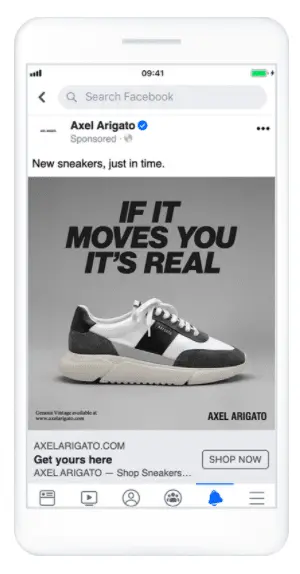
If you want to learn how to post image ads on Facebook, there are a few things that you should keep in mind. First of all, the image should be a high-quality image, either a stock photo or an original. You can use this image for both mobile and desktop ads, but there are a few rules that you should remember. On the same subject : How to Edit Your Name in Facebook. You should avoid using images that are too controversial, exploit sensitive issues, or use shock tactics. You can’t use an image that imply nudity, cleavage, or focus on specific body parts.

When creating a single image Facebook ad, keep the resolution as high as possible. You’ll want to use a high-resolution image, such as 1200 x 628 pixels. Also, make sure the image ratio is between 9:16:9. If you’re working with a stock photo, you can upload it to PicMonkey, which offers free stock photos in PNG and JPG formats. Then, you can customize the font, add colors, and add graphics to your ad.

When creating image ads on Facebook, always keep in mind that Facebook’s algorithm decides what users see on their news feeds. This means that your ad image must be at least 20% text to avoid being cut out of the news feed. However, this does not mean that you can’t include a small amount of text in the image. Just be sure that the text is not more than 20%. In addition to that, you need to keep in mind that Facebook only counts text-based logos, numbers, and watermarks as text.

You can choose from several ad formats in Facebook. It can be daunting to compete with pros in this arena, but once you have mastered this method, you can make an impact and change someone’s life. After all, there are 1.84 billion daily users on Facebook and your ads could reach as many as one-third of those users. It’s time to start maximizing your marketing skills on Facebook with an image ad.

To see also :
How to Delete All Facebook Messages
How to Delete All Facebook Messages If you are wondering how to…

Related Posts:

  • What Are the Specs for a Facebook Ad?
  • How to Create Fancy Posts on Facebook
  • What is the Best Size for a Facebook Post?
  • What Size Should a Facebook Post Image Be?
  • What Are the Different Types of Facebook Ads?
  • How to Create a Facebook Business Page Using Canva
Was this article helpful?
YesNo

You might also like

Troubleshooting Instagram Posting Issues

Troubleshooting Instagram Posting Issues

How to Post Multiple Photos on Instagram Without Cropping – The Ultimate Guide

How to Post Multiple Photos on Instagram Without Cropping – The Ultimate Guide

How Do I View My Instagram Likes on My PC?

How Do I View My Instagram Likes on My PC?

How to Pause Reels in Instagram

How to Pause Reels in Instagram

How to Make Instagram Bio Center

How to Get Verified on YouTube: How to Speed Up the Process

How to Get Verified on YouTube: How to Speed Up the Process

Categories

  • Facebook
  • General
  • Instagram
  • LinkedIn
  • Marketing
  • Pinterest
  • Social Media
  • TikTok
  • Twitter
  • YouTube


Making Your Brands Popular.

(347) 875-0972

[email protected]

© 2024 Zeru.
All Rights Reserved.

DMCA.com Protection Status

Instagram Services

  • Buy Instagram Followers
  • Buy Instagram Likes
  • Buy Instagram Views
  • Buy Instagram Comments

YouTube Services

  • Buy YouTube Views
  • Buy YouTube Subscribers
  • Buy YouTube Likes
  • Buy YouTube Comments

TikTok Services

  • Buy TikTok Followers
  • Buy TikTok Likes
  • Buy TikTok Views

Facebook Services

  • Buy Facebook Page Likes
  • Buy Facebook Followers
  • Buy Facebook Post Likes
  • Buy Facebook Views

Twitter Services

  • Buy Twitter Followers
  • Buy Twitter Likes
  • Buy Twitter Retweets

Quick Links

  • FAQ
  • Blog
  • Contact
  • About
  • Terms and Conditions
  • Privacy Policy
No Result
View All Result
  • Buy Followers
    • Instagram Services
      • Buy Instagram Followers
      • Buy Instagram Likes
      • Buy Instagram Views
      • Buy Instagram Comments
    • YouTube Services
      • Buy YouTube Views
      • Buy YouTube Subscribers
      • Buy YouTube Likes
      • Buy YouTube Comments
    • TikTok Services
      • Buy TikTok Followers
      • Buy TikTok Likes
      • Buy TikTok Views
    • Facebook Services
      • Buy Facebook Page Likes
      • Buy Facebook Followers
      • Buy Facebook Post Likes
      • Buy Facebook Views
    • Twitter Services
      • Buy Twitter Followers
      • Buy Twitter Likes
      • Buy Twitter Retweets
  • Blog
  • Categories
    • Instagram
    • YouTube
    • TikTok
    • Facebook
    • Twitter
  • Contact

© 2023 Zeru. All Rights Reserved.

Welcome Back!

Login to your account below

Forgotten Password?

Create New Account!

Fill the forms bellow to register

All fields are required. Log In

Retrieve your password

Please enter your username or email address to reset your password.

Log In






