






• Buy Followers
    • Instagram Services
      • Buy Instagram Followers
      • Buy Instagram Likes
      • Buy Instagram Views
      • Buy Instagram Comments
    • YouTube Services
      • Buy YouTube Views
      • Buy YouTube Subscribers
      • Buy YouTube Likes
      • Buy YouTube Comments
    • TikTok Services
      • Buy TikTok Followers
      • Buy TikTok Likes
      • Buy TikTok Views
    • Facebook Services
      • Buy Facebook Page Likes
      • Buy Facebook Followers
      • Buy Facebook Post Likes
      • Buy Facebook Views
    • Twitter Services
      • Buy Twitter Followers
      • Buy Twitter Likes
      • Buy Twitter Retweets
  • Blog
  • Categories
    • Instagram
    • YouTube
    • TikTok
    • Facebook
    • Twitter
  • Contact
No Result
View All Result
Zeru
  • Buy Followers
    • Instagram Services
      • Buy Instagram Followers
      • Buy Instagram Likes
      • Buy Instagram Views
      • Buy Instagram Comments
    • YouTube Services
      • Buy YouTube Views
      • Buy YouTube Subscribers
      • Buy YouTube Likes
      • Buy YouTube Comments
    • TikTok Services
      • Buy TikTok Followers
      • Buy TikTok Likes
      • Buy TikTok Views
    • Facebook Services
      • Buy Facebook Page Likes
      • Buy Facebook Followers
      • Buy Facebook Post Likes
      • Buy Facebook Views
    • Twitter Services
      • Buy Twitter Followers
      • Buy Twitter Likes
      • Buy Twitter Retweets
  • Blog
  • Categories
    • Instagram
    • YouTube
    • TikTok
    • Facebook
    • Twitter
  • Contact
No Result
View All Result
Zeru
No Result
View All Result

Popular Services

Buy YouTube Views
Buy TikTok Followers
Buy Twitter Followers
Buy Facebook Followers
Buy Instagram Likes
Buy TikTok Likes
Buy Instagram Views
Buy TikTok Views
Buy Instagram Comments
Buy YouTube Likes
Buy Twitter Likes
Buy YouTube Comments
Buy Facebook Views
Buy Facebook Page Likes
Buy Twitter Retweets
Buy Facebook Post Likes
Buy YouTube Subscribers
Buy Instagram Followers

How to Delete an Instagram Comment

Lizzie Yates by Lizzie Yates
in Instagram
3 min read
68
How to Delete an Instagram Comment
14
SHARES
1.4k
VIEWS
Share on FacebookShare on Twitter

Contents

  • How to Delete an Instagram Comment
  • Editing a comment on Instagram
  • Hiding offensive comments on Instagram
  • Managing multiple comments on Instagram
  • Managing spam comments on Instagram

How to Delete an Instagram Comment

how to delete an instagram comment

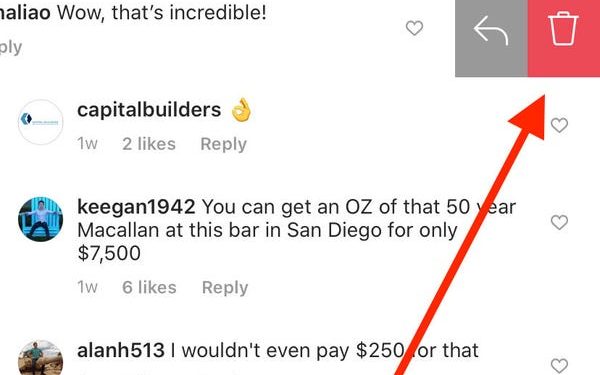
How to delete an Instagram comment? You can find out by following these simple steps:

Editing a comment on Instagram

In case you’ve made a comment that you later realized was wrong, you’ll want to change it before posting it on Instagram. Luckily, the platform does allow users to edit comments, although editing a comment on Instagram on the mobile app is not possible. This may interest you : Can You See Who Views My Instagram Profile?. Instead, you’ll need to delete the comment and start over, just as if you were leaving it on the website. The following steps will walk you through the process.

First of all, delete the comment from your post. Once you’ve deleted a comment, you’ll see a confirmation banner on your screen. Click the “undo” button to reverse the action. If you’re not sure whether or not to delete the comment, you can edit it after it’s been posted. To do so, first delete the comment and then copy it. Then, click the “Edit” button and enter your desired text in the text box.
This may interest you :
Is Instagram Not Working Today? Here’s What to Do
Is Instagram Not Working Today? Here’s What to Do If you have…

Hiding offensive comments on Instagram

A recent update to Instagram will allow users to hide offensive comments. Among other features, it will detect comments and block them with an AI-based filter. The algorithm will not be effective 100% of the time, however, since it will learn from flagging comments by users. See the article : How to Disable an Instagram Account. Luckily, you can use the new feature to prevent bullies from attacking your accounts. To start hiding offensive comments on Instagram, check out the settings on your profile and use the “Hide” option.

To prevent users from getting into trouble, Instagram is rolling out a new feature that will automatically hide comments that are considered abusive. These comments will still be visible to other users, but Instagram will block them if they are reported too many times. The move will discourage users from posting comments that are offensive and will expand the use of “nudge” warnings. If you don’t like the change, consider deleting your Instagram account.
See the article :
Instagram Marketing for Businesses of All Levels in 2022
Are you looking for a way to market your business on Instagram…

Managing multiple comments on Instagram

If you want to delete multiple comments from an Instagram post, you’ll find that there are several options available to you. Instagram allows users to manage which comments they want to delete or hide. You can either select all comments or a selected number of comments and hit Delete Comments to remove them all. Read also : How to Post Instagram Photos on Your PC. The latter option is especially useful for social media influencers and business owners. However, there are times when you don’t want to see comments that you haven’t approved. If this is the case, there are a few options you can use.

If you’re worried about spammers, you can delete unwanted comments in Instagram by following the steps mentioned below. The first option is to delete comments that you’re not interested in reading. After this, you can delete comments on your own posts. To do so, tap the trash can icon on the post that you’d like to delete. It’s that simple. By doing this, you can ensure that your posts won’t receive unwanted comments.
On the same subject :
How to Change Background Color on Your Instagram Story
How to Change Background Color on Your Instagram Story There are several…

Managing spam comments on Instagram

Managing spam comments on Instagram can be difficult, but there are a few simple ways to limit the number of these annoying comments. For example, if you regularly post pictures of new shoes, you may want to consider making those posts private so that no one else can see them. Besides, you may also want to report spam follow requests. To do so, you must identify each spam like and report it separately. Next, go to the Privacy section of your Instagram account and enable Custom Keywords. There, you can write down words that come up frequently in annoying comments.

You can also apply a manual filter. Unlike the mean comments tool, the spam filter is available in 13 different languages. To train the spam filter, Instagram hired contractors to go through the comments and create algorithms. Wired ran a sentence through the algorithm and discovered some strange results. This algorithm helps Instagram users to find the comments that are most likely to contain spam. By applying this filter, you will get fewer spam comments. If you still see a high number of spam comments on your Instagram profile, you can contact Instagram support and ask them to help you.


Related Posts:

  • How to Delete a Comment on TikTok
  • How to Delete a Comment on TikTok
  • How to Delete a Comment on Instagram
  • How to Delete a Comment on Instagram
  • How to Delete a Comment on Instagram
  • How to Delete a Comment on Instagram
Was this article helpful?
YesNo

You might also like

Troubleshooting Instagram Posting Issues

Troubleshooting Instagram Posting Issues

How to Post Multiple Photos on Instagram Without Cropping – The Ultimate Guide

How to Post Multiple Photos on Instagram Without Cropping – The Ultimate Guide

How Do I View My Instagram Likes on My PC?

How Do I View My Instagram Likes on My PC?

How to Pause Reels in Instagram

How to Pause Reels in Instagram

How to Make Instagram Bio Center

How to Get Verified on YouTube: How to Speed Up the Process

How to Get Verified on YouTube: How to Speed Up the Process

Categories

  • Facebook
  • General
  • Instagram
  • LinkedIn
  • Marketing
  • Pinterest
  • Social Media
  • TikTok
  • Twitter
  • YouTube


Making Your Brands Popular.

(347) 875-0972

[email protected]

© 2024 Zeru.
All Rights Reserved.

DMCA.com Protection Status

Instagram Services

  • Buy Instagram Followers
  • Buy Instagram Likes
  • Buy Instagram Views
  • Buy Instagram Comments

YouTube Services

  • Buy YouTube Views
  • Buy YouTube Subscribers
  • Buy YouTube Likes
  • Buy YouTube Comments

TikTok Services

  • Buy TikTok Followers
  • Buy TikTok Likes
  • Buy TikTok Views

Facebook Services

  • Buy Facebook Page Likes
  • Buy Facebook Followers
  • Buy Facebook Post Likes
  • Buy Facebook Views

Twitter Services

  • Buy Twitter Followers
  • Buy Twitter Likes
  • Buy Twitter Retweets

Quick Links

  • FAQ
  • Blog
  • Contact
  • About
  • Terms and Conditions
  • Privacy Policy
No Result
View All Result
  • Buy Followers
    • Instagram Services
      • Buy Instagram Followers
      • Buy Instagram Likes
      • Buy Instagram Views
      • Buy Instagram Comments
    • YouTube Services
      • Buy YouTube Views
      • Buy YouTube Subscribers
      • Buy YouTube Likes
      • Buy YouTube Comments
    • TikTok Services
      • Buy TikTok Followers
      • Buy TikTok Likes
      • Buy TikTok Views
    • Facebook Services
      • Buy Facebook Page Likes
      • Buy Facebook Followers
      • Buy Facebook Post Likes
      • Buy Facebook Views
    • Twitter Services
      • Buy Twitter Followers
      • Buy Twitter Likes
      • Buy Twitter Retweets
  • Blog
  • Categories
    • Instagram
    • YouTube
    • TikTok
    • Facebook
    • Twitter
  • Contact

© 2023 Zeru. All Rights Reserved.

Welcome Back!

Login to your account below

Forgotten Password?

Create New Account!

Fill the forms bellow to register

All fields are required. Log In

Retrieve your password

Please enter your username or email address to reset your password.

Log In





