






• Buy Followers
    • Instagram Services
      • Buy Instagram Followers
      • Buy Instagram Likes
      • Buy Instagram Views
      • Buy Instagram Comments
    • YouTube Services
      • Buy YouTube Views
      • Buy YouTube Subscribers
      • Buy YouTube Likes
      • Buy YouTube Comments
    • TikTok Services
      • Buy TikTok Followers
      • Buy TikTok Likes
      • Buy TikTok Views
    • Facebook Services
      • Buy Facebook Page Likes
      • Buy Facebook Followers
      • Buy Facebook Post Likes
      • Buy Facebook Views
    • Twitter Services
      • Buy Twitter Followers
      • Buy Twitter Likes
      • Buy Twitter Retweets
  • Blog
  • Categories
    • Instagram
    • YouTube
    • TikTok
    • Facebook
    • Twitter
  • Contact
No Result
View All Result
Zeru
  • Buy Followers
    • Instagram Services
      • Buy Instagram Followers
      • Buy Instagram Likes
      • Buy Instagram Views
      • Buy Instagram Comments
    • YouTube Services
      • Buy YouTube Views
      • Buy YouTube Subscribers
      • Buy YouTube Likes
      • Buy YouTube Comments
    • TikTok Services
      • Buy TikTok Followers
      • Buy TikTok Likes
      • Buy TikTok Views
    • Facebook Services
      • Buy Facebook Page Likes
      • Buy Facebook Followers
      • Buy Facebook Post Likes
      • Buy Facebook Views
    • Twitter Services
      • Buy Twitter Followers
      • Buy Twitter Likes
      • Buy Twitter Retweets
  • Blog
  • Categories
    • Instagram
    • YouTube
    • TikTok
    • Facebook
    • Twitter
  • Contact
No Result
View All Result
Zeru
No Result
View All Result

Popular Services

Buy YouTube Views
Buy TikTok Followers
Buy Twitter Followers
Buy Facebook Followers
Buy Instagram Likes
Buy TikTok Likes
Buy Instagram Views
Buy TikTok Views
Buy Instagram Comments
Buy YouTube Likes
Buy Twitter Likes
Buy YouTube Comments
Buy Facebook Views
Buy Facebook Page Likes
Buy Twitter Retweets
Buy Facebook Post Likes
Buy YouTube Subscribers
Buy Instagram Followers

How to Connect Instagram to Facebook

Lizzie Yates by Lizzie Yates
in Facebook
3 min read
62
How to Connect Instagram to Facebook
13
SHARES
1.3k
VIEWS
Share on FacebookShare on Twitter

Contents

  • How to Connect Instagram to Facebook
  • Linking your Instagram account to a Facebook page
  • Sharing content from Instagram to Facebook
  • Changing your Facebook page’s category

How to Connect Instagram to Facebook

If you’ve ever wondered how to connect Instagram to Facebook, read this! In this article, you’ll learn how to connect your Instagram account to your Facebook page so you can cross-post content to your audience on both social networks. This will also allow you to improve your ad targeting and messaging inbox. By following these simple steps, you’ll be well on your way to successfully connecting your two accounts.

Linking your Instagram account to a Facebook page

You can link your Instagram account to your Facebook page, which will give your fans the ability to follow your posts. First, you must login to your Facebook account. You should then select the Continue as name option. Once you have done this, you can choose to share your posts to Facebook. Once you’ve confirmed, you can now post from both accounts. Just be sure to check the privacy settings of both accounts.

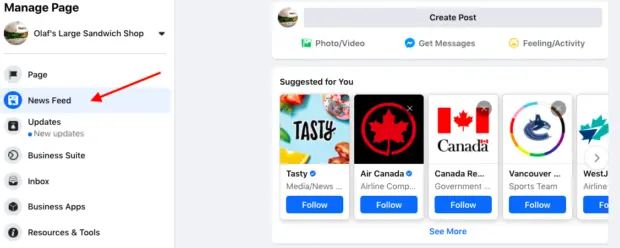
Ensure you’re an admin of the Facebook page you want to link Instagram to. By default, your Instagram account is a personal account. If you want to use analytics and run ads on Instagram, you’ll have to switch to a professional account. See the article : The Guardian’s Facebook Experience Explained. To do this, click the hamburger menu in the top right corner of your profile page and scroll all the way down to Switch to Professional Account. Once your page is set up, you can then enter your business information and link to your Facebook page.

Connecting your Instagram account to your Facebook page is a great way to share your photos to multiple platforms. In addition to cross-posting, this allows you to target your audience more effectively, because your posts will appear on both sites. Furthermore, you can connect your accounts with each other to improve your ad targeting and messaging inbox. The best part is that it’s a painless process that will make your life easier and make your social media marketing efforts more successful.
Read also :
Is There a Facebook Messenger App for Windows 10?
Is There a Facebook Messenger App for Windows 10? To download the…

Sharing content from Instagram to Facebook

Share content from Instagram to your Facebook page is now possible! The first step to do this is to connect your Instagram account to your Facebook page. When you do this, you can choose which Facebook page you would like to share your Instagram posts with. To see also : Who Owns the Companies That Facebook Owns?. By default, Instagram posts will be shared on your personal timeline, but you can choose to share content from your business page as well. If you choose to share on your personal timeline, make sure to follow the instructions above.

To share content from your Instagram account to your Facebook page, first log in to your Instagram account. You will need to be an admin of your Facebook page. You may also need to switch to a professional account to make this work. After switching to a professional account, your personal account will be switched to a public profile, which allows you to have access to the new features. Once you’ve done this, click “share” in the upper right corner of the Instagram page.

To share content from Instagram to Facebook page, you need to go to your profile page in the app and select “Share to Other Apps.” You may need to reconnect the accounts again. If you do not have an account linked to Instagram yet, you can also use a third-party app to connect your accounts. Once you’ve successfully linked your accounts, you can share your content from Instagram to Facebook. If you still have problems, you can always contact customer support and request that they help you resolve the issue.

See the article :
How to Request Friend on Facebook
How to Request Friend on Facebook If you are wondering how to…

Changing your Facebook page’s category

One of the features of Facebook is the ability to change the category of a page. While it may seem like a simple task, it can be complicated if you’re not an admin. You may want to follow a few basic steps to make the change. This may interest you : How to Make Your Facebook Private. First of all, make sure you are logged into your admin account. Only admins can change the category of a page. Once you’ve made the change, you cannot make it back.

If you want to attract more customers, it’s important to choose the correct category. The most obvious category is business, but you can also choose the topic of your page and add a description as well. For example, if you sell Indian food, you can use the category “Indian food.”

First, make sure that you are an admin of the page. Only admins have the ability to edit the categories and roles of pages. Log in to Facebook by clicking on the arrow in the upper right corner of the platform, near the help question mark. Alternatively, you can go directly to the page by typing its URL or searching for it in the search bar. Regardless of which category you choose, make sure you keep the page’s name, category, and contact information accurate and updated.


See the article :
Is VK Same As Facebook?
Is VK Same As Facebook? Whether or not VK is the same…

Related Posts:

  • How to Link Instagram to Facebook
  • How to Connect Your Instagram Account to Your Facebook Page
  • How to Link Instagram to Facebook
  • How to Link Instagram to Facebook Business Page
  • How to Link Facebook and Instagram
  • How to Connect Your Facebook Page to Instagram
Was this article helpful?
YesNo

You might also like

Troubleshooting Instagram Posting Issues

Troubleshooting Instagram Posting Issues

How to Post Multiple Photos on Instagram Without Cropping – The Ultimate Guide

How to Post Multiple Photos on Instagram Without Cropping – The Ultimate Guide

How Do I View My Instagram Likes on My PC?

How Do I View My Instagram Likes on My PC?

How to Pause Reels in Instagram

How to Pause Reels in Instagram

How to Make Instagram Bio Center

How to Get Verified on YouTube: How to Speed Up the Process

How to Get Verified on YouTube: How to Speed Up the Process

Categories

  • Facebook
  • General
  • Instagram
  • LinkedIn
  • Marketing
  • Pinterest
  • Social Media
  • TikTok
  • Twitter
  • YouTube


Making Your Brands Popular.

(347) 875-0972

[email protected]

© 2024 Zeru.
All Rights Reserved.

DMCA.com Protection Status

Instagram Services

  • Buy Instagram Followers
  • Buy Instagram Likes
  • Buy Instagram Views
  • Buy Instagram Comments

YouTube Services

  • Buy YouTube Views
  • Buy YouTube Subscribers
  • Buy YouTube Likes
  • Buy YouTube Comments

TikTok Services

  • Buy TikTok Followers
  • Buy TikTok Likes
  • Buy TikTok Views

Facebook Services

  • Buy Facebook Page Likes
  • Buy Facebook Followers
  • Buy Facebook Post Likes
  • Buy Facebook Views

Twitter Services

  • Buy Twitter Followers
  • Buy Twitter Likes
  • Buy Twitter Retweets

Quick Links

  • FAQ
  • Blog
  • Contact
  • About
  • Terms and Conditions
  • Privacy Policy
No Result
View All Result
  • Buy Followers
    • Instagram Services
      • Buy Instagram Followers
      • Buy Instagram Likes
      • Buy Instagram Views
      • Buy Instagram Comments
    • YouTube Services
      • Buy YouTube Views
      • Buy YouTube Subscribers
      • Buy YouTube Likes
      • Buy YouTube Comments
    • TikTok Services
      • Buy TikTok Followers
      • Buy TikTok Likes
      • Buy TikTok Views
    • Facebook Services
      • Buy Facebook Page Likes
      • Buy Facebook Followers
      • Buy Facebook Post Likes
      • Buy Facebook Views
    • Twitter Services
      • Buy Twitter Followers
      • Buy Twitter Likes
      • Buy Twitter Retweets
  • Blog
  • Categories
    • Instagram
    • YouTube
    • TikTok
    • Facebook
    • Twitter
  • Contact

© 2023 Zeru. All Rights Reserved.

Welcome Back!

Login to your account below

Forgotten Password?

Create New Account!

Fill the forms bellow to register

All fields are required. Log In

Retrieve your password

Please enter your username or email address to reset your password.

Log In






