






• Buy Followers
    • Instagram Services
      • Buy Instagram Followers
      • Buy Instagram Likes
      • Buy Instagram Views
      • Buy Instagram Comments
    • YouTube Services
      • Buy YouTube Views
      • Buy YouTube Subscribers
      • Buy YouTube Likes
      • Buy YouTube Comments
    • TikTok Services
      • Buy TikTok Followers
      • Buy TikTok Likes
      • Buy TikTok Views
    • Facebook Services
      • Buy Facebook Page Likes
      • Buy Facebook Followers
      • Buy Facebook Post Likes
      • Buy Facebook Views
    • Twitter Services
      • Buy Twitter Followers
      • Buy Twitter Likes
      • Buy Twitter Retweets
  • Blog
  • Categories
    • Instagram
    • YouTube
    • TikTok
    • Facebook
    • Twitter
  • Contact
No Result
View All Result
Zeru
  • Buy Followers
    • Instagram Services
      • Buy Instagram Followers
      • Buy Instagram Likes
      • Buy Instagram Views
      • Buy Instagram Comments
    • YouTube Services
      • Buy YouTube Views
      • Buy YouTube Subscribers
      • Buy YouTube Likes
      • Buy YouTube Comments
    • TikTok Services
      • Buy TikTok Followers
      • Buy TikTok Likes
      • Buy TikTok Views
    • Facebook Services
      • Buy Facebook Page Likes
      • Buy Facebook Followers
      • Buy Facebook Post Likes
      • Buy Facebook Views
    • Twitter Services
      • Buy Twitter Followers
      • Buy Twitter Likes
      • Buy Twitter Retweets
  • Blog
  • Categories
    • Instagram
    • YouTube
    • TikTok
    • Facebook
    • Twitter
  • Contact
No Result
View All Result
Zeru
No Result
View All Result

Popular Services

Buy YouTube Views
Buy TikTok Followers
Buy Twitter Followers
Buy Facebook Followers
Buy Instagram Likes
Buy TikTok Likes
Buy Instagram Views
Buy TikTok Views
Buy Instagram Comments
Buy YouTube Likes
Buy Twitter Likes
Buy YouTube Comments
Buy Facebook Views
Buy Facebook Page Likes
Buy Twitter Retweets
Buy Facebook Post Likes
Buy YouTube Subscribers
Buy Instagram Followers

How to Close a Facebook Group

Lizzie Yates by Lizzie Yates
in Facebook
3 min read
63
How to Close a Facebook Group
13
SHARES
1.3k
VIEWS
Share on FacebookShare on Twitter

Contents

  • How to Close a Facebook Group
  • Rebranding a Facebook group
  • Archiving a Facebook group
  • Removing unwanted members from a Facebook group
  • Getting support for deleting a Facebook group

How to Close a Facebook Group

how to close a facebook group

If you’re wondering how to close a Facebook group, then you’ve come to the right place. There are many different options, from rebranding to archiving and removing unwanted members to getting support for deletion. In this article, we’ll walk you through the process step by step. We hope you find it helpful! And if you’re still stuck, here’s a handy guide to help you get started.

Rebranding a Facebook group

If you want to make your Facebook group more visible to new members, it is imperative that you rebrand it. Facebook will soon archive groups that are not admins, as this will prevent the spread of misinformation and harmful content. Here are some strategies to rebrand your group and make it more visible. See the article : How to Unblock People on Facebook. You can even try using Facebook groups to build a business. However, rebranding your group before closing it is not recommended, since it will end up looking like you’ve just deleted it.

Rebranding your Facebook group is not a simple process. You need to get the permission of the group owner before doing this. The group admin must approve any request for permission before a group can be closed. Facebook also has its own rules and guidelines for group admins. If you want your group to stay up and running, you must have the approval of the group admin. If you have any doubts, you can ask your admin for permission to close it.

See the article :
Why Am I Not Getting the 6-Digit Facebook Code?
Why Am I Not Getting the 6-Digit Facebook Code? If you’re not…

Archiving a Facebook group

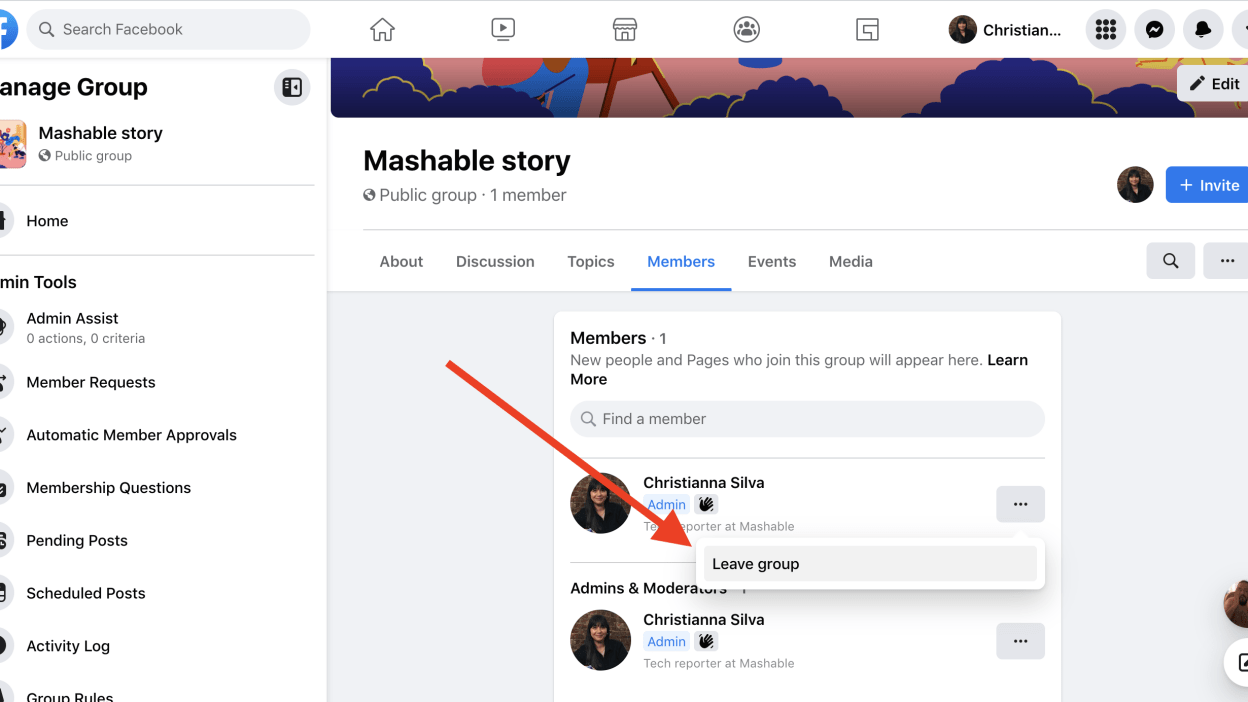
If you want to archive a Facebook group, follow these simple steps. First, log in to your Facebook account. In your left-hand corner, click the three-dot menu icon. This will take you to the group management page. See the article : Why Have My Photo Albums Disappeared on Facebook?. From here, you can choose to archive or delete the group. Archived groups are those that are no longer active. To delete a group, all members must choose to unsubscribe from the group.

Once the group has been archived, it will no longer appear on Facebook. It will only be visible to the group’s members. If you decide to reactivate the group, you will need to notify the admins. Clicking the “Unarchive” button will restore your group to normal functionality. You can also unarchive a group to regain its privileges and functionality. However, it is essential to contact the admins of the group first.

Read also :
How to Set Up Facebook Ads
How to Set Up Facebook Ads There are several different ways to…

Removing unwanted members from a Facebook group

There are a few steps that you can take to remove unwanted members from a Facebook group. First, log in to your Facebook account. Next, choose a group and select its members. Search for the member that you want to remove and click the three dots (…) icon next to their name. Read also : How to See Who is Viewing Your Facebook Profile. Click Remove From Group to delete their posts and comments. You can also block them. This option will not remove them permanently, but it will prevent them from posting again in the group.

Once the member has been removed, they will no longer be able to join the group. The other option is to block them from joining the group in the future. However, this option won’t work if you don’t want the member to see the content of the group. It will also prevent them from being invited back to the group. You can then find and select the member you want to remove by searching for them. Then, click the checkbox next to the member. You should then be able to do this in a few minutes.
This may interest you :
How to Change Your Password in Facebook
How to Change Your Password in Facebook If you have forgotten your…

Getting support for deleting a Facebook group

If you are wondering how to delete a Facebook group, you are not alone. Many Facebook users have experienced this frustration and have asked for help. This article will help you learn how to remove a group from your Facebook account. Once you have found the way to delete a Facebook group, you will no longer have to deal with the repercussions. Here are a few steps to help you get started.

First, log into your Facebook account and locate the group you want to delete. The group may be listed on the left-hand side of the screen or you can search for it by typing in its name. Once you’ve found the group, click on its name to navigate to its management page. Click the three-dot menu icon to the right of the group title bar. Choose the option you wish to remove.


Related Posts:

  • How Do You Delete a Group on Facebook?
  • How to Remove Group From Facebook
  • How Do You Delete a Facebook Group?
  • How to Rebrand a Facebook Group With Thousands of Members
  • How to Delete a Group on Facebook
  • How to Delete a Facebook Group
Was this article helpful?
YesNo

You might also like

Troubleshooting Instagram Posting Issues

Troubleshooting Instagram Posting Issues

How to Post Multiple Photos on Instagram Without Cropping – The Ultimate Guide

How to Post Multiple Photos on Instagram Without Cropping – The Ultimate Guide

How Do I View My Instagram Likes on My PC?

How Do I View My Instagram Likes on My PC?

How to Pause Reels in Instagram

How to Pause Reels in Instagram

How to Make Instagram Bio Center

How to Get Verified on YouTube: How to Speed Up the Process

How to Get Verified on YouTube: How to Speed Up the Process

Categories

  • Facebook
  • General
  • Instagram
  • LinkedIn
  • Marketing
  • Pinterest
  • Social Media
  • TikTok
  • Twitter
  • YouTube


Making Your Brands Popular.

(347) 875-0972

[email protected]

© 2024 Zeru.
All Rights Reserved.

DMCA.com Protection Status

Instagram Services

  • Buy Instagram Followers
  • Buy Instagram Likes
  • Buy Instagram Views
  • Buy Instagram Comments

YouTube Services

  • Buy YouTube Views
  • Buy YouTube Subscribers
  • Buy YouTube Likes
  • Buy YouTube Comments

TikTok Services

  • Buy TikTok Followers
  • Buy TikTok Likes
  • Buy TikTok Views

Facebook Services

  • Buy Facebook Page Likes
  • Buy Facebook Followers
  • Buy Facebook Post Likes
  • Buy Facebook Views

Twitter Services

  • Buy Twitter Followers
  • Buy Twitter Likes
  • Buy Twitter Retweets

Quick Links

  • FAQ
  • Blog
  • Contact
  • About
  • Terms and Conditions
  • Privacy Policy
No Result
View All Result
  • Buy Followers
    • Instagram Services
      • Buy Instagram Followers
      • Buy Instagram Likes
      • Buy Instagram Views
      • Buy Instagram Comments
    • YouTube Services
      • Buy YouTube Views
      • Buy YouTube Subscribers
      • Buy YouTube Likes
      • Buy YouTube Comments
    • TikTok Services
      • Buy TikTok Followers
      • Buy TikTok Likes
      • Buy TikTok Views
    • Facebook Services
      • Buy Facebook Page Likes
      • Buy Facebook Followers
      • Buy Facebook Post Likes
      • Buy Facebook Views
    • Twitter Services
      • Buy Twitter Followers
      • Buy Twitter Likes
      • Buy Twitter Retweets
  • Blog
  • Categories
    • Instagram
    • YouTube
    • TikTok
    • Facebook
    • Twitter
  • Contact

© 2023 Zeru. All Rights Reserved.

Welcome Back!

Login to your account below

Forgotten Password?

Create New Account!

Fill the forms bellow to register

All fields are required. Log In

Retrieve your password

Please enter your username or email address to reset your password.

Log In





