






• Buy Followers
    • Instagram Services
      • Buy Instagram Followers
      • Buy Instagram Likes
      • Buy Instagram Views
      • Buy Instagram Comments
    • YouTube Services
      • Buy YouTube Views
      • Buy YouTube Subscribers
      • Buy YouTube Likes
      • Buy YouTube Comments
    • TikTok Services
      • Buy TikTok Followers
      • Buy TikTok Likes
      • Buy TikTok Views
    • Facebook Services
      • Buy Facebook Page Likes
      • Buy Facebook Followers
      • Buy Facebook Post Likes
      • Buy Facebook Views
    • Twitter Services
      • Buy Twitter Followers
      • Buy Twitter Likes
      • Buy Twitter Retweets
  • Blog
  • Categories
    • Instagram
    • YouTube
    • TikTok
    • Facebook
    • Twitter
  • Contact
No Result
View All Result
Zeru
  • Buy Followers
    • Instagram Services
      • Buy Instagram Followers
      • Buy Instagram Likes
      • Buy Instagram Views
      • Buy Instagram Comments
    • YouTube Services
      • Buy YouTube Views
      • Buy YouTube Subscribers
      • Buy YouTube Likes
      • Buy YouTube Comments
    • TikTok Services
      • Buy TikTok Followers
      • Buy TikTok Likes
      • Buy TikTok Views
    • Facebook Services
      • Buy Facebook Page Likes
      • Buy Facebook Followers
      • Buy Facebook Post Likes
      • Buy Facebook Views
    • Twitter Services
      • Buy Twitter Followers
      • Buy Twitter Likes
      • Buy Twitter Retweets
  • Blog
  • Categories
    • Instagram
    • YouTube
    • TikTok
    • Facebook
    • Twitter
  • Contact
No Result
View All Result
Zeru
No Result
View All Result

Popular Services

Buy YouTube Views
Buy TikTok Followers
Buy Twitter Followers
Buy Facebook Followers
Buy Instagram Likes
Buy TikTok Likes
Buy Instagram Views
Buy TikTok Views
Buy Instagram Comments
Buy YouTube Likes
Buy Twitter Likes
Buy YouTube Comments
Buy Facebook Views
Buy Facebook Page Likes
Buy Twitter Retweets
Buy Facebook Post Likes
Buy YouTube Subscribers
Buy Instagram Followers

How to Chat in Instagram on a PC

Lizzie Yates by Lizzie Yates
in Instagram
3 min read
66
How to Chat in Instagram on a PC
13
SHARES
1.3k
VIEWS
Share on FacebookShare on Twitter

Contents

  • How to Chat in Instagram on a PC
  • IG:dm
  • Hootsuite Inbox
  • Direct Message for Instagram
  • Checking DMs on a computer

How to Chat in Instagram on a PC

how to chat in instagram in pc

How do I chat in Instagram on a PC? There are several ways to do this. First, you can use the DM feature on Instagram. You can also use the inbox feature in your Hootsuite account. Next, you can enter a message into the chat box. You’ll get a notification when the person you’re messaging has seen it. If you’d like to chat with multiple people, you can name the group.

IG:dm

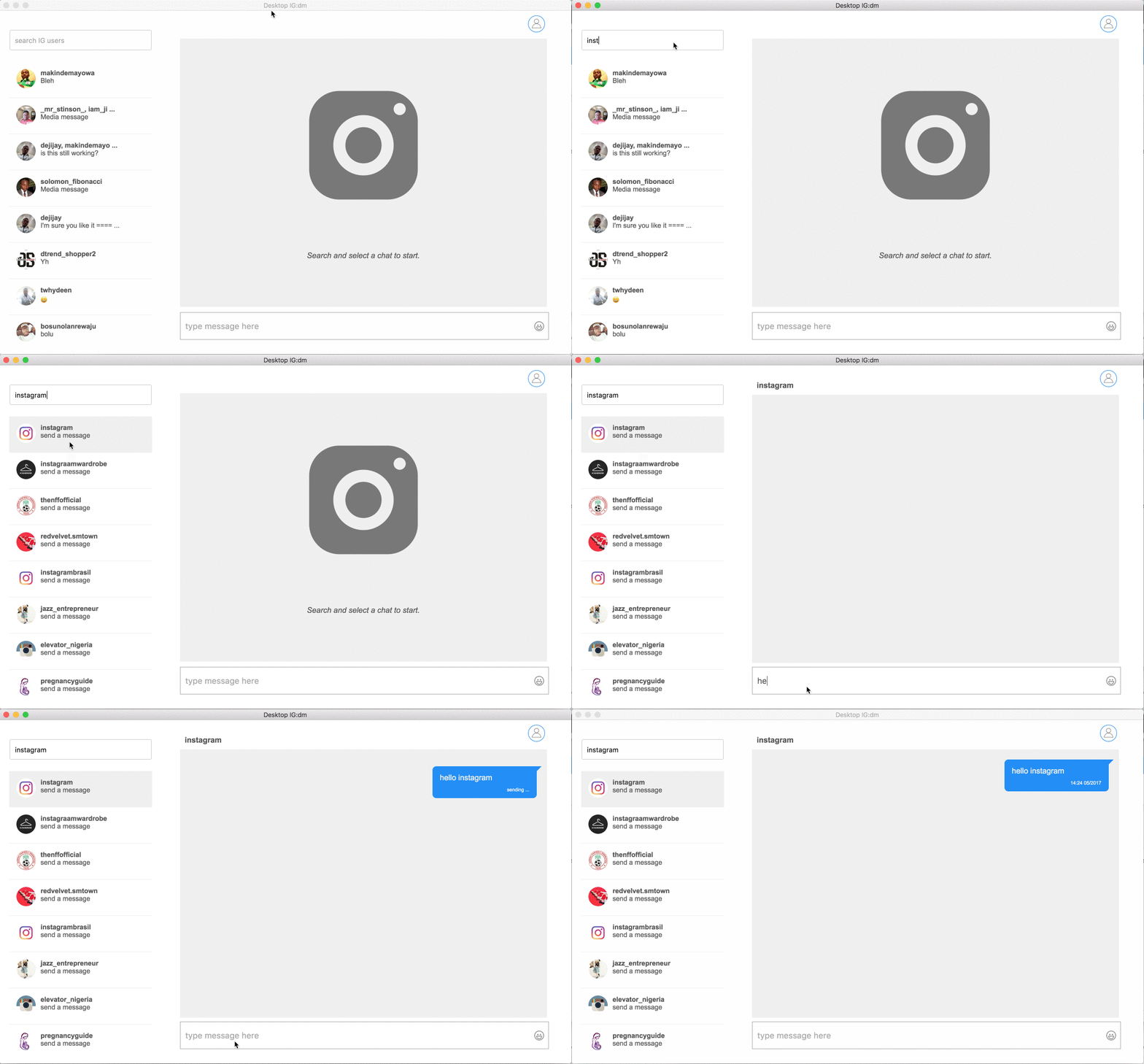
You might be wondering how to chat in Instagram on a PC. This social networking website has a number of features that make it convenient to use on both mobile and desktop. One such feature is DMs. See the article : How to View Instagram Stories Without Them Knowing. DMs are direct messages sent to someone on Instagram. You can send emojis and pictures to this type of message. In contrast, DMs can’t include GIFs and stickers.

If you’d like to use Instagram DM on your PC, you can do so using the free tool IG-dm. This program allows you to connect your Android smartphone to your PC using a USB cable or wireless network. The application runs on both your Android phone and PC, and mirrors the display of your smartphone to your computer’s screen. You can continue to send direct messages and send pictures from your PC to your phone, as well as view your file library. You can download IG-dm from here.

This may interest you :
Who Visited My Instagram Profile? Find Out Now!
Who Visited My Instagram Profile? Find Out Now! Have you ever been…

Hootsuite Inbox

If you use Twitter, you’re probably familiar with Hootsuite Inbox. But did you know that it also works with Instagram? This tool will enable you to manage your DMs and private messages. While it’s not perfect, it will do more than just send notifications. With the new Inbox, you’ll be able to reply to threads, private messages, and @mentions, all from one convenient location. You can even delete messages that don’t need your attention.

Enterprise customers can also use Hootsuite Inbox to manage their social conversations. This product allows enterprise users to create automated Inbox assignments and measure their message handling efficiency. Inbox visual notifications indicate new activities by showing a red dot. See the article : Who Has the Most Followers in Instagram?. For instance, if someone replies to a thread in the Instagram chat, they’ll see the notification as an assignment. If the thread was assigned to someone else, the notification will show up as a message from that person or team. By default, all users with a profile can enable Inbox notifications.

Read also :
How to See Posts You’ve Liked on Instagram
How to See Posts You’ve Liked on Instagram So, you’re interested in…

Direct Message for Instagram

If you’d like to use Instagram’s Direct Message (DM) feature on your PC, you’ll need to install a program called Igdm. Unlike its mobile counterpart, this software is available for both Windows and Mac. Once you’ve installed the application, you can start chatting with your friends from your PC. Read also : How Do I Change My Instagram Password?. After installing the program, you can pick up where you left off by accessing your recent and older messages. You can also go back and view your entire chat history. Download the app from the Mac App Store or PC App Store.

To install IG DM for PC, first you must log into the Instagram app with your credentials. Once you’ve done this, you’ll see your feed similar to the one on your smartphone, with the exception of the paper airplane icon at the top-right corner. You’ll see a list of all conversations, including those currently in progress. Click the name of the person you wish to message, or choose suggested users.

On the same subject :
How to Change Font in Instagram
How to Change Font in Instagram If you’ve ever wondered how to…

Checking DMs on a computer

You may be wondering how to check DMs in Instagram on a PC. You may have a Mac or a PC, and want to see your direct messages without having to open up your phone. Thankfully, there’s an easy way to do this! You can install an extension that allows you to check DMs in Instagram on a PC. The extension is relatively straightforward and does not require any additional setup.

To access your DMs from a desktop computer, first log into your Instagram account. From the DMs section, click the arrow icon on the left side. From there, you can choose to see a specific individual or group of users. You can respond to any direct messages using either method. If you’re using a computer, you can also use the web browser to access your DMs.


Related Posts:

  • How to Make a Group Chat on Instagram
  • How to Make a Group Chat on TikTok
  • How to Reply in Instagram Chat
  • How to Make a Group Chat on TikTok
  • How to Change Instagram Chat Theme
  • How to Delete Chat on Instagram
Was this article helpful?
YesNo

You might also like

Troubleshooting Instagram Posting Issues

Troubleshooting Instagram Posting Issues

How to Post Multiple Photos on Instagram Without Cropping – The Ultimate Guide

How to Post Multiple Photos on Instagram Without Cropping – The Ultimate Guide

How Do I View My Instagram Likes on My PC?

How Do I View My Instagram Likes on My PC?

How to Pause Reels in Instagram

How to Pause Reels in Instagram

How to Make Instagram Bio Center

How to Get Verified on YouTube: How to Speed Up the Process

How to Get Verified on YouTube: How to Speed Up the Process

Categories

  • Facebook
  • General
  • Instagram
  • LinkedIn
  • Marketing
  • Pinterest
  • Social Media
  • TikTok
  • Twitter
  • YouTube


Making Your Brands Popular.

(347) 875-0972

[email protected]

© 2024 Zeru.
All Rights Reserved.

DMCA.com Protection Status

Instagram Services

  • Buy Instagram Followers
  • Buy Instagram Likes
  • Buy Instagram Views
  • Buy Instagram Comments

YouTube Services

  • Buy YouTube Views
  • Buy YouTube Subscribers
  • Buy YouTube Likes
  • Buy YouTube Comments

TikTok Services

  • Buy TikTok Followers
  • Buy TikTok Likes
  • Buy TikTok Views

Facebook Services

  • Buy Facebook Page Likes
  • Buy Facebook Followers
  • Buy Facebook Post Likes
  • Buy Facebook Views

Twitter Services

  • Buy Twitter Followers
  • Buy Twitter Likes
  • Buy Twitter Retweets

Quick Links

  • FAQ
  • Blog
  • Contact
  • About
  • Terms and Conditions
  • Privacy Policy
No Result
View All Result
  • Buy Followers
    • Instagram Services
      • Buy Instagram Followers
      • Buy Instagram Likes
      • Buy Instagram Views
      • Buy Instagram Comments
    • YouTube Services
      • Buy YouTube Views
      • Buy YouTube Subscribers
      • Buy YouTube Likes
      • Buy YouTube Comments
    • TikTok Services
      • Buy TikTok Followers
      • Buy TikTok Likes
      • Buy TikTok Views
    • Facebook Services
      • Buy Facebook Page Likes
      • Buy Facebook Followers
      • Buy Facebook Post Likes
      • Buy Facebook Views
    • Twitter Services
      • Buy Twitter Followers
      • Buy Twitter Likes
      • Buy Twitter Retweets
  • Blog
  • Categories
    • Instagram
    • YouTube
    • TikTok
    • Facebook
    • Twitter
  • Contact

© 2023 Zeru. All Rights Reserved.

Welcome Back!

Login to your account below

Forgotten Password?

Create New Account!

Fill the forms bellow to register

All fields are required. Log In

Retrieve your password

Please enter your username or email address to reset your password.

Log In





