






• Buy Followers
    • Instagram Services
      • Buy Instagram Followers
      • Buy Instagram Likes
      • Buy Instagram Views
      • Buy Instagram Comments
    • YouTube Services
      • Buy YouTube Views
      • Buy YouTube Subscribers
      • Buy YouTube Likes
      • Buy YouTube Comments
    • TikTok Services
      • Buy TikTok Followers
      • Buy TikTok Likes
      • Buy TikTok Views
    • Facebook Services
      • Buy Facebook Page Likes
      • Buy Facebook Followers
      • Buy Facebook Post Likes
      • Buy Facebook Views
    • Twitter Services
      • Buy Twitter Followers
      • Buy Twitter Likes
      • Buy Twitter Retweets
  • Blog
  • Categories
    • Instagram
    • YouTube
    • TikTok
    • Facebook
    • Twitter
  • Contact
No Result
View All Result
Zeru
  • Buy Followers
    • Instagram Services
      • Buy Instagram Followers
      • Buy Instagram Likes
      • Buy Instagram Views
      • Buy Instagram Comments
    • YouTube Services
      • Buy YouTube Views
      • Buy YouTube Subscribers
      • Buy YouTube Likes
      • Buy YouTube Comments
    • TikTok Services
      • Buy TikTok Followers
      • Buy TikTok Likes
      • Buy TikTok Views
    • Facebook Services
      • Buy Facebook Page Likes
      • Buy Facebook Followers
      • Buy Facebook Post Likes
      • Buy Facebook Views
    • Twitter Services
      • Buy Twitter Followers
      • Buy Twitter Likes
      • Buy Twitter Retweets
  • Blog
  • Categories
    • Instagram
    • YouTube
    • TikTok
    • Facebook
    • Twitter
  • Contact
No Result
View All Result
Zeru
No Result
View All Result

Popular Services

Buy YouTube Views
Buy TikTok Followers
Buy Twitter Followers
Buy Facebook Followers
Buy Instagram Likes
Buy TikTok Likes
Buy Instagram Views
Buy TikTok Views
Buy Instagram Comments
Buy YouTube Likes
Buy Twitter Likes
Buy YouTube Comments
Buy Facebook Views
Buy Facebook Page Likes
Buy Twitter Retweets
Buy Facebook Post Likes
Buy YouTube Subscribers
Buy Instagram Followers

How to Delete YouTube Search History on iPhone

Lizzie Yates by Lizzie Yates
in YouTube
3 min read
66
How to Delete YouTube Search History on iPhone
13
SHARES
1.3k
VIEWS
Share on FacebookShare on Twitter

Contents

  • How to Delete YouTube Search History on iPhone
  • YouTube uses cookies to track user behavior
  • You can delete your own search history
  • You can clear your watch history
  • You can pause your search history
  • You can recover deleted searches

How to Delete YouTube Search History on iPhone

how to delete youtube search history on iphone

If you are wondering how to delete YouTube search history on iPhone, you’re not alone. Most people are unable to do it because they’re not aware that YouTube uses cookies to track user behavior. Fortunately, there are ways to clear your watch history, pause your history, and delete your own search history. Read on to find out how to delete YouTube search history on iPhone. Listed below are the steps you need to follow.

YouTube uses cookies to track user behavior

YouTube sets a tracking cookie on your computer to collect data about your use of the site. You can disable this cookie in your browser settings. By default, YouTube sets cookies for marketing purposes. To see also : How Do I Download YouTube Videos Using Firefox?. The tracking cookie is not used to track your personal information when you view non-YouTube sites. But if you want to protect your privacy, you should disable the cookie. The GDPR law requires businesses to follow GDPR guidelines, so removing the tracking cookie can make your site faster and safer.

Third-party cookies track your activity on YouTube. They store information in your browser and enable advertising, like what pages you view most often. If you visit YouTube using a link, YouTube will save a cookie in your browser. This cookie allows YouTube to track you until you delete it. Some people have expressed concern about third-party cookies, but these are not the only types of cookies used by YouTube. It’s important to understand what each cookie does.

This may interest you :
How to Delete a YouTube Account
How to Delete a YouTube Account If you’ve ever wondered how to…

You can delete your own search history

There are two ways to delete your YouTube search history on iPhone. You can pause the history or erase the entire history. The latter option will prevent YouTube from saving any data or making personalized suggestions. The former option will not delete your past searches, though. Read also : How to Download Video From YouTube to Phone. In both cases, you will need to log in to your Google account. To delete your search history, follow the steps below. You should also be able to clear the cache of your web browser to prevent YouTube from tracking your searches.

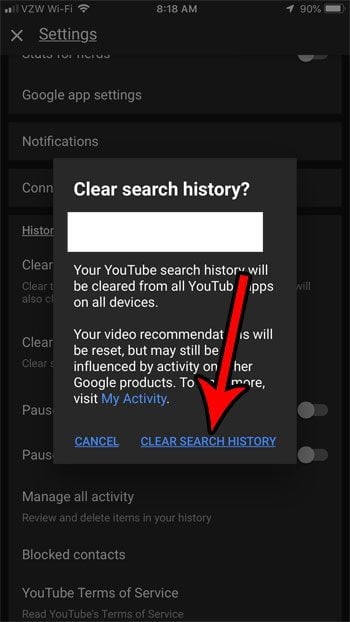
You can also use the YouTube iOS app to clear your history. It is similar to the YouTube Android app in that it provides a feature that allows you to delete your history in one go. Simply open the profile icon and choose the options menu. Scroll down to the section called History and privacy. Once you are done there, click on the “Clear all search history” button. Then, select the items you wish to remove from the history by clicking the X button.

This may interest you :
How to Change Your YouTube Email Address If You Use Gmail As Your Email Provider
How to Change Your YouTube Email Address If You Use Gmail As…

You can clear your watch history

Clearing the YouTube watch history on iPhone can be difficult – but it is possible. Follow these steps to clear it completely. In the web browser, tap the three dots on the upper-right corner of your YouTube screen. See the article : Can I Watch General Conference Live on YouTube?. Select Manage all activity, then tap the “Auto-delete” option. If you don’t want to delete the history, tap Pause. If you want to keep the watch history, you can pause it.

You can clear the search and watch history on iPhone by following the instructions below. You can delete all of your history or a certain range of history. Using Incognito mode to clear your watch history won’t work on YouTube. The same goes for turning off the search history in your browser. But, if you’re concerned about privacy, you can set the settings to prevent the website from tracking your searches.

Read also :
How to Get YouTube to Play in the Background on Your iPhone
How to Get YouTube to Play in the Background on Your iPhone…

You can pause your search history

If you’re concerned about your privacy while using YouTube, you can pause the history for that app. To do this, tap on the account icon on the top-left corner of your screen. Tap Settings. Scroll down to the section for History & privacy. Tap pause watch history or search history. Tap PAUSE to confirm. Then, tap OK to continue. Your history will be deleted. This is not a permanent option and cannot be restored.

There are ways to permanently delete your YouTube search history. First, you must log into your account. From there, choose “Clear All Search History.” To clear individual searches, tap “X.” On iPhones, you can also access the Settings cog and click the Clear History button. After doing this, you can use the app to search YouTube without any history. This is an easy way to prevent unwanted results from showing up.

You can recover deleted searches

If you delete a YouTube video from your iPhone, there’s a good chance that it’s still on the device. If not, you can use Disk Drill to recover deleted videos. This app works by scanning the disk and showing you the files that are recoverable. It can even tell you if the file is a lost cause or not. But how do you know if you’re likely to recover it?

If you’ve accidentally deleted a video, you can still recover it. To do this, open the YouTube app and search for the video by typing in the title. The result of the search will appear after you press ‘=’ sign. You can then select the video and save it to the device’s memory. Similarly, you can use Stellar Photo Recovery to recover deleted YouTube videos. Hopefully, these tips will help you recover deleted YouTube videos on iPhone.


Related Posts:

  • How to Delete YouTube Search History
  • How to Delete Facebook Search History
  • How to Clear Instagram Search Suggestions
  • How to Reset YouTube Recommendations
  • How to Clear Facebook Search History
  • How Do I Find My YouTube Search History?
Was this article helpful?
YesNo

You might also like

Troubleshooting Instagram Posting Issues

Troubleshooting Instagram Posting Issues

How to Post Multiple Photos on Instagram Without Cropping – The Ultimate Guide

How to Post Multiple Photos on Instagram Without Cropping – The Ultimate Guide

How Do I View My Instagram Likes on My PC?

How Do I View My Instagram Likes on My PC?

How to Pause Reels in Instagram

How to Pause Reels in Instagram

How to Make Instagram Bio Center

How to Get Verified on YouTube: How to Speed Up the Process

How to Get Verified on YouTube: How to Speed Up the Process

Categories

  • Facebook
  • General
  • Instagram
  • LinkedIn
  • Marketing
  • Pinterest
  • Social Media
  • TikTok
  • Twitter
  • YouTube


Making Your Brands Popular.

(347) 875-0972

[email protected]

© 2024 Zeru.
All Rights Reserved.

DMCA.com Protection Status

Instagram Services

  • Buy Instagram Followers
  • Buy Instagram Likes
  • Buy Instagram Views
  • Buy Instagram Comments

YouTube Services

  • Buy YouTube Views
  • Buy YouTube Subscribers
  • Buy YouTube Likes
  • Buy YouTube Comments

TikTok Services

  • Buy TikTok Followers
  • Buy TikTok Likes
  • Buy TikTok Views

Facebook Services

  • Buy Facebook Page Likes
  • Buy Facebook Followers
  • Buy Facebook Post Likes
  • Buy Facebook Views

Twitter Services

  • Buy Twitter Followers
  • Buy Twitter Likes
  • Buy Twitter Retweets

Quick Links

  • FAQ
  • Blog
  • Contact
  • About
  • Terms and Conditions
  • Privacy Policy
No Result
View All Result
  • Buy Followers
    • Instagram Services
      • Buy Instagram Followers
      • Buy Instagram Likes
      • Buy Instagram Views
      • Buy Instagram Comments
    • YouTube Services
      • Buy YouTube Views
      • Buy YouTube Subscribers
      • Buy YouTube Likes
      • Buy YouTube Comments
    • TikTok Services
      • Buy TikTok Followers
      • Buy TikTok Likes
      • Buy TikTok Views
    • Facebook Services
      • Buy Facebook Page Likes
      • Buy Facebook Followers
      • Buy Facebook Post Likes
      • Buy Facebook Views
    • Twitter Services
      • Buy Twitter Followers
      • Buy Twitter Likes
      • Buy Twitter Retweets
  • Blog
  • Categories
    • Instagram
    • YouTube
    • TikTok
    • Facebook
    • Twitter
  • Contact

© 2023 Zeru. All Rights Reserved.

Welcome Back!

Login to your account below

Forgotten Password?

Create New Account!

Fill the forms bellow to register

All fields are required. Log In

Retrieve your password

Please enter your username or email address to reset your password.

Log In





