






• Buy Followers
    • Instagram Services
      • Buy Instagram Followers
      • Buy Instagram Likes
      • Buy Instagram Views
      • Buy Instagram Comments
    • YouTube Services
      • Buy YouTube Views
      • Buy YouTube Subscribers
      • Buy YouTube Likes
      • Buy YouTube Comments
    • TikTok Services
      • Buy TikTok Followers
      • Buy TikTok Likes
      • Buy TikTok Views
    • Facebook Services
      • Buy Facebook Page Likes
      • Buy Facebook Followers
      • Buy Facebook Post Likes
      • Buy Facebook Views
    • Twitter Services
      • Buy Twitter Followers
      • Buy Twitter Likes
      • Buy Twitter Retweets
  • Blog
  • Categories
    • Instagram
    • YouTube
    • TikTok
    • Facebook
    • Twitter
  • Contact
No Result
View All Result
Zeru
  • Buy Followers
    • Instagram Services
      • Buy Instagram Followers
      • Buy Instagram Likes
      • Buy Instagram Views
      • Buy Instagram Comments
    • YouTube Services
      • Buy YouTube Views
      • Buy YouTube Subscribers
      • Buy YouTube Likes
      • Buy YouTube Comments
    • TikTok Services
      • Buy TikTok Followers
      • Buy TikTok Likes
      • Buy TikTok Views
    • Facebook Services
      • Buy Facebook Page Likes
      • Buy Facebook Followers
      • Buy Facebook Post Likes
      • Buy Facebook Views
    • Twitter Services
      • Buy Twitter Followers
      • Buy Twitter Likes
      • Buy Twitter Retweets
  • Blog
  • Categories
    • Instagram
    • YouTube
    • TikTok
    • Facebook
    • Twitter
  • Contact
No Result
View All Result
Zeru
No Result
View All Result

Popular Services

Buy YouTube Views
Buy TikTok Followers
Buy Twitter Followers
Buy Facebook Followers
Buy Instagram Likes
Buy TikTok Likes
Buy Instagram Views
Buy TikTok Views
Buy Instagram Comments
Buy YouTube Likes
Buy Twitter Likes
Buy YouTube Comments
Buy Facebook Views
Buy Facebook Page Likes
Buy Twitter Retweets
Buy Facebook Post Likes
Buy YouTube Subscribers
Buy Instagram Followers

How to Check Your Facebook Password on Android

Lizzie Yates by Lizzie Yates
in Facebook
3 min read
67
How to Check Your Facebook Password on Android
14
SHARES
1.4k
VIEWS
Share on FacebookShare on Twitter

Contents

  • How to Check Your Facebook Password on Android
  • View saved Facebook password on Android device
  • Turn on two-factor authentication on Facebook
  • Log out of Facebook sessions
  • Check last activity on Facebook
  • Reset your Facebook password

How to Check Your Facebook Password on Android

how to check your facebook password

You can see your saved Facebook password in a few simple steps if you have an Android device. You can also turn on two-factor authentication to secure your account and check your last activity on Facebook. The steps mentioned below will help you get the information you need to log out of Facebook sessions and check your last activity on Facebook. So, if you’ve forgotten your Facebook password, it’s time to make sure it’s safe to access your account again.

View saved Facebook password on Android device

Unlike most websites, Facebook does not offer a built-in password saver, making it necessary to view saved Facebook password on Android devices. Fortunately, a password-saving feature is already built into the Chrome Android browser. This may interest you : How to Remove Friends From Facebook. It creates a built-in password when you sign up for a new account. These saved passwords are stored in Google’s password database, making them easy to find and retrieve later.

Using a third-party app or browser will also allow you to view saved Facebook password on Android devices. Similarly, installing a password-finding application from Google Play Store will allow you to view saved Facebook passwords from your Android device. Facebook used to block Android users from viewing saved passwords, but this has been resolved with the help of a password-finding application. This solution is not a permanent solution, however.

To see also :
What is Facebook for Developers Used For?
What is Facebook for Developers Used For? If you’re new to Facebook,…

Turn on two-factor authentication on Facebook

One of the best ways to keep your Facebook account secure is to turn on Two-Factor Authentication, which sends a text message with a code to your mobile phone. You can use your mobile device or a third-party app to enable this feature. To enable Two-Factor Authentication, go to the settings of your Facebook account. Read also : How to Like and Unlike on Facebook. To activate it, select the option that best suits your needs. Then, choose a method of authentication – either your mobile phone or a secure third-party app – and then enter your new password. This new password must be unique from the previous one, and include upper and lowercase letters, numbers, and special characters.

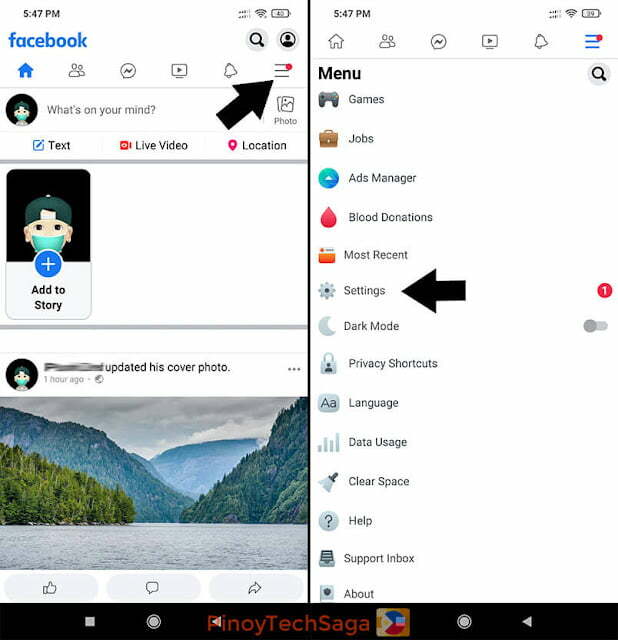
To enable 2FA on Facebook, sign in and click on the “Settings” tab. Select Security and Login from the drop-down menu. Scroll down until you see “Use two-factor authentication” on the left side of the screen. Select the “Edit” option next to Two-factor Authentication. In the “Your Security Method” section, click on the “Manage” button.
To see also :
How Do I Switch Back to the Old Facebook Layout?
How Do I Switch Back to the Old Facebook Layout? Having trouble…

Log out of Facebook sessions

If you use Facebook on several devices, it is important to log out of those sessions once you are finished using them. The same is true if you are using a laptop or tablet. You can log out from multiple devices by selecting “Sign Out” and confirm in the pop-up window that appears. Read also : Facebook’s Outage May Have Been Caused by a Bug in an Audit Tool. After you have done so, you can use Facebook on another device. You can also use the same method to log out from a desktop computer.

To log out of Facebook sessions, open the settings menu and click on the ‘Password and Security’ submenu. The ‘Where you’re logged in’ section will show recent devices. Select ‘See all devices’ to see all the devices that are currently logged into Facebook. Click the ‘Log Out of All Sessions’ button to terminate your Facebook logins on all those devices. After you’ve confirmed the log-out process, you can change your password and re-login using the same Facebook account.

To see also :
How to Deactively Delete Facebook
How to Deactively Delete Facebook Delete or Cancel – if you’re not…

Check last activity on Facebook

How to check a friend’s last activity on Facebook is not difficult. First of all, you’ll need to login to Facebook. Then, go to your friend’s profile. Then, go to the “More” section of the profile and select “Likes.” You’ll then be able to see which posts, photos, and videos your friend has liked and disliked. Once you’ve done this, you can find out the most recent activity for any user on Facebook.

If you’re not sure how to find out a friend’s activity on Facebook, you can check their Activity Log. Facebook keeps a record of everything you post on the site, including posts, likes, and shares. You can view this history at any time to see what people have been doing. While scrolling through your friend’s Activity Log might be creepy, you can be rest assured that it’s a safe and reliable way to see if someone is hiding behind the guise of anonymity.

Reset your Facebook password

Forgotten your Facebook password? You’re not alone! This happens to everyone from time to time. Even the simplest passwords can easily get lost or forgotten over time. Luckily, Facebook offers several alternative methods to recover your account. These methods will help you get back on track without having to log in to your account. If you’re looking for a quick way to recover your account, follow the steps below. You can also try the Google account option.

To reset your Facebook password, you’ll need your username and email address. If you don’t have these, search for your account by name. Once you’ve entered these two pieces of information, Facebook will send you a text message with a six-digit reset code. You can then use that code to log back into your Facebook account. The best part about this method is that it will work for most people. If you’re still unable to remember your password, just delete the old account.


Related Posts:

  • How to Check Facebook Password on Android and Windows
  • How to Find Your Facebook Password on an Android Device
  • How to Find Facebook Password
  • How to Know Your Password in Facebook on Your Android
  • How Can I See My Password in Facebook?
  • How Can I See My Password in Facebook?
Was this article helpful?
YesNo

You might also like

Troubleshooting Instagram Posting Issues

Troubleshooting Instagram Posting Issues

How to Post Multiple Photos on Instagram Without Cropping – The Ultimate Guide

How to Post Multiple Photos on Instagram Without Cropping – The Ultimate Guide

How Do I View My Instagram Likes on My PC?

How Do I View My Instagram Likes on My PC?

How to Pause Reels in Instagram

How to Pause Reels in Instagram

How to Make Instagram Bio Center

How to Get Verified on YouTube: How to Speed Up the Process

How to Get Verified on YouTube: How to Speed Up the Process

Categories

  • Facebook
  • General
  • Instagram
  • LinkedIn
  • Marketing
  • Pinterest
  • Social Media
  • TikTok
  • Twitter
  • YouTube


Making Your Brands Popular.

(347) 875-0972

[email protected]

© 2024 Zeru.
All Rights Reserved.

DMCA.com Protection Status

Instagram Services

  • Buy Instagram Followers
  • Buy Instagram Likes
  • Buy Instagram Views
  • Buy Instagram Comments

YouTube Services

  • Buy YouTube Views
  • Buy YouTube Subscribers
  • Buy YouTube Likes
  • Buy YouTube Comments

TikTok Services

  • Buy TikTok Followers
  • Buy TikTok Likes
  • Buy TikTok Views

Facebook Services

  • Buy Facebook Page Likes
  • Buy Facebook Followers
  • Buy Facebook Post Likes
  • Buy Facebook Views

Twitter Services

  • Buy Twitter Followers
  • Buy Twitter Likes
  • Buy Twitter Retweets

Quick Links

  • FAQ
  • Blog
  • Contact
  • About
  • Terms and Conditions
  • Privacy Policy
No Result
View All Result
  • Buy Followers
    • Instagram Services
      • Buy Instagram Followers
      • Buy Instagram Likes
      • Buy Instagram Views
      • Buy Instagram Comments
    • YouTube Services
      • Buy YouTube Views
      • Buy YouTube Subscribers
      • Buy YouTube Likes
      • Buy YouTube Comments
    • TikTok Services
      • Buy TikTok Followers
      • Buy TikTok Likes
      • Buy TikTok Views
    • Facebook Services
      • Buy Facebook Page Likes
      • Buy Facebook Followers
      • Buy Facebook Post Likes
      • Buy Facebook Views
    • Twitter Services
      • Buy Twitter Followers
      • Buy Twitter Likes
      • Buy Twitter Retweets
  • Blog
  • Categories
    • Instagram
    • YouTube
    • TikTok
    • Facebook
    • Twitter
  • Contact

© 2023 Zeru. All Rights Reserved.

Welcome Back!

Login to your account below

Forgotten Password?

Create New Account!

Fill the forms bellow to register

All fields are required. Log In

Retrieve your password

Please enter your username or email address to reset your password.

Log In





