






• Buy Followers
    • Instagram Services
      • Buy Instagram Followers
      • Buy Instagram Likes
      • Buy Instagram Views
      • Buy Instagram Comments
    • YouTube Services
      • Buy YouTube Views
      • Buy YouTube Subscribers
      • Buy YouTube Likes
      • Buy YouTube Comments
    • TikTok Services
      • Buy TikTok Followers
      • Buy TikTok Likes
      • Buy TikTok Views
    • Facebook Services
      • Buy Facebook Page Likes
      • Buy Facebook Followers
      • Buy Facebook Post Likes
      • Buy Facebook Views
    • Twitter Services
      • Buy Twitter Followers
      • Buy Twitter Likes
      • Buy Twitter Retweets
  • Blog
  • Categories
    • Instagram
    • YouTube
    • TikTok
    • Facebook
    • Twitter
  • Contact
No Result
View All Result
Zeru
  • Buy Followers
    • Instagram Services
      • Buy Instagram Followers
      • Buy Instagram Likes
      • Buy Instagram Views
      • Buy Instagram Comments
    • YouTube Services
      • Buy YouTube Views
      • Buy YouTube Subscribers
      • Buy YouTube Likes
      • Buy YouTube Comments
    • TikTok Services
      • Buy TikTok Followers
      • Buy TikTok Likes
      • Buy TikTok Views
    • Facebook Services
      • Buy Facebook Page Likes
      • Buy Facebook Followers
      • Buy Facebook Post Likes
      • Buy Facebook Views
    • Twitter Services
      • Buy Twitter Followers
      • Buy Twitter Likes
      • Buy Twitter Retweets
  • Blog
  • Categories
    • Instagram
    • YouTube
    • TikTok
    • Facebook
    • Twitter
  • Contact
No Result
View All Result
Zeru
No Result
View All Result

Popular Services

Buy YouTube Views
Buy TikTok Followers
Buy Twitter Followers
Buy Facebook Followers
Buy Instagram Likes
Buy TikTok Likes
Buy Instagram Views
Buy TikTok Views
Buy Instagram Comments
Buy YouTube Likes
Buy Twitter Likes
Buy YouTube Comments
Buy Facebook Views
Buy Facebook Page Likes
Buy Twitter Retweets
Buy Facebook Post Likes
Buy YouTube Subscribers
Buy Instagram Followers

How to Turn Off TikTok Notifications

Lizzie Yates by Lizzie Yates
in TikTok
3 min read
73
How to Turn Off TikTok Notifications
16
SHARES
1.6k
VIEWS
Share on FacebookShare on Twitter

Contents

  • How to Turn Off TikTok Notifications
  • Muting conversations in TikTok
  • Turning on post notifications in TikTok
  • Customizing your personal settings of direct messages in TikTok

How to Turn Off TikTok Notifications

how to turn off tiktok notifications

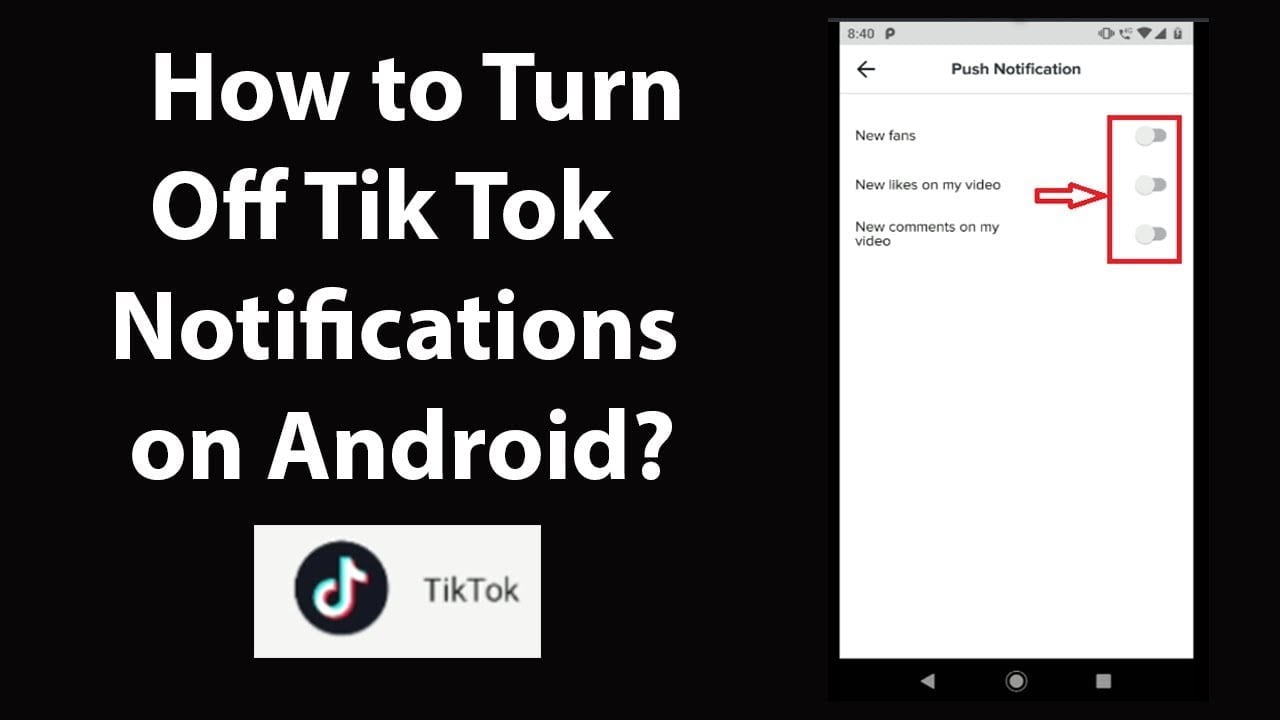
If you are fed up of the constant notifications you receive from your Tiktok friends, then you can easily customize the app to mute pop-ups and turn off push notifications. To do this, open the Tiktok app on your phone and log in with your Tiktok credentials. Once logged in, tap the Profile tab at the bottom right corner of the screen. Tap the Three Horizontal Lines located at the top-right corner of your screen. From there, tap Privacy. In the Privacy section, tap Push Notifications.

Muting conversations in TikTok

You can mute your TikTok conversations. The downside is that you won’t know if someone has muted you, and it’s not easy to determine who muted you. However, there are ways to determine who you’ve muted without letting them know. See the article : How to Make Your TikTok Account Public Or Private. The best way to do this is to read the TikTok terms of privacy. Otherwise, you’ll have to go through the same process as before.

First, launch the TikTok app on your device and log in with your credentials. Locate the conversation you’d like to mute by long pressing it. From there, tap the three-dot icon in the top right corner of the screen. You can also mute the conversation by selecting the “Do not disturb” option. Alternatively, you can go to the message toggling notifications to silent mode.

Once you have unmuted a conversation, you can see whether or not the other person has muted you. To do this, go to the notification bar and click the speaker icon with a split-circle. Tap it to un-mute the story. This will inform you about the time the conversation was muted. Additionally, it will also tell you the reason for the mutation. If it was mutated due to being offensive to the streamer, you may want to unmute them so that they don’t bother you anymore.
To see also :
How Do You Change Your Birthday on TikTok Without Deleting Your Account?
How Do You Change Your Birthday on TikTok Without Deleting Your Account?…

Turning on post notifications in TikTok

If you’ve ever found it difficult to keep up with new content in TikTok, you can turn on post notifications to avoid missing out on something important. The notifications in TikTok notify users when a video has been posted, but too many can be annoying. Read also : How Much Are 1000 TikTok Coins Worth?. Here are some tips to turn off post notifications in TikTok. If you use TikTok frequently, turn off post notifications when you’re not posting new content.

If you’re interested in keeping up with your friends’ posts, turn on post notifications in TikTok. While you can turn this option off at times, you should avoid enabling it during certain periods of time. Specifically, turning off notifications when you’re in a public place could affect the quality of your posts. However, if you’re not going to spend a lot of time on TikTok, you shouldn’t turn off notification altogether.

The next time you want to enable notifications on TikTok, try turning it on in the settings app. On iOS, simply tap on TikTok and toggle the Allow Notifications switch to the green color. After you do that, you’ll start receiving notifications whenever someone uploads a new video. Before turning off notifications, make sure to check for pending updates in Google Play or Apple App Store. Finally, make sure you have enabled push notifications on your phone.

See the article :
Can You See Who Viewed Your TikTok Profile?
Can You See Who Viewed Your TikTok Profile? Have you wondered if…

Customizing your personal settings of direct messages in TikTok

Using TikTok’s custom settings will allow you to customize your inbox and direct messages to suit your preferences. You can choose to receive messages from Friends only, or from No One at all. You can also customize the settings of your privacy settings. See the article : How to Delete Video From TikTok. These will help you keep your privacy settings private, while still allowing you to communicate with friends and family. For more information, visit the TikTok website.

If you want to customize your direct messaging preferences, you’ll need to sign up for an account with TikTok. Once you’ve done so, you’ll be able to see who has sent you messages and who has unread messages. By default, you’ll be able to DM people you follow, but not non-followers. If you’re uncomfortable interacting with others, you can also block them. Blocking them will prevent them from contacting you.

To customize your personal settings of direct messages, visit the settings page on the TikTok website. There, you’ll be able to see who is following you. You can also view a list of your friends’ names to send them messages. Just make sure you’re over the age limit on your TikTok profile! Otherwise, the direct message will appear as a blank.


On the same subject :
3 Ways to Make Money With TikTok
3 Ways to Make Money With TikTok If you’re looking for ways…

Related Posts:

  • How to Stop Twitter Notifications
  • How to Turn Off Facebook Notifications
  • How to Turn Off Twitter Notifications
  • How to Turn on Post Notifications on TikTok
  • How to See Who Has Viewed Your Profile on TikTok
  • How to Turn Off Facebook Sounds on Your Android Phone
Was this article helpful?
YesNo

You might also like

Troubleshooting Instagram Posting Issues

Troubleshooting Instagram Posting Issues

How to Post Multiple Photos on Instagram Without Cropping – The Ultimate Guide

How to Post Multiple Photos on Instagram Without Cropping – The Ultimate Guide

How Do I View My Instagram Likes on My PC?

How Do I View My Instagram Likes on My PC?

How to Pause Reels in Instagram

How to Pause Reels in Instagram

How to Make Instagram Bio Center

How to Get Verified on YouTube: How to Speed Up the Process

How to Get Verified on YouTube: How to Speed Up the Process

Categories

  • Facebook
  • General
  • Instagram
  • LinkedIn
  • Marketing
  • Pinterest
  • Social Media
  • TikTok
  • Twitter
  • YouTube


Making Your Brands Popular.

(347) 875-0972

[email protected]

© 2024 Zeru.
All Rights Reserved.

DMCA.com Protection Status

Instagram Services

  • Buy Instagram Followers
  • Buy Instagram Likes
  • Buy Instagram Views
  • Buy Instagram Comments

YouTube Services

  • Buy YouTube Views
  • Buy YouTube Subscribers
  • Buy YouTube Likes
  • Buy YouTube Comments

TikTok Services

  • Buy TikTok Followers
  • Buy TikTok Likes
  • Buy TikTok Views

Facebook Services

  • Buy Facebook Page Likes
  • Buy Facebook Followers
  • Buy Facebook Post Likes
  • Buy Facebook Views

Twitter Services

  • Buy Twitter Followers
  • Buy Twitter Likes
  • Buy Twitter Retweets

Quick Links

  • FAQ
  • Blog
  • Contact
  • About
  • Terms and Conditions
  • Privacy Policy
No Result
View All Result
  • Buy Followers
    • Instagram Services
      • Buy Instagram Followers
      • Buy Instagram Likes
      • Buy Instagram Views
      • Buy Instagram Comments
    • YouTube Services
      • Buy YouTube Views
      • Buy YouTube Subscribers
      • Buy YouTube Likes
      • Buy YouTube Comments
    • TikTok Services
      • Buy TikTok Followers
      • Buy TikTok Likes
      • Buy TikTok Views
    • Facebook Services
      • Buy Facebook Page Likes
      • Buy Facebook Followers
      • Buy Facebook Post Likes
      • Buy Facebook Views
    • Twitter Services
      • Buy Twitter Followers
      • Buy Twitter Likes
      • Buy Twitter Retweets
  • Blog
  • Categories
    • Instagram
    • YouTube
    • TikTok
    • Facebook
    • Twitter
  • Contact

© 2023 Zeru. All Rights Reserved.

Welcome Back!

Login to your account below

Forgotten Password?

Create New Account!

Fill the forms bellow to register

All fields are required. Log In

Retrieve your password

Please enter your username or email address to reset your password.

Log In






