






• Buy Followers
    • Instagram Services
      • Buy Instagram Followers
      • Buy Instagram Likes
      • Buy Instagram Views
      • Buy Instagram Comments
    • YouTube Services
      • Buy YouTube Views
      • Buy YouTube Subscribers
      • Buy YouTube Likes
      • Buy YouTube Comments
    • TikTok Services
      • Buy TikTok Followers
      • Buy TikTok Likes
      • Buy TikTok Views
    • Facebook Services
      • Buy Facebook Page Likes
      • Buy Facebook Followers
      • Buy Facebook Post Likes
      • Buy Facebook Views
    • Twitter Services
      • Buy Twitter Followers
      • Buy Twitter Likes
      • Buy Twitter Retweets
  • Blog
  • Categories
    • Instagram
    • YouTube
    • TikTok
    • Facebook
    • Twitter
  • Contact
No Result
View All Result
Zeru
  • Buy Followers
    • Instagram Services
      • Buy Instagram Followers
      • Buy Instagram Likes
      • Buy Instagram Views
      • Buy Instagram Comments
    • YouTube Services
      • Buy YouTube Views
      • Buy YouTube Subscribers
      • Buy YouTube Likes
      • Buy YouTube Comments
    • TikTok Services
      • Buy TikTok Followers
      • Buy TikTok Likes
      • Buy TikTok Views
    • Facebook Services
      • Buy Facebook Page Likes
      • Buy Facebook Followers
      • Buy Facebook Post Likes
      • Buy Facebook Views
    • Twitter Services
      • Buy Twitter Followers
      • Buy Twitter Likes
      • Buy Twitter Retweets
  • Blog
  • Categories
    • Instagram
    • YouTube
    • TikTok
    • Facebook
    • Twitter
  • Contact
No Result
View All Result
Zeru
No Result
View All Result

Popular Services

Buy YouTube Views
Buy TikTok Followers
Buy Twitter Followers
Buy Facebook Followers
Buy Instagram Likes
Buy TikTok Likes
Buy Instagram Views
Buy TikTok Views
Buy Instagram Comments
Buy YouTube Likes
Buy Twitter Likes
Buy YouTube Comments
Buy Facebook Views
Buy Facebook Page Likes
Buy Twitter Retweets
Buy Facebook Post Likes
Buy YouTube Subscribers
Buy Instagram Followers

How to Translate a YouTube Video

Lizzie Yates by Lizzie Yates
in YouTube
3 min read
69
How to Translate a YouTube Video
15
SHARES
1.5k
VIEWS
Share on FacebookShare on Twitter

Contents

  • How to Translate a YouTube Video
  • YouTube’s automatic translation
  • Adding subtitles
  • Adding closed captions
  • Using Keevi

How to Translate a YouTube Video

how to translate a youtube video

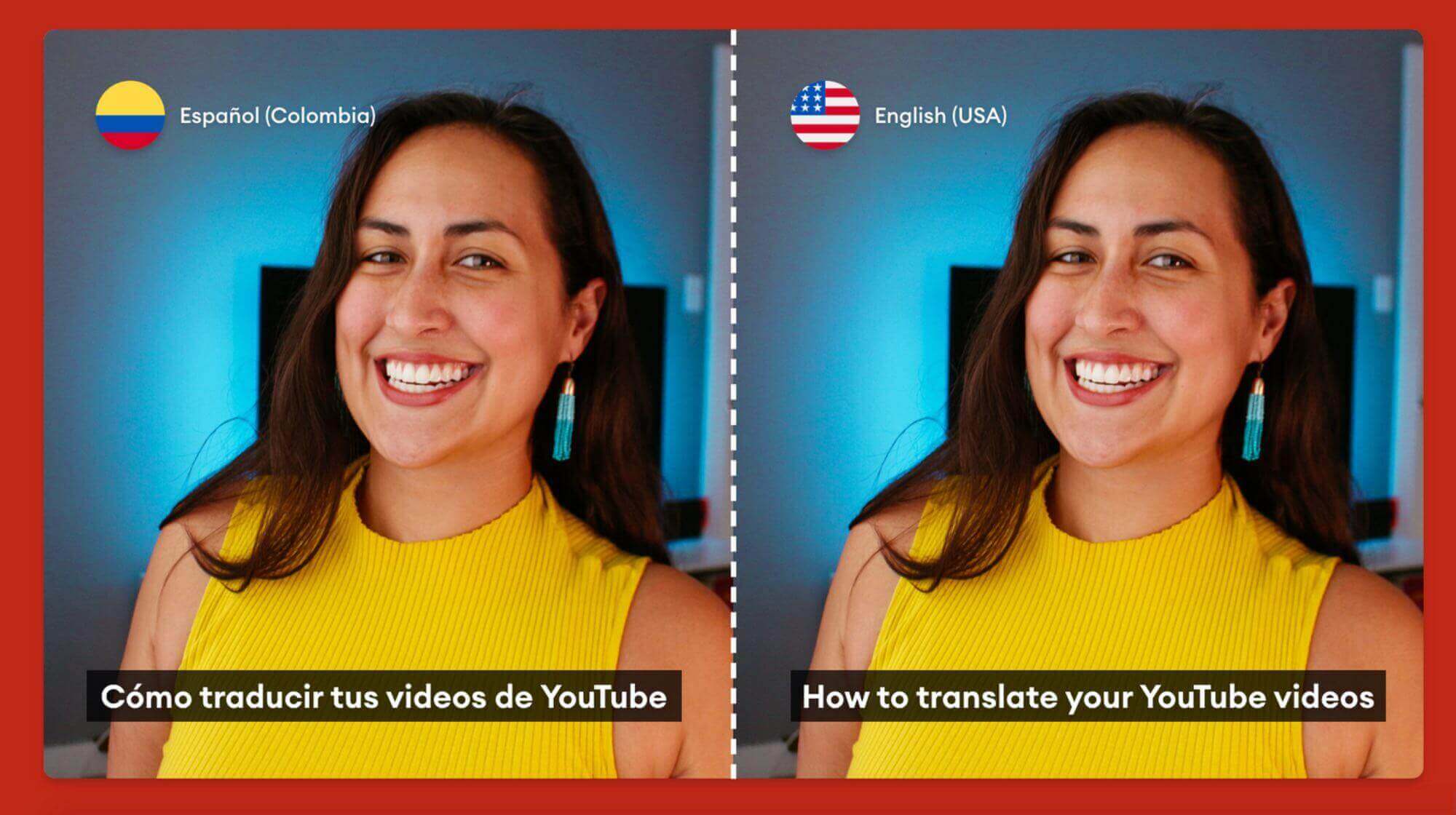
You may be wondering how to translate a YouTube video. There are several ways to do this, from adding closed captions and subtitles to using an online tool like Keevi. Let’s examine some of the most common ways to do so. In addition to subtitles, video metadata can be translated by the video owner. Here are some of the easiest ways to do this. This article is written to help you make the most of these features.

YouTube’s automatic translation

The auto translation feature on YouTube allows users to translate the title and description of videos. The auto translation feature also translates the subscriber count, button text, and captions. While this feature is extremely useful, it also has some issues. This may interest you : How to Log Out of YouTube. It may not be 100% accurate, and mistakes can occur. So, be sure to double-check your translations before you post them! In the meantime, check out some of the other translation features available on YouTube.

YouTube has millions of users worldwide, so it makes sense to have videos in all languages. Closed captioning can be a hassle, but YouTube has an easy fix: auto translation. To turn off automatic translation, go to your YouTube account settings and click on the Closed Captions option. Choose the language you want subtitles in. English is the default. In addition to English, YouTube’s auto-translation feature also works with videos in other languages. However, if your video is too long, your viewers may lose interest and leave.
This may interest you :
What is the Top 10 Most Viewed Video on YouTube?
What is the Top 10 Most Viewed Video on YouTube? If you…

Adding subtitles

There are two ways to add captions to a YouTube video. One is to upload a file, which you can do using the action menu. The other way is to enter the subtitles manually. See the article : How to Find Trending Searches on YouTube. Then, YouTube will match the subtitles to the video. You can also use the preview player to find the frame you want to add captions to. In either case, you’ll have to provide a start and end timestamp for each subtitle.

The caption file will include text that describes the video. When the captions are finished, you can turn the video off and on again. You can adjust the length of the captions with keyboard shortcuts. If you want to add captions to a video that’s already uploaded, you can use YouTube’s caption editor. You can then add captions to the video while it plays. You can even change the font, color, and alignment of the captions.

Read also :
Can You Do a Watch Party on YouTube?
Can You Do a Watch Party on YouTube? Can you do a…

Adding closed captions

To add closed captions to a YouTube video, follow these simple steps. First, you need to choose the language of your video, which should be one supported by YouTube’s speech recognition technology. Then, type the subtitle text into the text area. Read also : Is Rumble Better Than YouTube?. If necessary, you can also use text tags to give more context to your subtitles. You can pause the video to type the captions, or press Shift and space to add a new line.

In addition to making your video more accessible, adding closed captions will also boost your search engine rankings. Googlebots cannot understand videos without captions, so adding captions will help you get ranked in YouTube search. Adding closed captions to your YouTube videos is the first step to making your video more accessible. By following these steps, you will be on your way to having a successful YouTube video that appeals to a wider audience.

See the article :
Can You Play YouTube App in Background?
Can You Play YouTube App in Background? Unless you’re on an iPad,…

Using Keevi

With Keevi, you can easily translate YouTube videos by adding subtitles and voice over in the desired language. The application is easy to use and will export the translated video in minutes. You can even choose to embed the translations right in the video itself. You won’t need to download any software, and Keevi supports over 100 languages. Its user-friendly interface makes it easy for beginners to get started.

Whether you’re creating a video to share on YouTube or for other purposes, making it available in multiple languages is crucial to your success. One study has found that 82% of web traffic is video content. With Keevi, you can expand your reach to global audiences without spending any money on localization. You can also focus your audience on one channel with a single video. Whether it’s a YouTube video or a web-based tutorial, Keevi can help you translate your YouTube video and drive traffic to it.


Related Posts:

  • How Do I Get YouTube to Automatically Translate?
  • How to Translate YouTube Videos
  • How Do I Translate a YouTube Video?
  • How Do I Use Google Translate on TikTok?
  • How Do I Use Google Translate on YouTube?
  • How to Download YouTube Videos With Subtitles and Automatic…
Was this article helpful?
YesNo

You might also like

Troubleshooting Instagram Posting Issues

Troubleshooting Instagram Posting Issues

How to Post Multiple Photos on Instagram Without Cropping – The Ultimate Guide

How to Post Multiple Photos on Instagram Without Cropping – The Ultimate Guide

How Do I View My Instagram Likes on My PC?

How Do I View My Instagram Likes on My PC?

How to Pause Reels in Instagram

How to Pause Reels in Instagram

How to Make Instagram Bio Center

How to Get Verified on YouTube: How to Speed Up the Process

How to Get Verified on YouTube: How to Speed Up the Process

Categories

  • Facebook
  • General
  • Instagram
  • LinkedIn
  • Marketing
  • Pinterest
  • Social Media
  • TikTok
  • Twitter
  • YouTube


Making Your Brands Popular.

(347) 875-0972

[email protected]

© 2024 Zeru.
All Rights Reserved.

DMCA.com Protection Status

Instagram Services

  • Buy Instagram Followers
  • Buy Instagram Likes
  • Buy Instagram Views
  • Buy Instagram Comments

YouTube Services

  • Buy YouTube Views
  • Buy YouTube Subscribers
  • Buy YouTube Likes
  • Buy YouTube Comments

TikTok Services

  • Buy TikTok Followers
  • Buy TikTok Likes
  • Buy TikTok Views

Facebook Services

  • Buy Facebook Page Likes
  • Buy Facebook Followers
  • Buy Facebook Post Likes
  • Buy Facebook Views

Twitter Services

  • Buy Twitter Followers
  • Buy Twitter Likes
  • Buy Twitter Retweets

Quick Links

  • FAQ
  • Blog
  • Contact
  • About
  • Terms and Conditions
  • Privacy Policy
No Result
View All Result
  • Buy Followers
    • Instagram Services
      • Buy Instagram Followers
      • Buy Instagram Likes
      • Buy Instagram Views
      • Buy Instagram Comments
    • YouTube Services
      • Buy YouTube Views
      • Buy YouTube Subscribers
      • Buy YouTube Likes
      • Buy YouTube Comments
    • TikTok Services
      • Buy TikTok Followers
      • Buy TikTok Likes
      • Buy TikTok Views
    • Facebook Services
      • Buy Facebook Page Likes
      • Buy Facebook Followers
      • Buy Facebook Post Likes
      • Buy Facebook Views
    • Twitter Services
      • Buy Twitter Followers
      • Buy Twitter Likes
      • Buy Twitter Retweets
  • Blog
  • Categories
    • Instagram
    • YouTube
    • TikTok
    • Facebook
    • Twitter
  • Contact

© 2023 Zeru. All Rights Reserved.

Welcome Back!

Login to your account below

Forgotten Password?

Create New Account!

Fill the forms bellow to register

All fields are required. Log In

Retrieve your password

Please enter your username or email address to reset your password.

Log In





