






• Buy Followers
    • Instagram Services
      • Buy Instagram Followers
      • Buy Instagram Likes
      • Buy Instagram Views
      • Buy Instagram Comments
    • YouTube Services
      • Buy YouTube Views
      • Buy YouTube Subscribers
      • Buy YouTube Likes
      • Buy YouTube Comments
    • TikTok Services
      • Buy TikTok Followers
      • Buy TikTok Likes
      • Buy TikTok Views
    • Facebook Services
      • Buy Facebook Page Likes
      • Buy Facebook Followers
      • Buy Facebook Post Likes
      • Buy Facebook Views
    • Twitter Services
      • Buy Twitter Followers
      • Buy Twitter Likes
      • Buy Twitter Retweets
  • Blog
  • Categories
    • Instagram
    • YouTube
    • TikTok
    • Facebook
    • Twitter
  • Contact
No Result
View All Result
Zeru
  • Buy Followers
    • Instagram Services
      • Buy Instagram Followers
      • Buy Instagram Likes
      • Buy Instagram Views
      • Buy Instagram Comments
    • YouTube Services
      • Buy YouTube Views
      • Buy YouTube Subscribers
      • Buy YouTube Likes
      • Buy YouTube Comments
    • TikTok Services
      • Buy TikTok Followers
      • Buy TikTok Likes
      • Buy TikTok Views
    • Facebook Services
      • Buy Facebook Page Likes
      • Buy Facebook Followers
      • Buy Facebook Post Likes
      • Buy Facebook Views
    • Twitter Services
      • Buy Twitter Followers
      • Buy Twitter Likes
      • Buy Twitter Retweets
  • Blog
  • Categories
    • Instagram
    • YouTube
    • TikTok
    • Facebook
    • Twitter
  • Contact
No Result
View All Result
Zeru
No Result
View All Result

Popular Services

Buy YouTube Views
Buy TikTok Followers
Buy Twitter Followers
Buy Facebook Followers
Buy Instagram Likes
Buy TikTok Likes
Buy Instagram Views
Buy TikTok Views
Buy Instagram Comments
Buy YouTube Likes
Buy Twitter Likes
Buy YouTube Comments
Buy Facebook Views
Buy Facebook Page Likes
Buy Twitter Retweets
Buy Facebook Post Likes
Buy YouTube Subscribers
Buy Instagram Followers

How to Share a Story on Instagram

Lizzie Yates by Lizzie Yates
in Instagram
3 min read
63
How to Share a Story on Instagram
14
SHARES
1.4k
VIEWS
Share on FacebookShare on Twitter

Contents

  • How to Share a Story on Instagram
  • Reposting a story if the poster is a private account
  • Reposting a story before it vanishes
  • Saving a screenshot of a story to your camera roll
  • Adding text to a story

How to Share a Story on Instagram

how to share story on instagram

To share a story, swipe left to bring up the camera view and take a photo or load one from the Gallery. Then, tap anywhere in the Story to tag someone. Tap the @Mention option and search for the friend you want to tag. Tap the profile picture of your friend. Finally, tap on the option to allow others to share your story. If you’d like to tag a friend, the steps are very similar.

Reposting a story if the poster is a private account

Reposting a story on Instagram enables you to share another user’s post or content. This works in the same way as reposting a post on your own feed. The repost will automatically tag the original content creator and link back to their original post. If the poster has set their profile to private, however, you’ll not be able to repost the original content.

Reposting other people’s work should be done carefully and sparingly. Make sure to credit the original creator with a link and hashtag. Read also : Why Is Instagram Not Working Today?. While reposting is generally not an appropriate way to build your personal brand or promote your business, it can be an effective way to spread the word about an event. Reposting local events is acceptable provided the content you share adds value to others.

To see also :
What App Makes Instagram Fan Edits?
What App Makes Instagram Fan Edits? Are you wondering, “What app makes…

Reposting a story before it vanishes

There are several ways to repost a story on Instagram before it disappears. You can repost personal stories that you’ve shared, or you can post stories that promote your products or services. If the original poster doesn’t mind, reposting the story is perfectly acceptable. On the same subject : How to Pin a Comment on Instagram. However, you must make sure that the story you repost is relevant to the person who originally posted it. Self-promotion will often turn people off, and you’ll end up limiting the reach of valuable content.

To post a story before it vanishes, you’ll need to be tagged in the original. You can do this by taking a screenshot of the story, saving it in your screenshots folder, and then uploading it to Plann. In most cases, you can also share a story from your feed in another profile by being tagged in it. This way, you can make sure that it goes viral and receive many more likes.
On the same subject :
How to Add Music to an Instagram Post
How to Add Music to an Instagram Post You may be wondering…

Saving a screenshot of a story to your camera roll

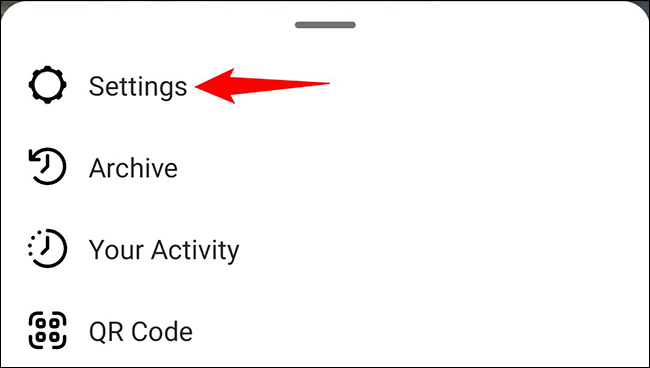
While you can’t download an Instagram story, you can save a screenshot. First, you must turn on Airplane Mode. This option can be found in the Settings menu or your notifications tray. On the same subject : How to Earn From Instagram. Then, hold the Home and Side buttons together, and then press the Power and Volume Down buttons at the same time. Once you have done this, you should see a preview of your screenshot. After that, tap the Share button to share it with your followers.

If you want to save a story screenshot to your camera roll, you can do so with two methods. The first method is a screenshot from your computer. If you’re using Windows, you can screenshot a story by pressing Ctrl + Shift + Print Screen. You can then paste the screenshot to an image editing app and edit it. Alternatively, you can click on the screenshot thumbnail and edit it later. Both methods are useful for capturing in-the-moment info on a mobile device.

To see also :
How to Upload a GIF to Instagram
How to Upload a GIF to Instagram If you’re wondering how to…

Adding text to a story

The next time you create a new story on Instagram, you’re going to want to add some text to it. This can add some character to your story, but it should be used sparingly and effectively. Instead of using your entire story to add text, try placing it in the speech bubble or as a statement. To add text, you’ll first need to open your story in Instagram’s editing tool. Click the “Aa” text symbol on the top right corner. Next, type in the text you want to add. Once done, click “Done”. Your caption will then appear on your story.

You can add text to your story using the text icon. It’s easy to add text on the screen and you can use the text icon wherever you’d like. The color of the text box is editable, and you can choose it from a wide range of colors. You can also use the Story camera to add text to your story. Once you’ve added text to your story, you can use stickers to customize it.


Related Posts:

  • How to Share Someone Else's Instagram Story
  • How to Share Someone's Instagram Story
  • How to Share a Post on Your Instagram Story
  • How to Unmute a Story on Instagram
  • How to Share an Instagram Story to My Story
  • How to Unmute an Instagram Story
Was this article helpful?
YesNo

You might also like

Troubleshooting Instagram Posting Issues

Troubleshooting Instagram Posting Issues

How to Post Multiple Photos on Instagram Without Cropping – The Ultimate Guide

How to Post Multiple Photos on Instagram Without Cropping – The Ultimate Guide

How Do I View My Instagram Likes on My PC?

How Do I View My Instagram Likes on My PC?

How to Pause Reels in Instagram

How to Pause Reels in Instagram

How to Make Instagram Bio Center

How to Get Verified on YouTube: How to Speed Up the Process

How to Get Verified on YouTube: How to Speed Up the Process

Categories

  • Facebook
  • General
  • Instagram
  • LinkedIn
  • Marketing
  • Pinterest
  • Social Media
  • TikTok
  • Twitter
  • YouTube


Making Your Brands Popular.

(347) 875-0972

[email protected]

© 2024 Zeru.
All Rights Reserved.

DMCA.com Protection Status

Instagram Services

  • Buy Instagram Followers
  • Buy Instagram Likes
  • Buy Instagram Views
  • Buy Instagram Comments

YouTube Services

  • Buy YouTube Views
  • Buy YouTube Subscribers
  • Buy YouTube Likes
  • Buy YouTube Comments

TikTok Services

  • Buy TikTok Followers
  • Buy TikTok Likes
  • Buy TikTok Views

Facebook Services

  • Buy Facebook Page Likes
  • Buy Facebook Followers
  • Buy Facebook Post Likes
  • Buy Facebook Views

Twitter Services

  • Buy Twitter Followers
  • Buy Twitter Likes
  • Buy Twitter Retweets

Quick Links

  • FAQ
  • Blog
  • Contact
  • About
  • Terms and Conditions
  • Privacy Policy
No Result
View All Result
  • Buy Followers
    • Instagram Services
      • Buy Instagram Followers
      • Buy Instagram Likes
      • Buy Instagram Views
      • Buy Instagram Comments
    • YouTube Services
      • Buy YouTube Views
      • Buy YouTube Subscribers
      • Buy YouTube Likes
      • Buy YouTube Comments
    • TikTok Services
      • Buy TikTok Followers
      • Buy TikTok Likes
      • Buy TikTok Views
    • Facebook Services
      • Buy Facebook Page Likes
      • Buy Facebook Followers
      • Buy Facebook Post Likes
      • Buy Facebook Views
    • Twitter Services
      • Buy Twitter Followers
      • Buy Twitter Likes
      • Buy Twitter Retweets
  • Blog
  • Categories
    • Instagram
    • YouTube
    • TikTok
    • Facebook
    • Twitter
  • Contact

© 2023 Zeru. All Rights Reserved.

Welcome Back!

Login to your account below

Forgotten Password?

Create New Account!

Fill the forms bellow to register

All fields are required. Log In

Retrieve your password

Please enter your username or email address to reset your password.

Log In





