






Contents
How to Set Up a YouTube Live Stream

If you are wondering how to set up a live stream on YouTube, you’ve come to the right place. This article will walk you through the process, from setting up your camera and choosing a time slot to adding age restrictions and a call to action (CTA) button. Follow these simple steps to get started and start earning money from your online broadcasts in no time. Here are some things to keep in mind:
Setting up a camera
If you’d like to live stream your video content on YouTube, you’ll first need a video/audio interface. You’ll want to connect a microphone directly to your camera, as this will minimize any chances of audio sync issues during the live stream. Read also : How to Unsubscribe YouTube Channels. However, not all video and audio gear is designed for this purpose. If this is the case, there are still some manual adjustments you can make to the settings in your live streaming software.
You can also use a webcam to live stream. The main difference between a webcam and a camera for live streaming is that a higher-end camera needs a USB capture card to bring video signal into your computer. Once you have the USB capture card installed, the camera will recognize itself as a plug-and-play webcam. Next, log into your YouTube account and select “Go Live.” You can choose to go live immediately or schedule a later date.
Choosing a time
When it comes to scheduling your live stream, choosing a time to go live is essential. You should consider the time of day your target audience is most active. Read also : How to Make YouTube Ads – How to Create Time-Bound YouTube Ads. Do you think that they are in school, on the way to work, or eating dinner between 6pm and 8pm? If so, you may want to consider a time that is less likely to be interrupted by other people. YouTube analytics can help you choose the most effective time to stream.
Another important factor when determining when to go live on YouTube is your location. There are many times of day when your audience is most likely to tune in. However, you should keep in mind that the most popular times for live streaming are from 7pm to 11pm, which is generally the peak viewing hours. If your audience is scattered across time zones, you may want to consider a later time to stream. You should also consider the time difference between different regions, as this can help you make the most of your live stream.
Adding an age restriction
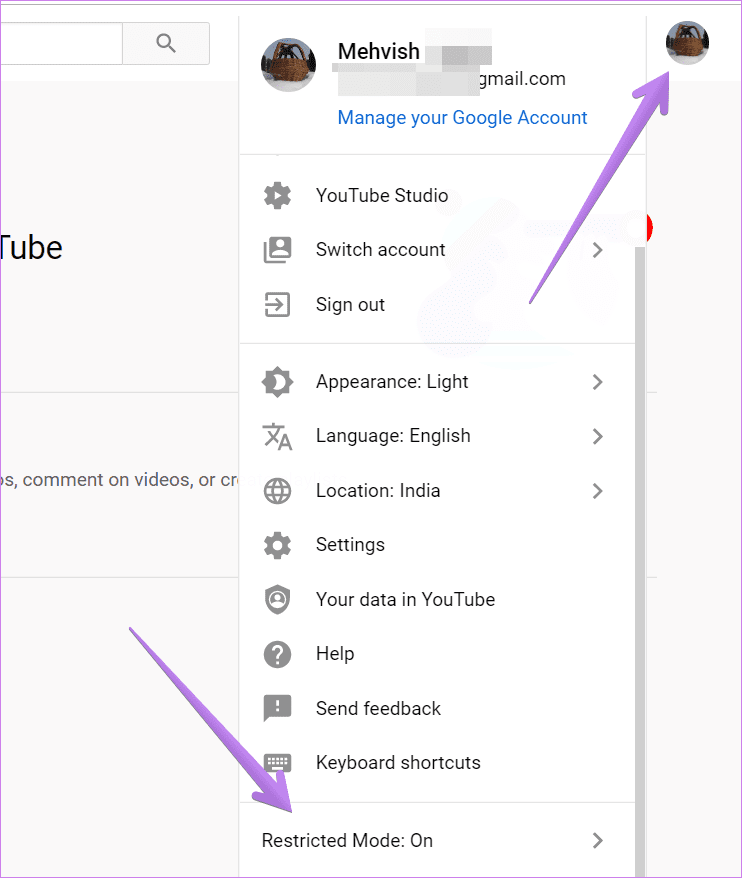
YouTube has an age restriction policy that can help protect underage viewers from inappropriate content. This rule prevents content that is sexually explicit or endangers minors from being posted. It can also prevent videos that contain adult content from being viewed by younger viewers. To see also : How Do I Promote My YouTube Channel?. If you feel that your videos are aimed at a mature audience, you can disable the age restriction on YouTube. You can remove the age restriction at any time.
Creating an age restriction on your YouTube live stream will prevent users under 18 from viewing your videos. YouTube will verify the user’s age based on their date of birth. Once they verify their age, they will allow the content. Unless a user is 18 years of age or older, they will not be able to view the video. By enabling age restrictions, viewers will only be able to view the content if they sign in.

Adding a CTA
In a YouTube live stream, it’s best to incorporate a Call to Action (CTA) to encourage viewers to take action. This can be verbal or visual, such as a button or pinned comment. CTAs have been around for quite some time, but they’ve recently taken on new life with YouTube’s TrueView ads. TrueView ads only pay when people watch your videos, so you can be sure that they will drive results.
Adding a CTA to your YouTube live stream can be as easy as adding a watermark at the end of the video. You can add a watermark to your video using the YouTube Studio application. To do this, simply log in to YouTube Studio, select Customization, and then click Branding. Next, upload your image and adjust its size. You can also choose the time it should appear. Choose from the entire video, just before the end, or a customized start time.
Using a streaming encoder
If you want to start broadcasting your videos on YouTube, you’ll need to use a streaming encoder. Encoders are hardware or software applications that will convert digital data to the required format. You’ll need to find one that’s compatible with YouTube Live. You can find a list of certified YouTube encoders below. Once you’ve selected an encoder, you’ll need to connect all of the necessary equipment. Next, you’ll need to enter your YouTube Live stream key and server URL.
To broadcast on YouTube, you need a video encoder, which will convert raw video content to a digital format that can be streamed. Some encoders are free, while others require a few dollars or more. Some will also let you share your screen with multiple contributors, while others are hardware-based and require a video camera. But you should be aware of the costs involved with using such a device.
Adding a thumbnail
Adding a thumbnail to your livestream is an important part of the video creation process. Many live streamers make multiple cover images. This is why it is important to use a high-quality picture for your thumbnail. According to social media marketing expert K.M. Robinson, a best-selling author, you should use a high-resolution photo of yourself. A DSLR camera or HD web camera is a good option. If you are using a cellphone, you should make sure that the quality of the photograph is good enough for the thumbnail.
Thumbnails are a great way to capture the attention of viewers. They are a brief snapshot of your video that draws people in. A colorful thumbnail is a great way to get people’s attention and make them want to click through to view the full video. It can help separate you from your competitors. Use a photo editor to create a compelling thumbnail. Don’t forget to use a font that is consistent with the rest of the content on your live stream.










