






• Buy Followers
    • Instagram Services
      • Buy Instagram Followers
      • Buy Instagram Likes
      • Buy Instagram Views
      • Buy Instagram Comments
    • YouTube Services
      • Buy YouTube Views
      • Buy YouTube Subscribers
      • Buy YouTube Likes
      • Buy YouTube Comments
    • TikTok Services
      • Buy TikTok Followers
      • Buy TikTok Likes
      • Buy TikTok Views
    • Facebook Services
      • Buy Facebook Page Likes
      • Buy Facebook Followers
      • Buy Facebook Post Likes
      • Buy Facebook Views
    • Twitter Services
      • Buy Twitter Followers
      • Buy Twitter Likes
      • Buy Twitter Retweets
  • Blog
  • Categories
    • Instagram
    • YouTube
    • TikTok
    • Facebook
    • Twitter
  • Contact
No Result
View All Result
Zeru
  • Buy Followers
    • Instagram Services
      • Buy Instagram Followers
      • Buy Instagram Likes
      • Buy Instagram Views
      • Buy Instagram Comments
    • YouTube Services
      • Buy YouTube Views
      • Buy YouTube Subscribers
      • Buy YouTube Likes
      • Buy YouTube Comments
    • TikTok Services
      • Buy TikTok Followers
      • Buy TikTok Likes
      • Buy TikTok Views
    • Facebook Services
      • Buy Facebook Page Likes
      • Buy Facebook Followers
      • Buy Facebook Post Likes
      • Buy Facebook Views
    • Twitter Services
      • Buy Twitter Followers
      • Buy Twitter Likes
      • Buy Twitter Retweets
  • Blog
  • Categories
    • Instagram
    • YouTube
    • TikTok
    • Facebook
    • Twitter
  • Contact
No Result
View All Result
Zeru
No Result
View All Result

Popular Services

Buy YouTube Views
Buy TikTok Followers
Buy Twitter Followers
Buy Facebook Followers
Buy Instagram Likes
Buy TikTok Likes
Buy Instagram Views
Buy TikTok Views
Buy Instagram Comments
Buy YouTube Likes
Buy Twitter Likes
Buy YouTube Comments
Buy Facebook Views
Buy Facebook Page Likes
Buy Twitter Retweets
Buy Facebook Post Likes
Buy YouTube Subscribers
Buy Instagram Followers

How to See Hidden Posts on Facebook 2022

Lizzie Yates by Lizzie Yates
in Facebook
3 min read
74
How to See Hidden Posts on Facebook 2022
16
SHARES
1.6k
VIEWS
Share on FacebookShare on Twitter

Contents

  • How to See Hidden Posts on Facebook 2022
  • View older posts on your timeline
  • Find hidden posts
  • Unhide a post
  • Unhide a comment
  • Hide a post from a friend

How to See Hidden Posts on Facebook 2022

How do you see hidden posts on Facebook 2022

If you’ve ever hidden a post, you probably wondered how to find it again. The good news is that you can easily unhide it! Listed below are some methods to find hidden posts. Read on to learn more! We’ve covered hidden posts on Facebook, how to view older posts, and how to unhide a post or comment. Hopefully, this article will help you see hidden posts on Facebook again.

View older posts on your timeline

Using the search field at the top of your Activity Log will help you find posts from earlier versions of your profile. The Activity Log lists all of your posts, likes, comments, events, and profile updates. To see also : How to Lock Profile on Facebook. You can view your older posts in reverse-chronological order or by keyword. However, if you’re a member of a group, you can restrict their posts to your timeline.

Another way to view older posts is by limiting their visibility on your Facebook profile. If you’d like to keep your posts private, you can choose a particular month or year to view. Otherwise, you can hide all posts and photos from your timeline. If you’re unsure whether this works for you, try refreshing your profile to find out for sure. There’s no right or wrong way to do this, so just do what’s right for you.

See the article :
Where Are Facebook Offices Located?
Where Are Facebook Offices Located? So, where are the Facebook offices located?…

Find hidden posts

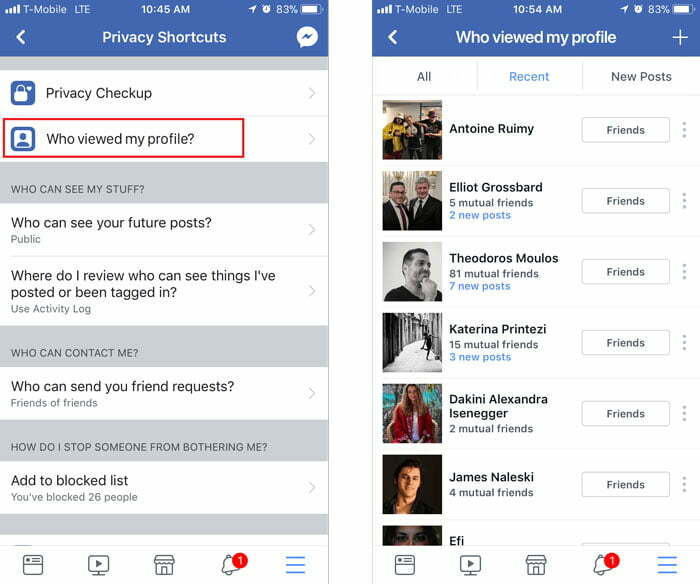
To find hidden posts on Facebook, first log into your account. Next, navigate to your personal Activity Log. You can find this under the menu on the upper right corner of the page, below your cover photo. See the article : Why is Facebook Down Today?. It looks like a small circle with a slanted line through it. If you see any posts that you’d like to view, click the post icon and select “Unhide.”

Hiding posts on Facebook gives you the opportunity to avoid seeing them. However, doing this may cause your server to timeout. If you’re able to see them, click the “View Activity History” button and they will be added back to your timeline. You can share this post on Twitter, too. Then, you can see whether your posts are public or private. Once you’ve unhidden them, you can easily share them on Twitter and Facebook.
Read also :
How to Take a Break From Facebook
How to Take a Break From Facebook There are many reasons why…

Unhide a post

If you have accidentally hidden a post on Facebook, you can easily unhide it. To do so, simply access the app’s settings page, click “Settings” and then “Privacy.” Click on the tab that says “Your Facebook Information” and scroll down to “Hidden Posts. Read also : Is Facebook Dating Any Good?.” Then, tap the post icon. The post will be added to your timeline. Once you’ve done this, you can view and edit any posts that have been hidden.

To unhide a post, first sign into your Facebook account. Next, navigate to your personal Activity Log. This is located near the bottom of the main menu. The main menu will list Facebook Pages, Business Managers, Groups, and Ads Manager. Once you have made sure to click on the correct tab, navigate to the Activity Log. You can now view the post. You can then re-hide it whenever you like.

This may interest you :
How Long Does It Take Facebook to Verify My Identity?
How Long Does It Take Facebook to Verify My Identity? You might…

Unhide a comment

If you’ve ever wanted to know how to unhide a comment on Facebook, this article will show you how. This feature lets you view comments that have been hidden by a previous user. Hide comments that you don’t want everyone to see. These comments will stay visible to the author of the comment, and the person who posted them will only see them. If you want to view a hidden comment, you will need to click on the small three-dot icon and select “Unhide comment.”

In case you don’t want your friends to see your comments, you can unhide them by scrolling down and visiting your profile. To find comments that are abusive, tap the “Comment” icon. This will show all of the comments that have been made about a particular piece of content. For example, if you’ve posted a product, you’ll likely have hundreds of comments. If you want to delete a comment that is harmful to your brand, you should go to the person’s profile and unhide it.

Hide a post from a friend

The first step in hiding a post on Facebook is to go to your friend’s profile page. Click the gear icon next to your friend’s name to expand your options. Select Hide this post from others. You can do the same thing on your mobile device. On the desktop, you need to click the gear icon next to your friend’s name and select the option “Hide this post from others.” Then, click the Save Changes button to save your changes.

Another option is to unfollow a person who posts offensive content. If you want to keep your privacy, you can snooze their post for 30 days or unfollow them completely. The first option is the simplest one. Facebook will automatically hide the content if the person you unfollowed isn’t online for 30 days. However, this doesn’t work for friends on the same network.


Related Posts:

  • How to Unhide a Facebook Post, Photo, Or Comment
  • How to See Hidden Posts on Facebook
  • How to Unhide Posts on Facebook
  • How to Unhide a Post in Facebook
  • How Do You Unhide a Post on Facebook?
  • How to Remove a Tag on Facebook
Was this article helpful?
YesNo

You might also like

Troubleshooting Instagram Posting Issues

Troubleshooting Instagram Posting Issues

How to Post Multiple Photos on Instagram Without Cropping – The Ultimate Guide

How to Post Multiple Photos on Instagram Without Cropping – The Ultimate Guide

How Do I View My Instagram Likes on My PC?

How Do I View My Instagram Likes on My PC?

How to Pause Reels in Instagram

How to Pause Reels in Instagram

How to Make Instagram Bio Center

How to Get Verified on YouTube: How to Speed Up the Process

How to Get Verified on YouTube: How to Speed Up the Process

Categories

  • Facebook
  • General
  • Instagram
  • LinkedIn
  • Marketing
  • Pinterest
  • Social Media
  • TikTok
  • Twitter
  • YouTube


Making Your Brands Popular.

(347) 875-0972

[email protected]

© 2024 Zeru.
All Rights Reserved.

DMCA.com Protection Status

Instagram Services

  • Buy Instagram Followers
  • Buy Instagram Likes
  • Buy Instagram Views
  • Buy Instagram Comments

YouTube Services

  • Buy YouTube Views
  • Buy YouTube Subscribers
  • Buy YouTube Likes
  • Buy YouTube Comments

TikTok Services

  • Buy TikTok Followers
  • Buy TikTok Likes
  • Buy TikTok Views

Facebook Services

  • Buy Facebook Page Likes
  • Buy Facebook Followers
  • Buy Facebook Post Likes
  • Buy Facebook Views

Twitter Services

  • Buy Twitter Followers
  • Buy Twitter Likes
  • Buy Twitter Retweets

Quick Links

  • FAQ
  • Blog
  • Contact
  • About
  • Terms and Conditions
  • Privacy Policy
No Result
View All Result
  • Buy Followers
    • Instagram Services
      • Buy Instagram Followers
      • Buy Instagram Likes
      • Buy Instagram Views
      • Buy Instagram Comments
    • YouTube Services
      • Buy YouTube Views
      • Buy YouTube Subscribers
      • Buy YouTube Likes
      • Buy YouTube Comments
    • TikTok Services
      • Buy TikTok Followers
      • Buy TikTok Likes
      • Buy TikTok Views
    • Facebook Services
      • Buy Facebook Page Likes
      • Buy Facebook Followers
      • Buy Facebook Post Likes
      • Buy Facebook Views
    • Twitter Services
      • Buy Twitter Followers
      • Buy Twitter Likes
      • Buy Twitter Retweets
  • Blog
  • Categories
    • Instagram
    • YouTube
    • TikTok
    • Facebook
    • Twitter
  • Contact

© 2023 Zeru. All Rights Reserved.

Welcome Back!

Login to your account below

Forgotten Password?

Create New Account!

Fill the forms bellow to register

All fields are required. Log In

Retrieve your password

Please enter your username or email address to reset your password.

Log In





