






• Buy Followers
    • Instagram Services
      • Buy Instagram Followers
      • Buy Instagram Likes
      • Buy Instagram Views
      • Buy Instagram Comments
    • YouTube Services
      • Buy YouTube Views
      • Buy YouTube Subscribers
      • Buy YouTube Likes
      • Buy YouTube Comments
    • TikTok Services
      • Buy TikTok Followers
      • Buy TikTok Likes
      • Buy TikTok Views
    • Facebook Services
      • Buy Facebook Page Likes
      • Buy Facebook Followers
      • Buy Facebook Post Likes
      • Buy Facebook Views
    • Twitter Services
      • Buy Twitter Followers
      • Buy Twitter Likes
      • Buy Twitter Retweets
  • Blog
  • Categories
    • Instagram
    • YouTube
    • TikTok
    • Facebook
    • Twitter
  • Contact
No Result
View All Result
Zeru
  • Buy Followers
    • Instagram Services
      • Buy Instagram Followers
      • Buy Instagram Likes
      • Buy Instagram Views
      • Buy Instagram Comments
    • YouTube Services
      • Buy YouTube Views
      • Buy YouTube Subscribers
      • Buy YouTube Likes
      • Buy YouTube Comments
    • TikTok Services
      • Buy TikTok Followers
      • Buy TikTok Likes
      • Buy TikTok Views
    • Facebook Services
      • Buy Facebook Page Likes
      • Buy Facebook Followers
      • Buy Facebook Post Likes
      • Buy Facebook Views
    • Twitter Services
      • Buy Twitter Followers
      • Buy Twitter Likes
      • Buy Twitter Retweets
  • Blog
  • Categories
    • Instagram
    • YouTube
    • TikTok
    • Facebook
    • Twitter
  • Contact
No Result
View All Result
Zeru
No Result
View All Result

Popular Services

Buy YouTube Views
Buy TikTok Followers
Buy Twitter Followers
Buy Facebook Followers
Buy Instagram Likes
Buy TikTok Likes
Buy Instagram Views
Buy TikTok Views
Buy Instagram Comments
Buy YouTube Likes
Buy Twitter Likes
Buy YouTube Comments
Buy Facebook Views
Buy Facebook Page Likes
Buy Twitter Retweets
Buy Facebook Post Likes
Buy YouTube Subscribers
Buy Instagram Followers

How to Repost on TikTok

Lizzie Yates by Lizzie Yates
in TikTok
3 min read
64
How to Repost on TikTok
13
SHARES
1.3k
VIEWS
Share on FacebookShare on Twitter

Contents

  • How to Repost on TikTok
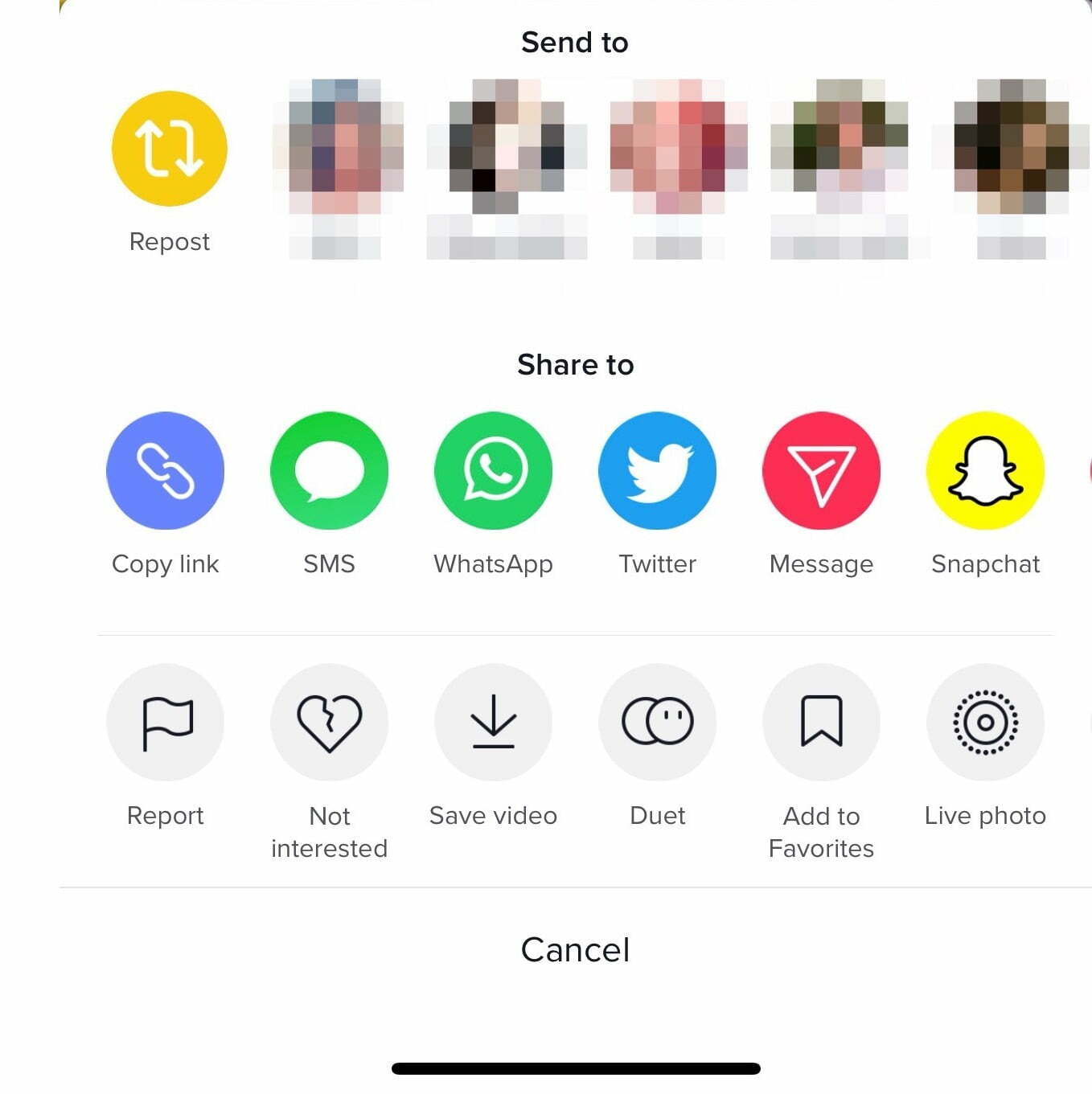
  • Repost button on TikTok
  • Steps to reposting a video on TikTok
  • Impact of reposting a video on TikTok’s algorithm
  • Unable to undo a TikTok repost

How to Repost on TikTok

You’ve probably heard of Repost on TikTok, but do you know how it works? Reposting a video on this social network allows you to share a video that’s already been uploaded. Reposting a video is simple, but it has important implications. Here are some things you should know about the process. If you repost a video on TikTok, you’ll be able to see how the algorithm views your video.

Repost button on TikTok

The Repost button is an option that users can use to re-share content from other people. It was announced by TikTok, which has become the most popular site in 2021. Previously, users could only repost videos to friends and followers. Read also : How to Get More Followers on TikTok. Now, users can repost any video clip to their own feed. Although it is still in a testing phase, it has already been seen on some users’ feeds.

The Repost button on TikTok allows users to re-share videos posted by others. However, this feature increases the risk of spreading misinformation, thereby raising the risk of harmful hoax campaigns. Despite the fact that users can use the Repost button to spread videos, there is also a downside. If you want to repost a video posted by a friend, you must make sure you are not posting the same video more than once.
Read also :
How to Get Your Banned TikTok Account Back
How to Get Your Banned TikTok Account Back If you have been…

Steps to reposting a video on TikTok

There are a few steps you need to follow before you can repost a video on TikTok. For starters, you need to find the video that you want to repost. See the article : When to Post on TikTok. If the video isn’t from the TikTok community, you’ll need to repost it from another account. After you’ve done this, you’ll need to choose a reason for reposting it.

To repost a video on TikTok, first locate it on your phone and click the share icon. You can also copy the link to your clipboard and paste it into an empty field. Next, click the “Download” icon and confirm the download. When the video downloads, you can open it with the ‘Download’ icon on your phone. Steps to repost a video on TikTok are the same for the phone as the computer version.

Once you’ve found a video you want to repost, follow its creator. Once they approve your repost, tap the ‘For You’ button. If you’ve uploaded a video to the TikTok Community, you can repost it by following them, as long as they’ve accepted the repost. However, if you’ve reposted a video from another user, you may have to wait a little while before the ‘Repost’ button is made available to more users.

To see also :
Top 10 TikTok Songs in 2022
Top 10 TikTok Songs in 2022 So, what will be the top…

Impact of reposting a video on TikTok’s algorithm

Reposting a video on TikTok can increase your reach. TikTok uses the engagement of users to determine whether your video is popular. If a video is engaging to the viewer, it is likely to receive more likes and views, which increases its chances of being featured on the For You Page. Unlike YouTube, where videos are automatically removed after a couple of days, your TikTok videos will remain online and appear in the For You Page based on engagement and time spent.

The first step to increase your visibility on TikTok is to ensure that your videos are of high quality. A low-quality video will be skipped by viewers and may be passed up. To increase your video’s chances of getting noticed, use the features TikTok offers, such as stickers, filters, and templates. On the same subject : How to Remove a TikTok Filter From a Video. Another important step is to post your videos when your audience is active. Posting during peak hours is likely to get more views.

Read also :
Who is Candice Tktok?
Who is Candice Tktok? If you’re wondering who is Candice Tktok, look…

Unable to undo a TikTok repost

You can try undoing a TikTok repost if you are unable to see the option on your screen. To do this, log into your TikTok account and click on the menu option. Then, click on “Repost” and select the video you wish to repost. If you do not see the option, you’re not part of the beta test. You can try waiting for TikTok to roll out the feature to everyone.

Another option is to delete the video completely. By deleting a TikTok video, it will no longer appear on your TikTok account and will only be available on your friend’s accounts. However, if you decide to repost another TikTok, you’ll see the video appear on your friend’s For You feed. However, if you want to delete the video, you’ll have to delete it.


Related Posts:

  • What Does Reposted Mean on TikTok?
  • What Does it Mean to Repost on TikTok?
  • How to Repot a Video on TikTok
  • Why Can't I Repost on TikTok?
  • How Do You Repo on TikTok?
  • What Does the Repost Button on TikTok Do?
Was this article helpful?
YesNo

You might also like

Troubleshooting Instagram Posting Issues

Troubleshooting Instagram Posting Issues

How to Post Multiple Photos on Instagram Without Cropping – The Ultimate Guide

How to Post Multiple Photos on Instagram Without Cropping – The Ultimate Guide

How Do I View My Instagram Likes on My PC?

How Do I View My Instagram Likes on My PC?

How to Pause Reels in Instagram

How to Pause Reels in Instagram

How to Make Instagram Bio Center

How to Get Verified on YouTube: How to Speed Up the Process

How to Get Verified on YouTube: How to Speed Up the Process

Categories

  • Facebook
  • General
  • Instagram
  • LinkedIn
  • Marketing
  • Pinterest
  • Social Media
  • TikTok
  • Twitter
  • YouTube


Making Your Brands Popular.

(347) 875-0972

[email protected]

© 2024 Zeru.
All Rights Reserved.

DMCA.com Protection Status

Instagram Services

  • Buy Instagram Followers
  • Buy Instagram Likes
  • Buy Instagram Views
  • Buy Instagram Comments

YouTube Services

  • Buy YouTube Views
  • Buy YouTube Subscribers
  • Buy YouTube Likes
  • Buy YouTube Comments

TikTok Services

  • Buy TikTok Followers
  • Buy TikTok Likes
  • Buy TikTok Views

Facebook Services

  • Buy Facebook Page Likes
  • Buy Facebook Followers
  • Buy Facebook Post Likes
  • Buy Facebook Views

Twitter Services

  • Buy Twitter Followers
  • Buy Twitter Likes
  • Buy Twitter Retweets

Quick Links

  • FAQ
  • Blog
  • Contact
  • About
  • Terms and Conditions
  • Privacy Policy
No Result
View All Result
  • Buy Followers
    • Instagram Services
      • Buy Instagram Followers
      • Buy Instagram Likes
      • Buy Instagram Views
      • Buy Instagram Comments
    • YouTube Services
      • Buy YouTube Views
      • Buy YouTube Subscribers
      • Buy YouTube Likes
      • Buy YouTube Comments
    • TikTok Services
      • Buy TikTok Followers
      • Buy TikTok Likes
      • Buy TikTok Views
    • Facebook Services
      • Buy Facebook Page Likes
      • Buy Facebook Followers
      • Buy Facebook Post Likes
      • Buy Facebook Views
    • Twitter Services
      • Buy Twitter Followers
      • Buy Twitter Likes
      • Buy Twitter Retweets
  • Blog
  • Categories
    • Instagram
    • YouTube
    • TikTok
    • Facebook
    • Twitter
  • Contact

© 2023 Zeru. All Rights Reserved.

Welcome Back!

Login to your account below

Forgotten Password?

Create New Account!

Fill the forms bellow to register

All fields are required. Log In

Retrieve your password

Please enter your username or email address to reset your password.

Log In





