






• Buy Followers
    • Instagram Services
      • Buy Instagram Followers
      • Buy Instagram Likes
      • Buy Instagram Views
      • Buy Instagram Comments
    • YouTube Services
      • Buy YouTube Views
      • Buy YouTube Subscribers
      • Buy YouTube Likes
      • Buy YouTube Comments
    • TikTok Services
      • Buy TikTok Followers
      • Buy TikTok Likes
      • Buy TikTok Views
    • Facebook Services
      • Buy Facebook Page Likes
      • Buy Facebook Followers
      • Buy Facebook Post Likes
      • Buy Facebook Views
    • Twitter Services
      • Buy Twitter Followers
      • Buy Twitter Likes
      • Buy Twitter Retweets
  • Blog
  • Categories
    • Instagram
    • YouTube
    • TikTok
    • Facebook
    • Twitter
  • Contact
No Result
View All Result
Zeru
  • Buy Followers
    • Instagram Services
      • Buy Instagram Followers
      • Buy Instagram Likes
      • Buy Instagram Views
      • Buy Instagram Comments
    • YouTube Services
      • Buy YouTube Views
      • Buy YouTube Subscribers
      • Buy YouTube Likes
      • Buy YouTube Comments
    • TikTok Services
      • Buy TikTok Followers
      • Buy TikTok Likes
      • Buy TikTok Views
    • Facebook Services
      • Buy Facebook Page Likes
      • Buy Facebook Followers
      • Buy Facebook Post Likes
      • Buy Facebook Views
    • Twitter Services
      • Buy Twitter Followers
      • Buy Twitter Likes
      • Buy Twitter Retweets
  • Blog
  • Categories
    • Instagram
    • YouTube
    • TikTok
    • Facebook
    • Twitter
  • Contact
No Result
View All Result
Zeru
No Result
View All Result

Popular Services

Buy YouTube Views
Buy TikTok Followers
Buy Twitter Followers
Buy Facebook Followers
Buy Instagram Likes
Buy TikTok Likes
Buy Instagram Views
Buy TikTok Views
Buy Instagram Comments
Buy YouTube Likes
Buy Twitter Likes
Buy YouTube Comments
Buy Facebook Views
Buy Facebook Page Likes
Buy Twitter Retweets
Buy Facebook Post Likes
Buy YouTube Subscribers
Buy Instagram Followers

How to Post Links on Instagram

Lizzie Yates by Lizzie Yates
in Instagram
3 min read
68
How to Post Links on Instagram
14
SHARES
1.4k
VIEWS
Share on FacebookShare on Twitter

Contents

  • How to Post Links on Instagram
  • Linking from your profile
  • Adding a link to a story
  • Adding a link to a bio
  • Creating a link tree
  • Avoiding long links

How to Post Links on Instagram

how to post links on instagram

If you are wondering how to post links on Instagram, then read this article! Here, you will learn the most effective ways to create and post links. There are two main ways to post links on Instagram: from your bio or profile. By following these steps, you will be able to create a link tree and post multiple links on your profile. Follow these tips to make your Instagram profile as clickable as possible! You should also remember to add a call to action and work on the design of the preview before posting a link.

Linking from your profile

If you are running a brand account, you know how important it is to have a link in your bio. However, Instagram only allows one permanent link in your bio. Thankfully, there are several ways to add links to your profile. Here are three methods. See the article : OG Instagram Names. 1. Shorten your link with Bitly. 2. Place it in a caption. 3. Use a link aggregator to gather your Instagram feed into a clickable format.

A clickable link is crucial for Instagram users. To make sure that your link is visible, choose a short URL and make it short. This way, people can copy and paste it without having to leave your profile. You can also use URL shorteners to make your links more memorable. This will ensure that your links are more likely to be clicked. Finally, remember to include a call to action. It’s worth remembering that only one link is allowed on your Instagram profile, so it’s important to create one that is relevant and memorable.

To see also :
Can You Automate Instagram Comments?
Can You Automate Instagram Comments? The truth is that some forms of…

Adding a link to a story

Adding a link to your Instagram story is a great way to drive more traffic to your website. You can add a link sticker to your story anywhere in the space. To use the link sticker, you’ll need to be verified and have a business account. Read also : How to Change Themes on Instagram. After you have verified your account, click on the link sticker icon at the bottom of your story. When the viewer swipes up on your story, they’ll be taken to the URL you’ve specified.

The next time you post an Instagram story, remember to add a link. You can also customize the text that appears next to your link. The link sticker can include a call to action and a bit more information than the default link name. The link can also be edited or resized, so you can make it as personalized as you want. It’s also simple to share and make it more appealing to your audience.

On the same subject :
How to Delete a Message on Instagram Using AutoClicker
How to Delete a Message on Instagram Using AutoClicker If you want…

Adding a link to a bio

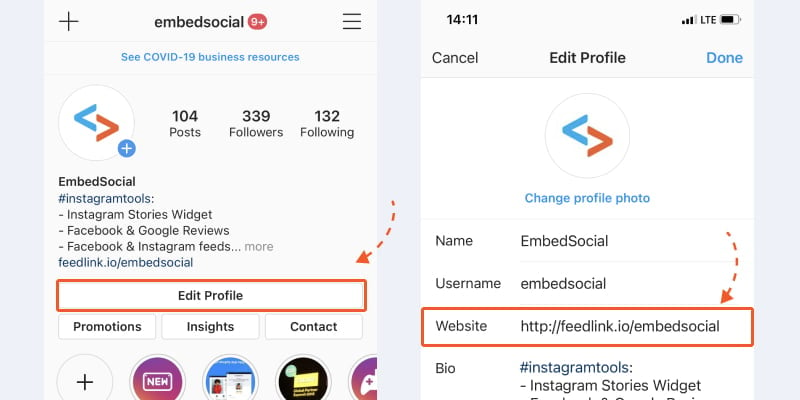
Adding a link to a bio is a great way to showcase your website or mobile site. Not only can this help you increase traffic to your site, but it can also highlight your latest content. This strategy can also be applied to other social media platforms like Twitter, YouTube, and Facebook. By following a few simple steps, you can add a link in your bio. To do this, visit the Instagram website or mobile app and edit your profile.

Once you have added the link, you need to click on “Website” in the settings menu. Here, you can type in the URL of your website. If you don’t want to type in the URL manually, you can paste it into the application. See the article : Can an Instagram Reel Be 60 Seconds?. Once you have entered the URL, you need to save your changes and check the validity of your link. Adding a link to a bio on Instagram can improve your online presence and drive more traffic.

To see also :
Can You Fake a Verified Instagram Account?
Can You Fake a Verified Instagram Account? This question is causing a…

Creating a link tree

Creating a link tree is a great way to share your links with your customers. But how do you create a link tree on Instagram? Instagram has very strict policies regarding sharing links, and you can’t simply add them to your feed posts. Even when you share links in stories, you can only do so on larger accounts. The only place all users can add links on Instagram is in their bio section. Here are some tips to help you create your own link tree on Instagram.

First, you need to sign in to Linktree and add your social accounts. You can add more than one link. For example, you can link to a website. You can even customize the color scheme of your links. Depending on your brand and logo, you can match the colors of the links. The best part is, you can use Linktree on both Instagram and other social media sites. Lastly, you can also add a website link in the website section of your Linktree. Once you have finished with these steps, your links will be displayed in your Instagram bio.

Avoiding long links

If you want to share something via Instagram, avoid posting long, complex URLs. Instagram is not as link-friendly as other social media sites, so you may want to keep this in mind. Instagram users may revisit links later. The longer your URL, the more likely your followers are to click on it. Here are some ways to avoid long links on Instagram. Listed below are some of the most common ones. Read on to learn more.

First of all, avoid using links that contain explicit content. Instagram blocks links that contain explicit content. Therefore, if you must post such links, make sure to use a URL shortener. It also helps to use branded link shorteners. Branded links are those with a branded domain. This ensures that your followers can navigate them safely. Once you get a verified account, you can also add links to stories.


Related Posts:

  • How to Find Instagram URL
  • How to Share Your Instagram Profile Link
  • How to Add a Link to an Instagram Story
  • How Do I Share My Instagram Link?
  • How to Add a Link to My Instagram Story
  • How to Add a Link to an Instagram Story
Was this article helpful?
YesNo

You might also like

Troubleshooting Instagram Posting Issues

Troubleshooting Instagram Posting Issues

How to Post Multiple Photos on Instagram Without Cropping – The Ultimate Guide

How to Post Multiple Photos on Instagram Without Cropping – The Ultimate Guide

How Do I View My Instagram Likes on My PC?

How Do I View My Instagram Likes on My PC?

How to Pause Reels in Instagram

How to Pause Reels in Instagram

How to Make Instagram Bio Center

How to Get Verified on YouTube: How to Speed Up the Process

How to Get Verified on YouTube: How to Speed Up the Process

Categories

  • Facebook
  • General
  • Instagram
  • LinkedIn
  • Marketing
  • Pinterest
  • Social Media
  • TikTok
  • Twitter
  • YouTube


Making Your Brands Popular.

(347) 875-0972

[email protected]

© 2024 Zeru.
All Rights Reserved.

DMCA.com Protection Status

Instagram Services

  • Buy Instagram Followers
  • Buy Instagram Likes
  • Buy Instagram Views
  • Buy Instagram Comments

YouTube Services

  • Buy YouTube Views
  • Buy YouTube Subscribers
  • Buy YouTube Likes
  • Buy YouTube Comments

TikTok Services

  • Buy TikTok Followers
  • Buy TikTok Likes
  • Buy TikTok Views

Facebook Services

  • Buy Facebook Page Likes
  • Buy Facebook Followers
  • Buy Facebook Post Likes
  • Buy Facebook Views

Twitter Services

  • Buy Twitter Followers
  • Buy Twitter Likes
  • Buy Twitter Retweets

Quick Links

  • FAQ
  • Blog
  • Contact
  • About
  • Terms and Conditions
  • Privacy Policy
No Result
View All Result
  • Buy Followers
    • Instagram Services
      • Buy Instagram Followers
      • Buy Instagram Likes
      • Buy Instagram Views
      • Buy Instagram Comments
    • YouTube Services
      • Buy YouTube Views
      • Buy YouTube Subscribers
      • Buy YouTube Likes
      • Buy YouTube Comments
    • TikTok Services
      • Buy TikTok Followers
      • Buy TikTok Likes
      • Buy TikTok Views
    • Facebook Services
      • Buy Facebook Page Likes
      • Buy Facebook Followers
      • Buy Facebook Post Likes
      • Buy Facebook Views
    • Twitter Services
      • Buy Twitter Followers
      • Buy Twitter Likes
      • Buy Twitter Retweets
  • Blog
  • Categories
    • Instagram
    • YouTube
    • TikTok
    • Facebook
    • Twitter
  • Contact

© 2023 Zeru. All Rights Reserved.

Welcome Back!

Login to your account below

Forgotten Password?

Create New Account!

Fill the forms bellow to register

All fields are required. Log In

Retrieve your password

Please enter your username or email address to reset your password.

Log In





