






• Buy Followers
    • Instagram Services
      • Buy Instagram Followers
      • Buy Instagram Likes
      • Buy Instagram Views
      • Buy Instagram Comments
    • YouTube Services
      • Buy YouTube Views
      • Buy YouTube Subscribers
      • Buy YouTube Likes
      • Buy YouTube Comments
    • TikTok Services
      • Buy TikTok Followers
      • Buy TikTok Likes
      • Buy TikTok Views
    • Facebook Services
      • Buy Facebook Page Likes
      • Buy Facebook Followers
      • Buy Facebook Post Likes
      • Buy Facebook Views
    • Twitter Services
      • Buy Twitter Followers
      • Buy Twitter Likes
      • Buy Twitter Retweets
  • Blog
  • Categories
    • Instagram
    • YouTube
    • TikTok
    • Facebook
    • Twitter
  • Contact
No Result
View All Result
Zeru
  • Buy Followers
    • Instagram Services
      • Buy Instagram Followers
      • Buy Instagram Likes
      • Buy Instagram Views
      • Buy Instagram Comments
    • YouTube Services
      • Buy YouTube Views
      • Buy YouTube Subscribers
      • Buy YouTube Likes
      • Buy YouTube Comments
    • TikTok Services
      • Buy TikTok Followers
      • Buy TikTok Likes
      • Buy TikTok Views
    • Facebook Services
      • Buy Facebook Page Likes
      • Buy Facebook Followers
      • Buy Facebook Post Likes
      • Buy Facebook Views
    • Twitter Services
      • Buy Twitter Followers
      • Buy Twitter Likes
      • Buy Twitter Retweets
  • Blog
  • Categories
    • Instagram
    • YouTube
    • TikTok
    • Facebook
    • Twitter
  • Contact
No Result
View All Result
Zeru
No Result
View All Result

Popular Services

Buy YouTube Views
Buy TikTok Followers
Buy Twitter Followers
Buy Facebook Followers
Buy Instagram Likes
Buy TikTok Likes
Buy Instagram Views
Buy TikTok Views
Buy Instagram Comments
Buy YouTube Likes
Buy Twitter Likes
Buy YouTube Comments
Buy Facebook Views
Buy Facebook Page Likes
Buy Twitter Retweets
Buy Facebook Post Likes
Buy YouTube Subscribers
Buy Instagram Followers

How to Edit Facebook Page Name

Lizzie Yates by Lizzie Yates
in Facebook
2 min read
71
How to Edit Facebook Page Name
15
SHARES
1.5k
VIEWS
Share on FacebookShare on Twitter

Contents

  • How to Edit Facebook Page Name
  • Avoid abusing or derogatory names
  • Avoid containing variations of “Facebook” in the name
  • Waiting time to change the name of a Facebook page
  • Common reasons for not being able to change the name of a Facebook page

How to Edit Facebook Page Name

If you are wondering how to edit Facebook page name, then this article will provide some useful information. This article covers the common reasons why you cannot edit a Facebook page name. Before you can do this, make sure to follow the steps outlined below. First, log in to your Facebook account as an admin. Next, enter the new name you want for your page. Remember that once you change the name, it cannot be reversed. You should also check if Facebook has approved the new name before you can publish it.

Avoid abusing or derogatory names

When editing Facebook page names, make sure to avoid using profane, abusive, or derogatory names. Facebook prohibits users from using such language and does not allow any punctuation or suggestive language in their profile fields. This may interest you : How Do I Look Up Someone’s Facebook ID?. Whether you choose a funny, provocative, or inappropriate name is entirely up to you, but the best way to avoid causing offence is to avoid using names like “Sue the Queen” or “Crazy Cats.”

The name of your Facebook page must not be abusive, derogatory, or violent. You can only use the name of the Page if you are an official representative of the organization, institution, or product or brand. There are certain rules to follow when editing a page name, however. Abuse or derogatory words are not allowed. You also cannot use symbols or unneeded punctuation, nor can you use slogans or descriptions.
Read also :
How to See Hidden Posts on Facebook 2022
How to See Hidden Posts on Facebook 2022 If you’ve ever hidden…

Avoid containing variations of “Facebook” in the name

One of the easiest ways to increase your Facebook reach is to use the word “Facebook” in the page name. Most users don’t want to see ads with variations of their name. See the article : How to Create a Facebook Page for Business. Also, Facebook has a stringent policy against using words related to your personal attributes, such as “your boyfriend” or “your cat.”
On the same subject :
How to Contact Facebook About a Problem
How to Contact Facebook About a Problem If you’re looking for ways…

Waiting time to change the name of a Facebook page

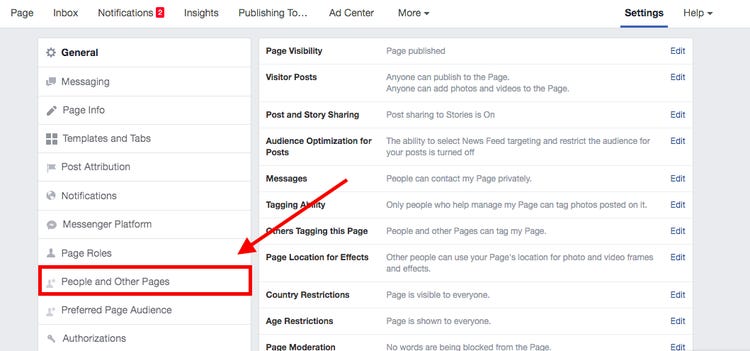
If you’d like to change the name of your Facebook page, you’ll need to apply for admin status first. To do this, visit the page settings page and click “Edit page name.” Enter the new name for your page and click “Request Change. Read also : Who is the Owner of Facebook?.” Facebook will then notify you about how long it will take to approve your request. You’ll then have seven days to change your page name.

After a few days, you can request a name change for your page. However, if you don’t have admin privileges, you’ll have to wait for a few days before requesting a name change. Depending on the reason you’re trying to change the name of your page, Facebook might limit it for activities that might make the name misleading. Before requesting a name change, make sure your page is not being suspended.

On the same subject :
How Much Is 100 Facebook Stars?
How Much Is 100 Facebook Stars? If you’ve been wondering how much…

Common reasons for not being able to change the name of a Facebook page

If you’ve recently changed the name of your Facebook page, you might be wondering why you’re still unable to make any changes. Facebook has a moderation team that will review each change and may require additional verification before your request is approved. It may take a day or more, depending on the reason for the change. Your fans will also see this change, so be patient!

One common reason for not being able to make changes to the name of your Facebook page is that you are not an administrator of the page. If you are an administrator, you will be able to make changes to the name of the page, but you may need to wait a few days before submitting your request again. Additionally, if the name of your page is misleading, Facebook may restrict it.


Related Posts:

  • How to Change Username in Facebook
  • How to Add an Admin to a Facebook Page
  • How to Edit Page Name on Facebook
  • How to Change the Name of Your Facebook Page
  • How to Remove Admin From Facebook Page
  • How to Change Facebook Page Name
Was this article helpful?
YesNo

You might also like

Troubleshooting Instagram Posting Issues

Troubleshooting Instagram Posting Issues

How to Post Multiple Photos on Instagram Without Cropping – The Ultimate Guide

How to Post Multiple Photos on Instagram Without Cropping – The Ultimate Guide

How Do I View My Instagram Likes on My PC?

How Do I View My Instagram Likes on My PC?

How to Pause Reels in Instagram

How to Pause Reels in Instagram

How to Make Instagram Bio Center

How to Get Verified on YouTube: How to Speed Up the Process

How to Get Verified on YouTube: How to Speed Up the Process

Categories

  • Facebook
  • General
  • Instagram
  • LinkedIn
  • Marketing
  • Pinterest
  • Social Media
  • TikTok
  • Twitter
  • YouTube


Making Your Brands Popular.

(347) 875-0972

[email protected]

© 2024 Zeru.
All Rights Reserved.

DMCA.com Protection Status

Instagram Services

  • Buy Instagram Followers
  • Buy Instagram Likes
  • Buy Instagram Views
  • Buy Instagram Comments

YouTube Services

  • Buy YouTube Views
  • Buy YouTube Subscribers
  • Buy YouTube Likes
  • Buy YouTube Comments

TikTok Services

  • Buy TikTok Followers
  • Buy TikTok Likes
  • Buy TikTok Views

Facebook Services

  • Buy Facebook Page Likes
  • Buy Facebook Followers
  • Buy Facebook Post Likes
  • Buy Facebook Views

Twitter Services

  • Buy Twitter Followers
  • Buy Twitter Likes
  • Buy Twitter Retweets

Quick Links

  • FAQ
  • Blog
  • Contact
  • About
  • Terms and Conditions
  • Privacy Policy
No Result
View All Result
  • Buy Followers
    • Instagram Services
      • Buy Instagram Followers
      • Buy Instagram Likes
      • Buy Instagram Views
      • Buy Instagram Comments
    • YouTube Services
      • Buy YouTube Views
      • Buy YouTube Subscribers
      • Buy YouTube Likes
      • Buy YouTube Comments
    • TikTok Services
      • Buy TikTok Followers
      • Buy TikTok Likes
      • Buy TikTok Views
    • Facebook Services
      • Buy Facebook Page Likes
      • Buy Facebook Followers
      • Buy Facebook Post Likes
      • Buy Facebook Views
    • Twitter Services
      • Buy Twitter Followers
      • Buy Twitter Likes
      • Buy Twitter Retweets
  • Blog
  • Categories
    • Instagram
    • YouTube
    • TikTok
    • Facebook
    • Twitter
  • Contact

© 2023 Zeru. All Rights Reserved.

Welcome Back!

Login to your account below

Forgotten Password?

Create New Account!

Fill the forms bellow to register

All fields are required. Log In

Retrieve your password

Please enter your username or email address to reset your password.

Log In





