






• Buy Followers
    • Instagram Services
      • Buy Instagram Followers
      • Buy Instagram Likes
      • Buy Instagram Views
      • Buy Instagram Comments
    • YouTube Services
      • Buy YouTube Views
      • Buy YouTube Subscribers
      • Buy YouTube Likes
      • Buy YouTube Comments
    • TikTok Services
      • Buy TikTok Followers
      • Buy TikTok Likes
      • Buy TikTok Views
    • Facebook Services
      • Buy Facebook Page Likes
      • Buy Facebook Followers
      • Buy Facebook Post Likes
      • Buy Facebook Views
    • Twitter Services
      • Buy Twitter Followers
      • Buy Twitter Likes
      • Buy Twitter Retweets
  • Blog
  • Categories
    • Instagram
    • YouTube
    • TikTok
    • Facebook
    • Twitter
  • Contact
No Result
View All Result
Zeru
  • Buy Followers
    • Instagram Services
      • Buy Instagram Followers
      • Buy Instagram Likes
      • Buy Instagram Views
      • Buy Instagram Comments
    • YouTube Services
      • Buy YouTube Views
      • Buy YouTube Subscribers
      • Buy YouTube Likes
      • Buy YouTube Comments
    • TikTok Services
      • Buy TikTok Followers
      • Buy TikTok Likes
      • Buy TikTok Views
    • Facebook Services
      • Buy Facebook Page Likes
      • Buy Facebook Followers
      • Buy Facebook Post Likes
      • Buy Facebook Views
    • Twitter Services
      • Buy Twitter Followers
      • Buy Twitter Likes
      • Buy Twitter Retweets
  • Blog
  • Categories
    • Instagram
    • YouTube
    • TikTok
    • Facebook
    • Twitter
  • Contact
No Result
View All Result
Zeru
No Result
View All Result

Popular Services

Buy YouTube Views
Buy TikTok Followers
Buy Twitter Followers
Buy Facebook Followers
Buy Instagram Likes
Buy TikTok Likes
Buy Instagram Views
Buy TikTok Views
Buy Instagram Comments
Buy YouTube Likes
Buy Twitter Likes
Buy YouTube Comments
Buy Facebook Views
Buy Facebook Page Likes
Buy Twitter Retweets
Buy Facebook Post Likes
Buy YouTube Subscribers
Buy Instagram Followers

How to Disable Your Instagram Account

Lizzie Yates by Lizzie Yates
in Instagram
3 min read
63
How to Disable Your Instagram Account
13
SHARES
1.3k
VIEWS
Share on FacebookShare on Twitter

Contents

  • How to Disable Your Instagram Account
  • Temporary deactivation
  • Reactivation
  • Permanent deletion
  • Timeframe

How to Disable Your Instagram Account

how to disable your instagram account

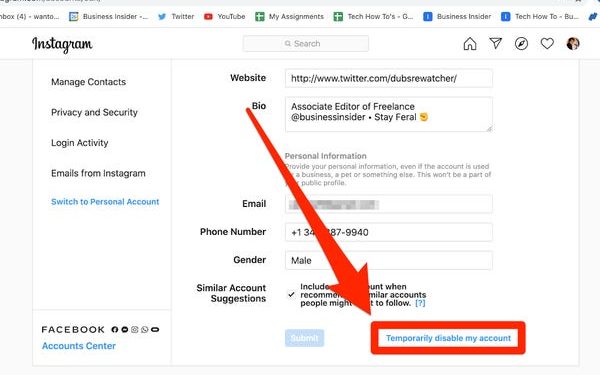
If you’re wondering how to disable your Instagram account, this article will help you out. Deactivated accounts won’t appear in others’ liked posts, tagged photos, or in messages. They will also disappear when you log in, but will reactivate when you do. To learn more about what deactivating your account means, read on. We’ll go over the three options: Temporary deactivation, Permanent deletion, and the Timeframe.

Temporary deactivation

If you haven’t visited your Instagram account in a while, you may wonder what exactly you can do after you’ve been suspended. Well, you can disable your Instagram account. This way, it won’t show up to others. On the same subject : What is Stromedy Instagram?. You can’t find your account, but don’t worry, it will be back as soon as you reactivate it. You will still have all your followers and previous content.

There are several reasons to temporarily deactivate your Instagram account. It can be for privacy reasons, too many ads, lack of followers, or just to take a break from the app. Once you have disabled your account, you can reactivate it again by signing in to the app. Once you have reactivated it, your profile will be visible to everyone. However, you will have to choose a new reason.
This may interest you :
How Do I Unblock Someone on Instagram?
How Do I Unblock Someone on Instagram? If someone has blocked you…

Reactivation

Sometimes, you may wish to temporarily disable your Instagram account. If so, reactivation isn’t a problem. There are a few steps to follow, and you won’t have to worry about making any awkward moves. See the article : How to Post Reels on Instagram. To reactivate your account, simply open the app and log in using your username and password. You can then proceed to upload pictures and videos to reactivate your account.

To reactivate your Instagram account, you must first fill out the “reactivation” form. In the form, you must provide your username, email address, and cellular phone number, along with the reason you want to restore your account. Once you have completed the form, tap the “Log In” button to initiate the reactivation process. Make sure to include the details of the account’s deactivation.

See the article :
What is Vanish Mode in Instagram?
What is Vanish Mode in Instagram? What is Vanish Mode in Instagram?…

Permanent deletion

If you’re tired of the constant stream of notifications from your Instagram followers, you can always permanently delete your account. Instagram is a popular photo-sharing social network where you can share photos, videos, and live streams. Read also : How to Unfollow All on Instagram Safely. However, it can become tiresome and annoying if you can’t keep up with them all. Here are a few reasons to delete your account:

You don’t want to use your account for commercial purposes. If you are sick and tired of constantly having to login to your account, you can disable your account for a while and then turn it back on. You must re-enter your username and password to complete the process. However, you can always enable your account by logging into it again. To do this, you will have to wait a day before your account will be deleted permanently.

Besides deleting your account, you may want to download any of your photos, videos, and other contents. This way, you can access your content later. Also, you can use Instagram’s archive feature to access your deleted account’s archived data. Once you’ve done that, you’ll find that your Instagram profile is empty and you don’t have any other content. Fortunately, there are still ways to retrieve deleted accounts.

To see also :
How to Get More Likes on Instagram
How to Get More Likes on Instagram The best way to get…

Timeframe

If you have been banned from Instagram, you may be wondering what the timeframe is for reactivating your account. While Instagram does not require you to wait for 24 hours, they do recommend you wait a day or so before you attempt to reactivate it. To restore access to your account, you need to first contact the support service of Instagram. They will help you remove the infringing content, and will also review your account to prevent any future violations.

If you want to keep your content and information private, you can temporarily disable your Instagram account. Disabling your account means your followers will no longer be able to find you or find anything you have shared. Moreover, it will make it impossible for you to tag other users in photos. Luckily, Instagram will back up your content to its server. If you ever decide to reactivate your account, you can easily restore all of your posts and DMs.


Related Posts:

  • How to Delete Account on Instagram
  • How to Temporarily Disable Your Instagram Account
  • How Do You Deactivate Instagram?
  • How to Deactivate an Instagram Account on iPhone
  • How to Disable an Instagram Account
  • How to Deactivate an Instagram Account
Was this article helpful?
YesNo

You might also like

Troubleshooting Instagram Posting Issues

Troubleshooting Instagram Posting Issues

How to Post Multiple Photos on Instagram Without Cropping – The Ultimate Guide

How to Post Multiple Photos on Instagram Without Cropping – The Ultimate Guide

How Do I View My Instagram Likes on My PC?

How Do I View My Instagram Likes on My PC?

How to Pause Reels in Instagram

How to Pause Reels in Instagram

How to Make Instagram Bio Center

How to Get Verified on YouTube: How to Speed Up the Process

How to Get Verified on YouTube: How to Speed Up the Process

Categories

  • Facebook
  • General
  • Instagram
  • LinkedIn
  • Marketing
  • Pinterest
  • Social Media
  • TikTok
  • Twitter
  • YouTube


Making Your Brands Popular.

(347) 875-0972

[email protected]

© 2024 Zeru.
All Rights Reserved.

DMCA.com Protection Status

Instagram Services

  • Buy Instagram Followers
  • Buy Instagram Likes
  • Buy Instagram Views
  • Buy Instagram Comments

YouTube Services

  • Buy YouTube Views
  • Buy YouTube Subscribers
  • Buy YouTube Likes
  • Buy YouTube Comments

TikTok Services

  • Buy TikTok Followers
  • Buy TikTok Likes
  • Buy TikTok Views

Facebook Services

  • Buy Facebook Page Likes
  • Buy Facebook Followers
  • Buy Facebook Post Likes
  • Buy Facebook Views

Twitter Services

  • Buy Twitter Followers
  • Buy Twitter Likes
  • Buy Twitter Retweets

Quick Links

  • FAQ
  • Blog
  • Contact
  • About
  • Terms and Conditions
  • Privacy Policy
No Result
View All Result
  • Buy Followers
    • Instagram Services
      • Buy Instagram Followers
      • Buy Instagram Likes
      • Buy Instagram Views
      • Buy Instagram Comments
    • YouTube Services
      • Buy YouTube Views
      • Buy YouTube Subscribers
      • Buy YouTube Likes
      • Buy YouTube Comments
    • TikTok Services
      • Buy TikTok Followers
      • Buy TikTok Likes
      • Buy TikTok Views
    • Facebook Services
      • Buy Facebook Page Likes
      • Buy Facebook Followers
      • Buy Facebook Post Likes
      • Buy Facebook Views
    • Twitter Services
      • Buy Twitter Followers
      • Buy Twitter Likes
      • Buy Twitter Retweets
  • Blog
  • Categories
    • Instagram
    • YouTube
    • TikTok
    • Facebook
    • Twitter
  • Contact

© 2023 Zeru. All Rights Reserved.

Welcome Back!

Login to your account below

Forgotten Password?

Create New Account!

Fill the forms bellow to register

All fields are required. Log In

Retrieve your password

Please enter your username or email address to reset your password.

Log In





