






• Buy Followers
    • Instagram Services
      • Buy Instagram Followers
      • Buy Instagram Likes
      • Buy Instagram Views
      • Buy Instagram Comments
    • YouTube Services
      • Buy YouTube Views
      • Buy YouTube Subscribers
      • Buy YouTube Likes
      • Buy YouTube Comments
    • TikTok Services
      • Buy TikTok Followers
      • Buy TikTok Likes
      • Buy TikTok Views
    • Facebook Services
      • Buy Facebook Page Likes
      • Buy Facebook Followers
      • Buy Facebook Post Likes
      • Buy Facebook Views
    • Twitter Services
      • Buy Twitter Followers
      • Buy Twitter Likes
      • Buy Twitter Retweets
  • Blog
  • Categories
    • Instagram
    • YouTube
    • TikTok
    • Facebook
    • Twitter
  • Contact
No Result
View All Result
Zeru
  • Buy Followers
    • Instagram Services
      • Buy Instagram Followers
      • Buy Instagram Likes
      • Buy Instagram Views
      • Buy Instagram Comments
    • YouTube Services
      • Buy YouTube Views
      • Buy YouTube Subscribers
      • Buy YouTube Likes
      • Buy YouTube Comments
    • TikTok Services
      • Buy TikTok Followers
      • Buy TikTok Likes
      • Buy TikTok Views
    • Facebook Services
      • Buy Facebook Page Likes
      • Buy Facebook Followers
      • Buy Facebook Post Likes
      • Buy Facebook Views
    • Twitter Services
      • Buy Twitter Followers
      • Buy Twitter Likes
      • Buy Twitter Retweets
  • Blog
  • Categories
    • Instagram
    • YouTube
    • TikTok
    • Facebook
    • Twitter
  • Contact
No Result
View All Result
Zeru
No Result
View All Result

Popular Services

Buy YouTube Views
Buy TikTok Followers
Buy Twitter Followers
Buy Facebook Followers
Buy Instagram Likes
Buy TikTok Likes
Buy Instagram Views
Buy TikTok Views
Buy Instagram Comments
Buy YouTube Likes
Buy Twitter Likes
Buy YouTube Comments
Buy Facebook Views
Buy Facebook Page Likes
Buy Twitter Retweets
Buy Facebook Post Likes
Buy YouTube Subscribers
Buy Instagram Followers

How to Change Background Colour in an Instagram Story

Lizzie Yates by Lizzie Yates
in Instagram
3 min read
64
How to Change Background Colour in an Instagram Story
13
SHARES
1.3k
VIEWS
Share on FacebookShare on Twitter

Contents

  • How to Change Background Colour in an Instagram Story
  • Preset backgrounds
  • Effects Tool
  • Drawing tools
  • Auto-selected background color

How to Change Background Colour in an Instagram Story

Want to know how to change the background colour in an Instagram story? Well, that is easy to do. All you need to do is follow a few simple steps: Preset backgrounds, Effects Tool, Drawing tools, and auto-selected background colour. After that, you’re all set to add some flair to your posts. If you’re not sure where to begin, take a look at some of our tips below.

Preset backgrounds

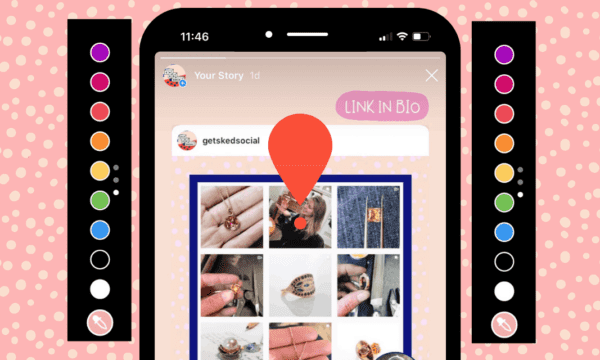
If you want to customize your Instagram story to make it look different from your previous posts, you need to know how to change the background colour. There are several ways to change the background color in Instagram. The first way is to tap the screen. Hold it still for a few seconds. Read also : How to Share a Video on Instagram and Play it in Your Story. You’ll see a new transparent layer on top of your story. To change the colour, use the dropper tool. You’ll need to choose the color from a palette that matches the background color of the image you’re editing.

Another option is to use a background photo or Gallery sticker as your Instagram story background. If you have a photo that you’d like to use as your background, you can also drag it into place. This option only works for photos you’ve shared on Instagram, so you shouldn’t try to change the background for your Instagram story post while sharing other posts. After saving the photo, you can share it. To change the background colour in Instagram story, follow the steps below.

On the same subject :
How to Share Video on Instagram Story
How to Share Video on Instagram Story To post a video on…

Effects Tool

You can use the Effects Tool to change the background colour in Instagram story in a number of ways. First, you can apply a colour to your text. Tap on the text icon and select a colour from the palette. This may interest you : When Will Instagram Be Back Up?. In the same way, you can choose the font style and boldness. Then, select the text style you want and make it bold or classic. Alternatively, you can make the background transparent.

In the effects tool, you can also use the photo that you have uploaded. This is the most convenient method as it will change the background colour of your entire story without affecting the photo’s quality. To use the tool, you’ll need to be in the Story mode. Once there, select a new photo or select an existing one. Next, select the palette of colours and hold it until the whole screen is filled with the colour.

To see also :
What Does Restricting Someone on Instagram Do?
What Does Restricting Someone on Instagram Do? What does restricting someone on…

Drawing tools

There’s a simple trick for changing the background colour in an Instagram story. Use the ‘Sharpie’ tool to change the colour of your background without covering up the contents of the screen. This may interest you : How to Copy Your Instagram Profile Link. Alternatively, you can use the ‘Eraser’ tool to delete the image and replace it with a new one. Depending on the background colour, you can also choose to cover up a photo from your camera roll.

To do so, open the Instagram app on your device and tap the profile picture to create a new Story. Click the ‘Create new post’ icon in the top right of the screen. This will open the Stories page where you can draw over the photo. This will change the background colour to a custom shade. You can also add text or stickers to the Story. The only catch with these two options is that you can only apply one color to each photo.

On the same subject :
How Deactivate Instagram Account – How to Temporarily Disable or Permanently Delete Your Instagram Account
How Deactivate Instagram Account – How to Temporarily Disable or Permanently Delete…

Auto-selected background color

It’s easy to customize the background color on an Instagram story. Simply click on the color wheel in the top left corner of the screen to switch between solid and transparent backgrounds. You can choose from the preloaded color choices or select a color from your previous post. When you’re finished, you can long press the screen to change the background color to any other color. In this way, you can change the overall aesthetic of your story without having to worry about editing it first.

If you’d like a different background color on your story, you can try changing the one that comes with it. The new feature is especially useful if you’d like your content to stand out from the others. Unlike the previous version of Instagram, the background is no longer included with your photo. Instead, it’s a blank canvas for your text. By customizing the background color, you can match your branding with your content.


Related Posts:

  • How to Change the Instagram Story Background Colour
  • How to Change Background Color on Instagram Story
  • How to Change Background Color on Instagram Story
  • How to Get Cool Backgrounds on Instagram
  • How to Change Instagram Background Color Without Covering Up…
  • How to Change Background on Instagram Stories
Was this article helpful?
YesNo

You might also like

Troubleshooting Instagram Posting Issues

Troubleshooting Instagram Posting Issues

How to Post Multiple Photos on Instagram Without Cropping – The Ultimate Guide

How to Post Multiple Photos on Instagram Without Cropping – The Ultimate Guide

How Do I View My Instagram Likes on My PC?

How Do I View My Instagram Likes on My PC?

How to Pause Reels in Instagram

How to Pause Reels in Instagram

How to Make Instagram Bio Center

How to Get Verified on YouTube: How to Speed Up the Process

How to Get Verified on YouTube: How to Speed Up the Process

Categories

  • Facebook
  • General
  • Instagram
  • LinkedIn
  • Marketing
  • Pinterest
  • Social Media
  • TikTok
  • Twitter
  • YouTube


Making Your Brands Popular.

(347) 875-0972

[email protected]

© 2024 Zeru.
All Rights Reserved.

DMCA.com Protection Status

Instagram Services

  • Buy Instagram Followers
  • Buy Instagram Likes
  • Buy Instagram Views
  • Buy Instagram Comments

YouTube Services

  • Buy YouTube Views
  • Buy YouTube Subscribers
  • Buy YouTube Likes
  • Buy YouTube Comments

TikTok Services

  • Buy TikTok Followers
  • Buy TikTok Likes
  • Buy TikTok Views

Facebook Services

  • Buy Facebook Page Likes
  • Buy Facebook Followers
  • Buy Facebook Post Likes
  • Buy Facebook Views

Twitter Services

  • Buy Twitter Followers
  • Buy Twitter Likes
  • Buy Twitter Retweets

Quick Links

  • FAQ
  • Blog
  • Contact
  • About
  • Terms and Conditions
  • Privacy Policy
No Result
View All Result
  • Buy Followers
    • Instagram Services
      • Buy Instagram Followers
      • Buy Instagram Likes
      • Buy Instagram Views
      • Buy Instagram Comments
    • YouTube Services
      • Buy YouTube Views
      • Buy YouTube Subscribers
      • Buy YouTube Likes
      • Buy YouTube Comments
    • TikTok Services
      • Buy TikTok Followers
      • Buy TikTok Likes
      • Buy TikTok Views
    • Facebook Services
      • Buy Facebook Page Likes
      • Buy Facebook Followers
      • Buy Facebook Post Likes
      • Buy Facebook Views
    • Twitter Services
      • Buy Twitter Followers
      • Buy Twitter Likes
      • Buy Twitter Retweets
  • Blog
  • Categories
    • Instagram
    • YouTube
    • TikTok
    • Facebook
    • Twitter
  • Contact

© 2023 Zeru. All Rights Reserved.

Welcome Back!

Login to your account below

Forgotten Password?

Create New Account!

Fill the forms bellow to register

All fields are required. Log In

Retrieve your password

Please enter your username or email address to reset your password.

Log In





