






• Buy Followers
    • Instagram Services
      • Buy Instagram Followers
      • Buy Instagram Likes
      • Buy Instagram Views
      • Buy Instagram Comments
    • YouTube Services
      • Buy YouTube Views
      • Buy YouTube Subscribers
      • Buy YouTube Likes
      • Buy YouTube Comments
    • TikTok Services
      • Buy TikTok Followers
      • Buy TikTok Likes
      • Buy TikTok Views
    • Facebook Services
      • Buy Facebook Page Likes
      • Buy Facebook Followers
      • Buy Facebook Post Likes
      • Buy Facebook Views
    • Twitter Services
      • Buy Twitter Followers
      • Buy Twitter Likes
      • Buy Twitter Retweets
  • Blog
  • Categories
    • Instagram
    • YouTube
    • TikTok
    • Facebook
    • Twitter
  • Contact
No Result
View All Result
Zeru
  • Buy Followers
    • Instagram Services
      • Buy Instagram Followers
      • Buy Instagram Likes
      • Buy Instagram Views
      • Buy Instagram Comments
    • YouTube Services
      • Buy YouTube Views
      • Buy YouTube Subscribers
      • Buy YouTube Likes
      • Buy YouTube Comments
    • TikTok Services
      • Buy TikTok Followers
      • Buy TikTok Likes
      • Buy TikTok Views
    • Facebook Services
      • Buy Facebook Page Likes
      • Buy Facebook Followers
      • Buy Facebook Post Likes
      • Buy Facebook Views
    • Twitter Services
      • Buy Twitter Followers
      • Buy Twitter Likes
      • Buy Twitter Retweets
  • Blog
  • Categories
    • Instagram
    • YouTube
    • TikTok
    • Facebook
    • Twitter
  • Contact
No Result
View All Result
Zeru
No Result
View All Result

Popular Services

Buy YouTube Views
Buy TikTok Followers
Buy Twitter Followers
Buy Facebook Followers
Buy Instagram Likes
Buy TikTok Likes
Buy Instagram Views
Buy TikTok Views
Buy Instagram Comments
Buy YouTube Likes
Buy Twitter Likes
Buy YouTube Comments
Buy Facebook Views
Buy Facebook Page Likes
Buy Twitter Retweets
Buy Facebook Post Likes
Buy YouTube Subscribers
Buy Instagram Followers

How to Remove an Instagram Account From Your Phone

Lizzie Yates by Lizzie Yates
in Instagram
3 min read
77
How to Remove an Instagram Account From Your Phone
16
SHARES
1.6k
VIEWS
Share on FacebookShare on Twitter

Contents

  • How to Remove an Instagram Account From Your Phone
  • Delete instagram account
  • Log out of instagram
  • Change password
  • Temporarily disable instagram account

How to Remove an Instagram Account From Your Phone

how to remove instagram account from phone

Are you worried about deleting your Instagram account? If so, you’re not alone. You may be confused by the number of options available. You can remove your account from your phone, log out of it, change your password, or disable it temporarily. Follow these steps to safely remove Instagram accounts from your phone. But before you try any of these options, make sure you understand all of their implications. This article will give you the insight you need to make an informed decision.

Delete instagram account

If you’ve ever wondered how to remove Instagram from your phone, you’re not alone. The number of users who want to delete their accounts is growing daily. There are many reasons for this, from privacy to security. See the article : How to Deactivate My Instagram Account. Here are some of the top reasons that you should delete your Instagram account. If you don’t want to see your photos and videos on your phone, you should remove your account. It can be as simple as following an account owner’s instructions.

First, you need to go to the Instagram website on your phone. It will detect your authorization, so you can access the simplified version. Next, enter your username and password, and then follow the link to “Edit my account” or “Delete my account”. Once you’ve entered the information required to delete your Instagram account, you’ll be prompted to tap a button to confirm your decision. After clicking the button, be prepared that you’re no longer able to access your account. Once you’ve done this, you can’t get it back.

This may interest you :
How Do You Add Music to Instagram Posts?
How Do You Add Music to Instagram Posts? If you’re a fan…

Log out of instagram

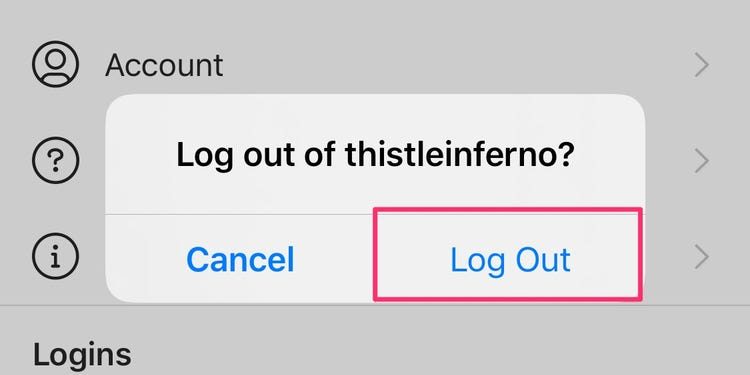
If you can’t log out of your Instagram account from your phone, you’re not alone. Many people are having the same problem, and there’s a simple way to fix it. If you’ve recently deactivated your Instagram account or rebooted your phone to resolve an issue, it may be time to reboot the app. Read also : How to Share a Post on Instagram Story. If you’re using Wi-Fi, try disabling the VPN or switching to mobile data. If that still doesn’t work, you can try logging out through your mobile browser.

To log out of Instagram from other devices, first go to the Instagram website and sign in using your IG credentials. Click the gear icon next to the ‘Edit Profile’ option. On the next screen, select ‘Change Password’. You’ll need your old password and the new password for your account. Then click the blue button to save the change. If you don’t have an emergency verification code, you can use the same phone number you used to login.
Read also :
What is the Most Popular Instagram Food?
What is the Most Popular Instagram Food? In addition to coffee, this…

Change password

You can reset your password by following the steps mentioned above. You can do this from the login screen of the mobile app or from the browser on a desktop. If you’ve forgotten your password, you’ll need to contact the Instagram security team to reset it. Read also : How to See Someone’s Private Instagram Account. It is also possible to reset your password via email if you’re using a laptop or desktop computer. The steps to reset your password are the same for both mobile and desktop versions of Instagram.

One common problem when trying to delete an Instagram account is forgetting your password. This is understandable since you’ll need to log in to your account. Fortunately, the process is quite simple. To reset your password, open Instagram and tap on “Forgot your password?” or “Get help logging in.” Once you know the email and phone number, you can follow the prompts to restore your account. Alternatively, you can report the account as an imposter.

To see also :
How to Get Followers on Instagram Fast
How to Get Followers on Instagram Fast The most popular question on…

Temporarily disable instagram account

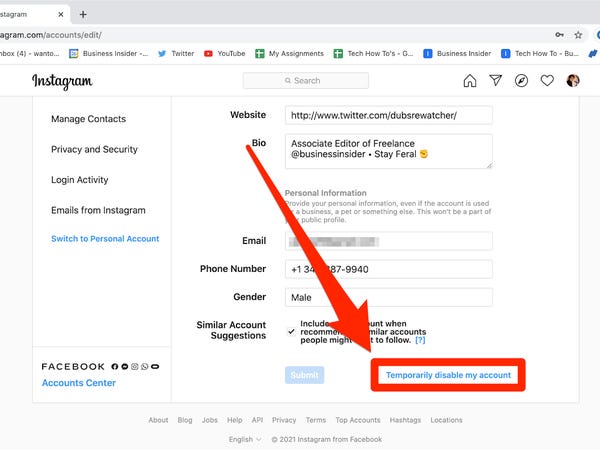
To deactivate an Instagram account from your phone, follow these simple steps. First, log into Instagram. Choose the reason for disabling your account, then enter your password. Once you have successfully entered your password, you’ll be redirected to the Instagram homepage where you can reactivate your account. Once this step is complete, your Instagram account will be temporarily disabled. It will appear hidden to everyone else, but you can reactivate it as soon as you’re ready to.

If you’re having trouble logging into Instagram on your phone, you can try to delete it from the website. You can do this by entering your password one more time. Afterward, you’ll be asked to confirm your action. Tap on the “Yes” button to confirm the process. Once you’ve successfully removed your account from the website, you can sign into the app again. Afterward, you can search for your username to confirm whether or not you’ve completely removed it.


Related Posts:

  • How to Delete Instagram Account on Phone
  • How to Remove Phone Number From Instagram
  • How to Delete an Instagram Account From Your Phone
  • How Do I Remove an Instagram Account I've Added to My Phone?
  • How to Delete Instagram Profile
  • How to Delete Instagram Profile
Was this article helpful?
YesNo

You might also like

Troubleshooting Instagram Posting Issues

Troubleshooting Instagram Posting Issues

How to Post Multiple Photos on Instagram Without Cropping – The Ultimate Guide

How to Post Multiple Photos on Instagram Without Cropping – The Ultimate Guide

How Do I View My Instagram Likes on My PC?

How Do I View My Instagram Likes on My PC?

How to Pause Reels in Instagram

How to Pause Reels in Instagram

How to Make Instagram Bio Center

How to Get Verified on YouTube: How to Speed Up the Process

How to Get Verified on YouTube: How to Speed Up the Process

Categories

  • Facebook
  • General
  • Instagram
  • LinkedIn
  • Marketing
  • Pinterest
  • Social Media
  • TikTok
  • Twitter
  • YouTube


Making Your Brands Popular.

(347) 875-0972

[email protected]

© 2024 Zeru.
All Rights Reserved.

DMCA.com Protection Status

Instagram Services

  • Buy Instagram Followers
  • Buy Instagram Likes
  • Buy Instagram Views
  • Buy Instagram Comments

YouTube Services

  • Buy YouTube Views
  • Buy YouTube Subscribers
  • Buy YouTube Likes
  • Buy YouTube Comments

TikTok Services

  • Buy TikTok Followers
  • Buy TikTok Likes
  • Buy TikTok Views

Facebook Services

  • Buy Facebook Page Likes
  • Buy Facebook Followers
  • Buy Facebook Post Likes
  • Buy Facebook Views

Twitter Services

  • Buy Twitter Followers
  • Buy Twitter Likes
  • Buy Twitter Retweets

Quick Links

  • FAQ
  • Blog
  • Contact
  • About
  • Terms and Conditions
  • Privacy Policy
No Result
View All Result
  • Buy Followers
    • Instagram Services
      • Buy Instagram Followers
      • Buy Instagram Likes
      • Buy Instagram Views
      • Buy Instagram Comments
    • YouTube Services
      • Buy YouTube Views
      • Buy YouTube Subscribers
      • Buy YouTube Likes
      • Buy YouTube Comments
    • TikTok Services
      • Buy TikTok Followers
      • Buy TikTok Likes
      • Buy TikTok Views
    • Facebook Services
      • Buy Facebook Page Likes
      • Buy Facebook Followers
      • Buy Facebook Post Likes
      • Buy Facebook Views
    • Twitter Services
      • Buy Twitter Followers
      • Buy Twitter Likes
      • Buy Twitter Retweets
  • Blog
  • Categories
    • Instagram
    • YouTube
    • TikTok
    • Facebook
    • Twitter
  • Contact

© 2023 Zeru. All Rights Reserved.

Welcome Back!

Login to your account below

Forgotten Password?

Create New Account!

Fill the forms bellow to register

All fields are required. Log In

Retrieve your password

Please enter your username or email address to reset your password.

Log In





