






• Buy Followers
    • Instagram Services
      • Buy Instagram Followers
      • Buy Instagram Likes
      • Buy Instagram Views
      • Buy Instagram Comments
    • YouTube Services
      • Buy YouTube Views
      • Buy YouTube Subscribers
      • Buy YouTube Likes
      • Buy YouTube Comments
    • TikTok Services
      • Buy TikTok Followers
      • Buy TikTok Likes
      • Buy TikTok Views
    • Facebook Services
      • Buy Facebook Page Likes
      • Buy Facebook Followers
      • Buy Facebook Post Likes
      • Buy Facebook Views
    • Twitter Services
      • Buy Twitter Followers
      • Buy Twitter Likes
      • Buy Twitter Retweets
  • Blog
  • Categories
    • Instagram
    • YouTube
    • TikTok
    • Facebook
    • Twitter
  • Contact
No Result
View All Result
Zeru
  • Buy Followers
    • Instagram Services
      • Buy Instagram Followers
      • Buy Instagram Likes
      • Buy Instagram Views
      • Buy Instagram Comments
    • YouTube Services
      • Buy YouTube Views
      • Buy YouTube Subscribers
      • Buy YouTube Likes
      • Buy YouTube Comments
    • TikTok Services
      • Buy TikTok Followers
      • Buy TikTok Likes
      • Buy TikTok Views
    • Facebook Services
      • Buy Facebook Page Likes
      • Buy Facebook Followers
      • Buy Facebook Post Likes
      • Buy Facebook Views
    • Twitter Services
      • Buy Twitter Followers
      • Buy Twitter Likes
      • Buy Twitter Retweets
  • Blog
  • Categories
    • Instagram
    • YouTube
    • TikTok
    • Facebook
    • Twitter
  • Contact
No Result
View All Result
Zeru
No Result
View All Result

Popular Services

Buy YouTube Views
Buy TikTok Followers
Buy Twitter Followers
Buy Facebook Followers
Buy Instagram Likes
Buy TikTok Likes
Buy Instagram Views
Buy TikTok Views
Buy Instagram Comments
Buy YouTube Likes
Buy Twitter Likes
Buy YouTube Comments
Buy Facebook Views
Buy Facebook Page Likes
Buy Twitter Retweets
Buy Facebook Post Likes
Buy YouTube Subscribers
Buy Instagram Followers

Why Won’t Twitter Let Me See Sensitive Content?

Lizzie Yates by Lizzie Yates
in Twitter
3 min read
70
Why Won’t Twitter Let Me See Sensitive Content?
14
SHARES
1.4k
VIEWS
Share on FacebookShare on Twitter

Contents

  • Why Won’t Twitter Let Me See Sensitive Content?
  • How to disable
  • How to turn off
  • How to post
  • How to post NSFW

Why Won’t Twitter Let Me See Sensitive Content?

why wont twitter let me see sensitive content

If you’re wondering why Twitter won’t let you see some sensitive content, fear not! The platform has provisions in place to prevent this from happening. Users are warned that the hidden content may be disturbing to some people. However, users can opt to view these contents. To learn more, read our guide: Why Won’t Twitter Let You See Sensitive Content?. There are a couple of ways to turn off the sensitive content filter in Twitter.

How to disable

When you post on Twitter, you may be wondering how to disable sensitive content. You may have heard about the “Tweets with sensitivity” label, but have you ever wondered how to turn it off? This feature helps Twitter filter its feeds and display warnings for content that may be offensive or inappropriate. While Twitter doesn’t explicitly prohibit sensitive content, it does have a policy. When you publish a tweet that contains sexual violence or gore, you must mark it as “sensitive” in order for it to be displayed. However, if you’re not sure about what this label is, you can turn it off in a few clicks.

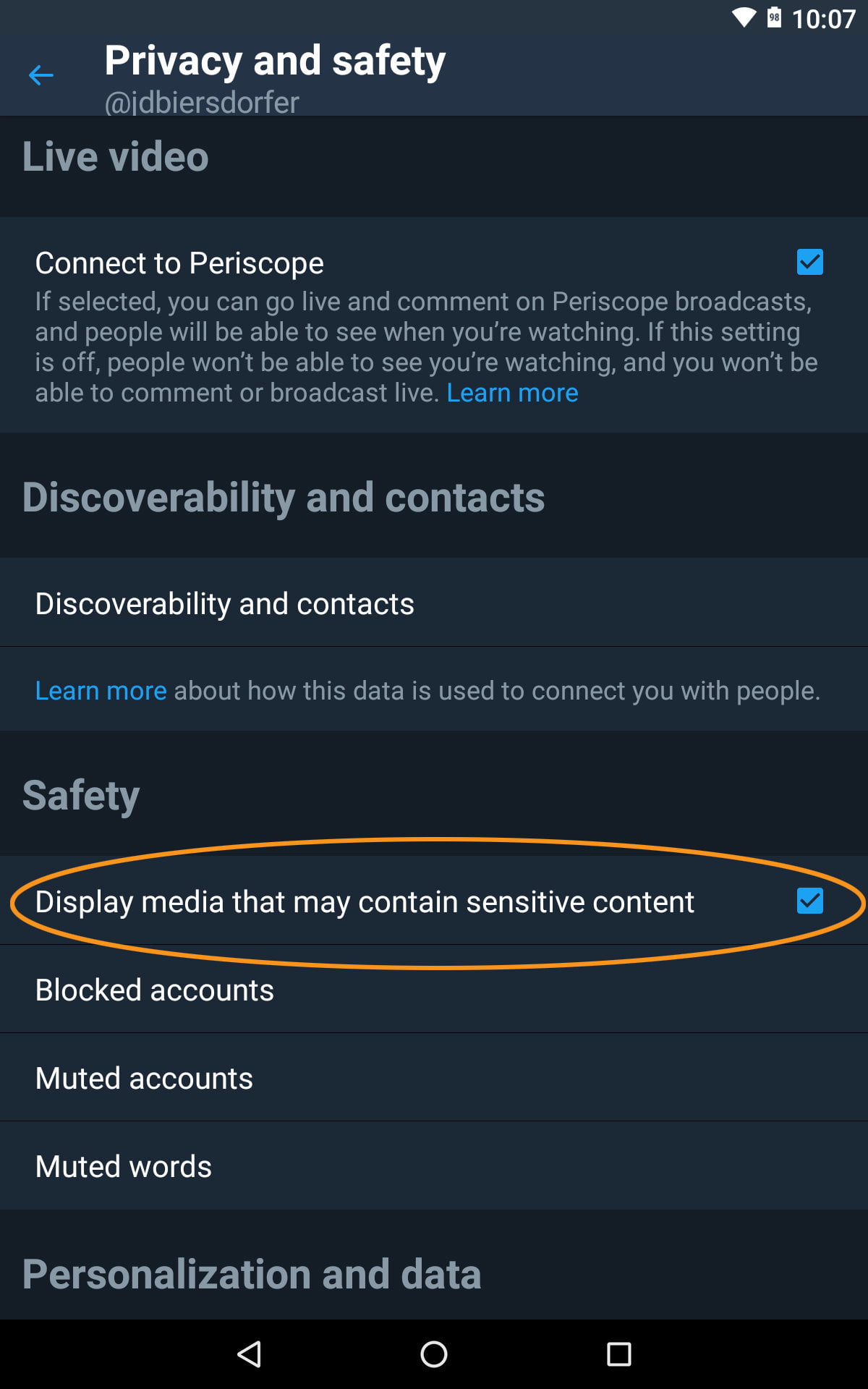
As you probably already know, Twitter blocks accounts with sensitive content. It also blocks posts that contain links from scammers. You can easily disable this sensitivity flag in your tweets by simply following a few simple steps. First, log into your Twitter account. Next, navigate to your settings page. Click on Privacy and safety. Next, uncheck the box next to “Mark media you Tweet as containing material that may be sensitive.”
This may interest you :
How to Log Out Twitter From All Your Devices
How to Log Out Twitter From All Your Devices You may have…

How to turn off

Generally, a Twitter “Sensitive Content” warning can be dismissed, but there are some people who are stuck with it. It can also be a hindrance, as it hides inoffensive content. To turn off sensitive content on Twitter, you can follow these simple steps:

Sign into Twitter on your desktop computer or mobile device. Click on your profile icon to open your account. Then, click on “Account Info” to open the settings panel. From there, select “Settings and Privacy” and then “display…sensitive content.” If you don’t want to use Google Chrome, simply choose the ‘Content You See’ option and disable sensitive content warning. This way, your tweets will continue to be safe even if you receive a “Sensitive Content” warning.

Once you’ve finished setting up your account, you’ll want to customize your Twitter experience. You can filter tweets by topics, hobbies, and interests to restrict what you see. Generally, tweets containing sensitive content are hidden from search results. However, you can enable or disable this feature as needed. The process is easy and will only take a few seconds. However, be sure to use caution when using Twitter.

This may interest you :
Who Owns Twitter?
Who Owns Twitter? If you want to own a piece of social…

How to post

You’ve probably wondered how to post sensitive content on Twitter. First of all, you need to understand how Twitter filters content before you post it. While you can filter a tweet by clicking on the “Sensitive Content” tab, you should still consider who you’re posting it to. In most cases, it’s okay to post NSFW content – just keep in mind that Twitter will not reward you with a permanent ban if you do this.

To mark your tweets as sensitive, you should make sure you’ve marked the media that you’ve shared with others as sensitive. The Twitter app will prompt you if you’ve shared gory images or videos or content describing sexual violence. You can also opt to turn off this warning. This way, you’ll know that no one will ever see your tweets without your permission. To get to this point, you should tap the “profile” icon.

See the article :
How to Get in Touch With Twitter
How to Get in Touch With Twitter If you’re wondering how to…

How to post NSFW

If you want to post NSFW content on Twitter, you’ll need to be aware of the new content warnings system that was announced by Twitter recently. Before, you had to flag your entire account as NSFW, which could be a problem if you have sensitive content that you want to avoid exposing other users to. The new system allows you to label specific pieces of media, like links or photos, with a granular level of warning. This system works for web and mobile applications, too.

If you’re not sure how to add a content warning, there are a couple of ways to do it. First, you must create your tweet and choose media. Then, click the “Edit” button to open editing tools. If you’d like to add a warning, choose a ‘WARNING’ label and follow the steps outlined. Once your tweet is ready, select NSFW from the list of available content warnings and save it. After saving the warning, you’ll be taken back to the original post editor.


Related Posts:

  • How to Turn Off Twitter Restrictions
  • Why Can't I See Sensitive Content on Twitter?
  • How to See Sensitive Content in the Twitter App
  • How to See Sensitive Content on Twitter on Your iPhone
  • How to Turn Off Sensitive Content on Twitter
  • How to Turn Off Sensitive Content Warnings on Twitter
Was this article helpful?
YesNo

You might also like

Troubleshooting Instagram Posting Issues

Troubleshooting Instagram Posting Issues

How to Post Multiple Photos on Instagram Without Cropping – The Ultimate Guide

How to Post Multiple Photos on Instagram Without Cropping – The Ultimate Guide

How Do I View My Instagram Likes on My PC?

How Do I View My Instagram Likes on My PC?

How to Pause Reels in Instagram

How to Pause Reels in Instagram

How to Make Instagram Bio Center

How to Get Verified on YouTube: How to Speed Up the Process

How to Get Verified on YouTube: How to Speed Up the Process

Categories

  • Facebook
  • General
  • Instagram
  • LinkedIn
  • Marketing
  • Pinterest
  • Social Media
  • TikTok
  • Twitter
  • YouTube


Making Your Brands Popular.

(347) 875-0972

[email protected]

© 2024 Zeru.
All Rights Reserved.

DMCA.com Protection Status

Instagram Services

  • Buy Instagram Followers
  • Buy Instagram Likes
  • Buy Instagram Views
  • Buy Instagram Comments

YouTube Services

  • Buy YouTube Views
  • Buy YouTube Subscribers
  • Buy YouTube Likes
  • Buy YouTube Comments

TikTok Services

  • Buy TikTok Followers
  • Buy TikTok Likes
  • Buy TikTok Views

Facebook Services

  • Buy Facebook Page Likes
  • Buy Facebook Followers
  • Buy Facebook Post Likes
  • Buy Facebook Views

Twitter Services

  • Buy Twitter Followers
  • Buy Twitter Likes
  • Buy Twitter Retweets

Quick Links

  • FAQ
  • Blog
  • Contact
  • About
  • Terms and Conditions
  • Privacy Policy
No Result
View All Result
  • Buy Followers
    • Instagram Services
      • Buy Instagram Followers
      • Buy Instagram Likes
      • Buy Instagram Views
      • Buy Instagram Comments
    • YouTube Services
      • Buy YouTube Views
      • Buy YouTube Subscribers
      • Buy YouTube Likes
      • Buy YouTube Comments
    • TikTok Services
      • Buy TikTok Followers
      • Buy TikTok Likes
      • Buy TikTok Views
    • Facebook Services
      • Buy Facebook Page Likes
      • Buy Facebook Followers
      • Buy Facebook Post Likes
      • Buy Facebook Views
    • Twitter Services
      • Buy Twitter Followers
      • Buy Twitter Likes
      • Buy Twitter Retweets
  • Blog
  • Categories
    • Instagram
    • YouTube
    • TikTok
    • Facebook
    • Twitter
  • Contact

© 2023 Zeru. All Rights Reserved.

Welcome Back!

Login to your account below

Forgotten Password?

Create New Account!

Fill the forms bellow to register

All fields are required. Log In

Retrieve your password

Please enter your username or email address to reset your password.

Log In





