






• Buy Followers
    • Instagram Services
      • Buy Instagram Followers
      • Buy Instagram Likes
      • Buy Instagram Views
      • Buy Instagram Comments
    • YouTube Services
      • Buy YouTube Views
      • Buy YouTube Subscribers
      • Buy YouTube Likes
      • Buy YouTube Comments
    • TikTok Services
      • Buy TikTok Followers
      • Buy TikTok Likes
      • Buy TikTok Views
    • Facebook Services
      • Buy Facebook Page Likes
      • Buy Facebook Followers
      • Buy Facebook Post Likes
      • Buy Facebook Views
    • Twitter Services
      • Buy Twitter Followers
      • Buy Twitter Likes
      • Buy Twitter Retweets
  • Blog
  • Categories
    • Instagram
    • YouTube
    • TikTok
    • Facebook
    • Twitter
  • Contact
No Result
View All Result
Zeru
  • Buy Followers
    • Instagram Services
      • Buy Instagram Followers
      • Buy Instagram Likes
      • Buy Instagram Views
      • Buy Instagram Comments
    • YouTube Services
      • Buy YouTube Views
      • Buy YouTube Subscribers
      • Buy YouTube Likes
      • Buy YouTube Comments
    • TikTok Services
      • Buy TikTok Followers
      • Buy TikTok Likes
      • Buy TikTok Views
    • Facebook Services
      • Buy Facebook Page Likes
      • Buy Facebook Followers
      • Buy Facebook Post Likes
      • Buy Facebook Views
    • Twitter Services
      • Buy Twitter Followers
      • Buy Twitter Likes
      • Buy Twitter Retweets
  • Blog
  • Categories
    • Instagram
    • YouTube
    • TikTok
    • Facebook
    • Twitter
  • Contact
No Result
View All Result
Zeru
No Result
View All Result

Popular Services

Buy YouTube Views
Buy TikTok Followers
Buy Twitter Followers
Buy Facebook Followers
Buy Instagram Likes
Buy TikTok Likes
Buy Instagram Views
Buy TikTok Views
Buy Instagram Comments
Buy YouTube Likes
Buy Twitter Likes
Buy YouTube Comments
Buy Facebook Views
Buy Facebook Page Likes
Buy Twitter Retweets
Buy Facebook Post Likes
Buy YouTube Subscribers
Buy Instagram Followers

How to Make a Facebook Post Shareable

Lizzie Yates by Lizzie Yates
in Facebook
2 min read
67
How to Make a Facebook Post Shareable
14
SHARES
1.4k
VIEWS
Share on FacebookShare on Twitter

Contents

  • How to Make a Facebook Post Shareable
  • Creating a custom list of your Close Friends
  • Changing the shareable status of all future Facebook posts

How to Make a Facebook Post Shareable

how to make a facebook post sharable

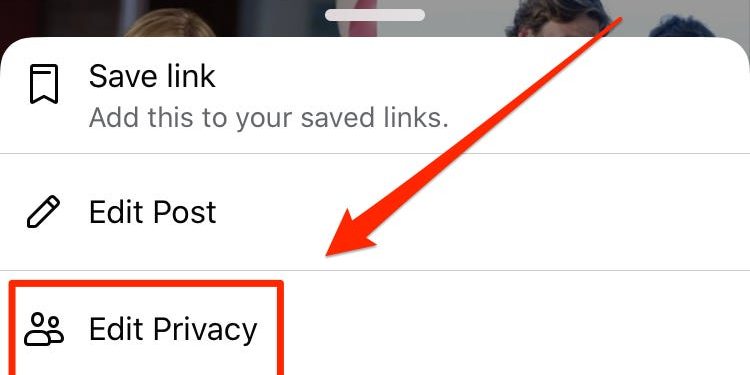
To make a Facebook post shareable, you must first determine the audience. Then, you need to change the audience of the post to “Public.” Among the options available to you are Friends Except and Specific Friends. This allows you to choose specific friends of friends. In order to change the audience of a post, you must change its default setting to “Public.” Alternatively, you can block an individual from viewing your post. Each platform has a different method for editing privacy settings.

Creating a custom list of your Close Friends

If you have a lot of friends on Facebook, you may want to create a custom list of those people. This will make it easier for you to see the people who are closest to you. Once you have a list, you can contact people directly through Facebook. To do this, you will need to sign into your account. See the article : What is the Difference Between Active Now and the Green Light on Facebook?. Then, go to your profile and tap on the three lines on the upper left corner. Once you’re in this screen, click the “+” button. Creating a custom list of your Close Friends is simple and can be done quickly and easily.

After creating your list, you can rename it as well as delete any unwanted friends. To rename a list, simply type in the name of the person to be removed and tap on the X button. The list will update automatically. You can create as many lists as you want, depending on what type of friends you have. Close friends and acquaintances lists have the same options, but a custom list will contain only the people you want.

To create a custom list of your Close Friends on a Facebook page, you can use the “People” tab. Once you’ve created a list, you can choose which friends you want to share updates with. You can create separate lists for close friends, business contacts, and acquaintances. If you’d like to share more information with your Close Friends, you can use the Audience Selector.

See the article :
How to Create a Facebook Frame
How to Create a Facebook Frame If you’re wondering how to create…

Changing the shareable status of all future Facebook posts

The first step in changing the shareable status of your future Facebook posts is to find the post you’d like to make public. Click the three dots in the upper right corner of your profile, then tap “Public” or any other relevant option. This may interest you : How to Create Facebook Account For Business. Once this is done, you should see a share button on your selected posts. Alternatively, you can choose to make your posts private or shareable to anyone you wish.

While you’re at it, don’t forget to make sure that your audience is set to “friends” instead of public. Facebook allows you to choose who can see your posts, but you can also change this setting to hide them from the boss. After making this change, click the “save” button and your new shareable status will be the default. This setting applies to all future Facebook posts.

Limiting the number of people who can view your past posts on Facebook is a simple way to restrict your content. This feature allows you to restrict access to posts made before the privacy setting was implemented. However, if you want to limit your future posts to only friends, you’ll have to make each one individual, one-by-one change. You can change this setting on the web interface or in the mobile app using privacy shortcuts.


This may interest you :
How to See Who You Are Following on Facebook
How to See Who You Are Following on Facebook Listed below are…

Related Posts:

  • How Do I Make a Post Shareable on Facebook?
  • How to Make a Post Shareable on Facebook
  • How to Make Facebook Post Shareable
  • How to Make Post Shareable on Facebook
  • How Do You Make a Post Shareable on Facebook?
  • How to Make Your Post Shareable on Facebook
Was this article helpful?
YesNo

You might also like

Troubleshooting Instagram Posting Issues

Troubleshooting Instagram Posting Issues

How to Post Multiple Photos on Instagram Without Cropping – The Ultimate Guide

How to Post Multiple Photos on Instagram Without Cropping – The Ultimate Guide

How Do I View My Instagram Likes on My PC?

How Do I View My Instagram Likes on My PC?

How to Pause Reels in Instagram

How to Pause Reels in Instagram

How to Make Instagram Bio Center

How to Get Verified on YouTube: How to Speed Up the Process

How to Get Verified on YouTube: How to Speed Up the Process

Categories

  • Facebook
  • General
  • Instagram
  • LinkedIn
  • Marketing
  • Pinterest
  • Social Media
  • TikTok
  • Twitter
  • YouTube


Making Your Brands Popular.

(347) 875-0972

[email protected]

© 2024 Zeru.
All Rights Reserved.

DMCA.com Protection Status

Instagram Services

  • Buy Instagram Followers
  • Buy Instagram Likes
  • Buy Instagram Views
  • Buy Instagram Comments

YouTube Services

  • Buy YouTube Views
  • Buy YouTube Subscribers
  • Buy YouTube Likes
  • Buy YouTube Comments

TikTok Services

  • Buy TikTok Followers
  • Buy TikTok Likes
  • Buy TikTok Views

Facebook Services

  • Buy Facebook Page Likes
  • Buy Facebook Followers
  • Buy Facebook Post Likes
  • Buy Facebook Views

Twitter Services

  • Buy Twitter Followers
  • Buy Twitter Likes
  • Buy Twitter Retweets

Quick Links

  • FAQ
  • Blog
  • Contact
  • About
  • Terms and Conditions
  • Privacy Policy
No Result
View All Result
  • Buy Followers
    • Instagram Services
      • Buy Instagram Followers
      • Buy Instagram Likes
      • Buy Instagram Views
      • Buy Instagram Comments
    • YouTube Services
      • Buy YouTube Views
      • Buy YouTube Subscribers
      • Buy YouTube Likes
      • Buy YouTube Comments
    • TikTok Services
      • Buy TikTok Followers
      • Buy TikTok Likes
      • Buy TikTok Views
    • Facebook Services
      • Buy Facebook Page Likes
      • Buy Facebook Followers
      • Buy Facebook Post Likes
      • Buy Facebook Views
    • Twitter Services
      • Buy Twitter Followers
      • Buy Twitter Likes
      • Buy Twitter Retweets
  • Blog
  • Categories
    • Instagram
    • YouTube
    • TikTok
    • Facebook
    • Twitter
  • Contact

© 2023 Zeru. All Rights Reserved.

Welcome Back!

Login to your account below

Forgotten Password?

Create New Account!

Fill the forms bellow to register

All fields are required. Log In

Retrieve your password

Please enter your username or email address to reset your password.

Log In






