






• Buy Followers
    • Instagram Services
      • Buy Instagram Followers
      • Buy Instagram Likes
      • Buy Instagram Views
      • Buy Instagram Comments
    • YouTube Services
      • Buy YouTube Views
      • Buy YouTube Subscribers
      • Buy YouTube Likes
      • Buy YouTube Comments
    • TikTok Services
      • Buy TikTok Followers
      • Buy TikTok Likes
      • Buy TikTok Views
    • Facebook Services
      • Buy Facebook Page Likes
      • Buy Facebook Followers
      • Buy Facebook Post Likes
      • Buy Facebook Views
    • Twitter Services
      • Buy Twitter Followers
      • Buy Twitter Likes
      • Buy Twitter Retweets
  • Blog
  • Categories
    • Instagram
    • YouTube
    • TikTok
    • Facebook
    • Twitter
  • Contact
No Result
View All Result
Zeru
  • Buy Followers
    • Instagram Services
      • Buy Instagram Followers
      • Buy Instagram Likes
      • Buy Instagram Views
      • Buy Instagram Comments
    • YouTube Services
      • Buy YouTube Views
      • Buy YouTube Subscribers
      • Buy YouTube Likes
      • Buy YouTube Comments
    • TikTok Services
      • Buy TikTok Followers
      • Buy TikTok Likes
      • Buy TikTok Views
    • Facebook Services
      • Buy Facebook Page Likes
      • Buy Facebook Followers
      • Buy Facebook Post Likes
      • Buy Facebook Views
    • Twitter Services
      • Buy Twitter Followers
      • Buy Twitter Likes
      • Buy Twitter Retweets
  • Blog
  • Categories
    • Instagram
    • YouTube
    • TikTok
    • Facebook
    • Twitter
  • Contact
No Result
View All Result
Zeru
No Result
View All Result

Popular Services

Buy YouTube Views
Buy TikTok Followers
Buy Twitter Followers
Buy Facebook Followers
Buy Instagram Likes
Buy TikTok Likes
Buy Instagram Views
Buy TikTok Views
Buy Instagram Comments
Buy YouTube Likes
Buy Twitter Likes
Buy YouTube Comments
Buy Facebook Views
Buy Facebook Page Likes
Buy Twitter Retweets
Buy Facebook Post Likes
Buy YouTube Subscribers
Buy Instagram Followers

How to See Who Unfriended You on Facebook

Lizzie Yates by Lizzie Yates
in Facebook
3 min read
70
How to See Who Unfriended You on Facebook
14
SHARES
1.4k
VIEWS
Share on FacebookShare on Twitter

Contents

  • How to See Who Unfriended You on Facebook
  • Unfriend Finder
  • Mozilla Facebook Container
  • Greyed-out profile pictures of people who were friends with you earlier but are no longer friends with you
  • Checking your friends list for a globe icon

How to See Who Unfriended You on Facebook

how to see who unfriended you on facebook

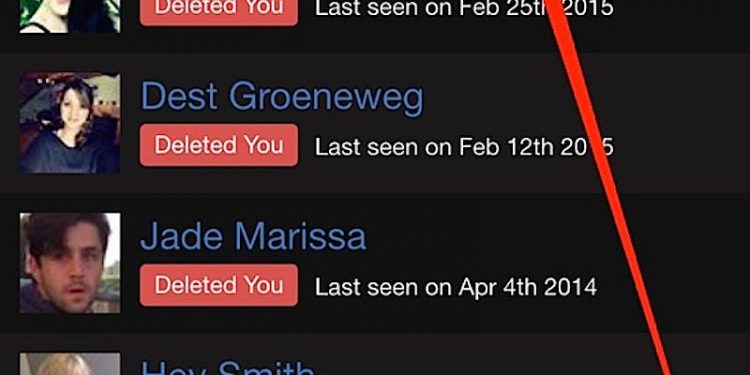
If you’ve received an unfriend request from someone on Facebook, there are a few ways to find out why. First, use the Mozilla Facebook Container or Unfriend Finder to check out the profile pictures of people who were once your friends but have since unfriended you. You may also be able to find out who unfriended you by checking the globe icon on your friends list.

Unfriend Finder

If you want to find out who unfriended you on Facebook, the first thing to do is look in the friend list of the person you are looking for. You’ll see a globe icon under their name. To see also : How to Sign Out of Facebook on Multiple Devices. Click this icon and a list of people who have unfriended you will appear. Alternatively, you can search the unfriended person’s name.

The next step is to download the Unfriend Finder browser extension. This tool can be downloaded from the official site. Firefox users should install Greasemonkey. You should be able to see the list of unfriended people on your home page. The installation process varies by browser. For Chrome, you need to install an extension and for Firefox users, you need to install Greasemonkey.

Alternatively, you can run a web script on your computer. This program will notify you every time someone unfriends you or deactivates their profile. The script does not do any fancy monitoring, but it does provide a quick way to find out who unfriended you on Facebook. It’s worth checking out because you may have lost contact with your friends because they changed their privacy settings.

This may interest you :
How to Find Deleted Messages on Facebook
How to Find Deleted Messages on Facebook How to find deleted messages…

Mozilla Facebook Container

If you’ve ever wondered how to see who unfriended you on your Facebook profile, you can now use the Firefox Container extension to block tracking scripts. By default, the container blocks Facebook logins, likes, and comments outside of Facebook. You can add custom websites to the container, such as Instagram and Facebook Messenger. Using the Mozilla Facebook Container extension doesn’t disrupt the functioning of other websites, but you should ensure that you’re using it on your Facebook account before proceeding.

By installing the Firefox extension, you’ll separate your Facebook session from the rest of the web. This way, Facebook can’t track your web activity and use it to better profile you. On the same subject : Are Facebook Gift Cards Discontinued?. Additionally, you won’t be tracking other sites when using the extension, and it won’t load non-Facebook links inside the container. Once you’ve installed it, go to your Facebook account page, log in, and enjoy the privacy features that come with the extension.

Read also :
How to Avoid Running an Illegal Raffle on Facebook
How to Avoid Running an Illegal Raffle on Facebook If you are…

Greyed-out profile pictures of people who were friends with you earlier but are no longer friends with you

If you’ve ever found yourself noticing that the profile pictures of people who used to be your friends are now greyed out, it could be because they have unfriended you. You may have blocked them in the past but haven’t deleted them, but the app you use to visit Facebook might have malfunctioned. To see also : Where is Facebook Located in San Francisco?. You can try to unblock them by changing the privacy settings on your browser.

One way to resolve this problem is to disable the option that enables people to send you friend requests. Normally, this option allows anyone to add you as a friend, but if the person doesn’t respond to the request, you can manually unfriend them. To do this, you’ll need to go to their profile page and click “edit” next to their name.
This may interest you :
How to Use Facebook Reactions Properly
How to Use Facebook Reactions Properly Whether you want to use Reactions…

Checking your friends list for a globe icon

How do you check if someone has unfriended you? One of the easiest ways to do so is by checking your friends list for a globe icon. This is an indicator that a friend has made a post public, which means that it is visible to everyone on the social network. This may be helpful if you regularly encounter posts from people you don’t know, but this is not always the case.


Related Posts:

  • How to Find Out If Someone Has Unfriended Me on Facebook
  • How to Unfriend All Friends on Facebook
  • What Happened to My Friends List on Facebook?
  • How to Delete All Facebook Friends
  • How to Find Out Who Deleted Me on Facebook
  • How Do I Find My Unfriend List on Facebook?
Was this article helpful?
YesNo

You might also like

Troubleshooting Instagram Posting Issues

Troubleshooting Instagram Posting Issues

How to Post Multiple Photos on Instagram Without Cropping – The Ultimate Guide

How to Post Multiple Photos on Instagram Without Cropping – The Ultimate Guide

How Do I View My Instagram Likes on My PC?

How Do I View My Instagram Likes on My PC?

How to Pause Reels in Instagram

How to Pause Reels in Instagram

How to Make Instagram Bio Center

How to Get Verified on YouTube: How to Speed Up the Process

How to Get Verified on YouTube: How to Speed Up the Process

Categories

  • Facebook
  • General
  • Instagram
  • LinkedIn
  • Marketing
  • Pinterest
  • Social Media
  • TikTok
  • Twitter
  • YouTube


Making Your Brands Popular.

(347) 875-0972

[email protected]

© 2024 Zeru.
All Rights Reserved.

DMCA.com Protection Status

Instagram Services

  • Buy Instagram Followers
  • Buy Instagram Likes
  • Buy Instagram Views
  • Buy Instagram Comments

YouTube Services

  • Buy YouTube Views
  • Buy YouTube Subscribers
  • Buy YouTube Likes
  • Buy YouTube Comments

TikTok Services

  • Buy TikTok Followers
  • Buy TikTok Likes
  • Buy TikTok Views

Facebook Services

  • Buy Facebook Page Likes
  • Buy Facebook Followers
  • Buy Facebook Post Likes
  • Buy Facebook Views

Twitter Services

  • Buy Twitter Followers
  • Buy Twitter Likes
  • Buy Twitter Retweets

Quick Links

  • FAQ
  • Blog
  • Contact
  • About
  • Terms and Conditions
  • Privacy Policy
No Result
View All Result
  • Buy Followers
    • Instagram Services
      • Buy Instagram Followers
      • Buy Instagram Likes
      • Buy Instagram Views
      • Buy Instagram Comments
    • YouTube Services
      • Buy YouTube Views
      • Buy YouTube Subscribers
      • Buy YouTube Likes
      • Buy YouTube Comments
    • TikTok Services
      • Buy TikTok Followers
      • Buy TikTok Likes
      • Buy TikTok Views
    • Facebook Services
      • Buy Facebook Page Likes
      • Buy Facebook Followers
      • Buy Facebook Post Likes
      • Buy Facebook Views
    • Twitter Services
      • Buy Twitter Followers
      • Buy Twitter Likes
      • Buy Twitter Retweets
  • Blog
  • Categories
    • Instagram
    • YouTube
    • TikTok
    • Facebook
    • Twitter
  • Contact

© 2023 Zeru. All Rights Reserved.

Welcome Back!

Login to your account below

Forgotten Password?

Create New Account!

Fill the forms bellow to register

All fields are required. Log In

Retrieve your password

Please enter your username or email address to reset your password.

Log In





