






• Buy Followers
    • Instagram Services
      • Buy Instagram Followers
      • Buy Instagram Likes
      • Buy Instagram Views
      • Buy Instagram Comments
    • YouTube Services
      • Buy YouTube Views
      • Buy YouTube Subscribers
      • Buy YouTube Likes
      • Buy YouTube Comments
    • TikTok Services
      • Buy TikTok Followers
      • Buy TikTok Likes
      • Buy TikTok Views
    • Facebook Services
      • Buy Facebook Page Likes
      • Buy Facebook Followers
      • Buy Facebook Post Likes
      • Buy Facebook Views
    • Twitter Services
      • Buy Twitter Followers
      • Buy Twitter Likes
      • Buy Twitter Retweets
  • Blog
  • Categories
    • Instagram
    • YouTube
    • TikTok
    • Facebook
    • Twitter
  • Contact
No Result
View All Result
Zeru
  • Buy Followers
    • Instagram Services
      • Buy Instagram Followers
      • Buy Instagram Likes
      • Buy Instagram Views
      • Buy Instagram Comments
    • YouTube Services
      • Buy YouTube Views
      • Buy YouTube Subscribers
      • Buy YouTube Likes
      • Buy YouTube Comments
    • TikTok Services
      • Buy TikTok Followers
      • Buy TikTok Likes
      • Buy TikTok Views
    • Facebook Services
      • Buy Facebook Page Likes
      • Buy Facebook Followers
      • Buy Facebook Post Likes
      • Buy Facebook Views
    • Twitter Services
      • Buy Twitter Followers
      • Buy Twitter Likes
      • Buy Twitter Retweets
  • Blog
  • Categories
    • Instagram
    • YouTube
    • TikTok
    • Facebook
    • Twitter
  • Contact
No Result
View All Result
Zeru
No Result
View All Result

Popular Services

Buy YouTube Views
Buy TikTok Followers
Buy Twitter Followers
Buy Facebook Followers
Buy Instagram Likes
Buy TikTok Likes
Buy Instagram Views
Buy TikTok Views
Buy Instagram Comments
Buy YouTube Likes
Buy Twitter Likes
Buy YouTube Comments
Buy Facebook Views
Buy Facebook Page Likes
Buy Twitter Retweets
Buy Facebook Post Likes
Buy YouTube Subscribers
Buy Instagram Followers

How to Make My Post Shareable on Facebook

Lizzie Yates by Lizzie Yates
in Facebook
3 min read
66
How to Make My Post Shareable on Facebook
13
SHARES
1.3k
VIEWS
Share on FacebookShare on Twitter

Contents

  • How to Make My Post Shareable on Facebook
  • Change privacy settings
  • Copy the URL of a post
  • Schedule a post
  • Change the audience selector

How to Make My Post Shareable on Facebook

how to make my post shareable on facebook

There are many ways to make your Facebook post shareable. In this article, we’ll go over how to change the privacy settings, copy the URL, schedule a post, and change the audience selector. Once you’ve done these steps, you’ll be ready to share your posts. But before we go into those methods, let’s take a look at some tips that will help you get started.

Change privacy settings

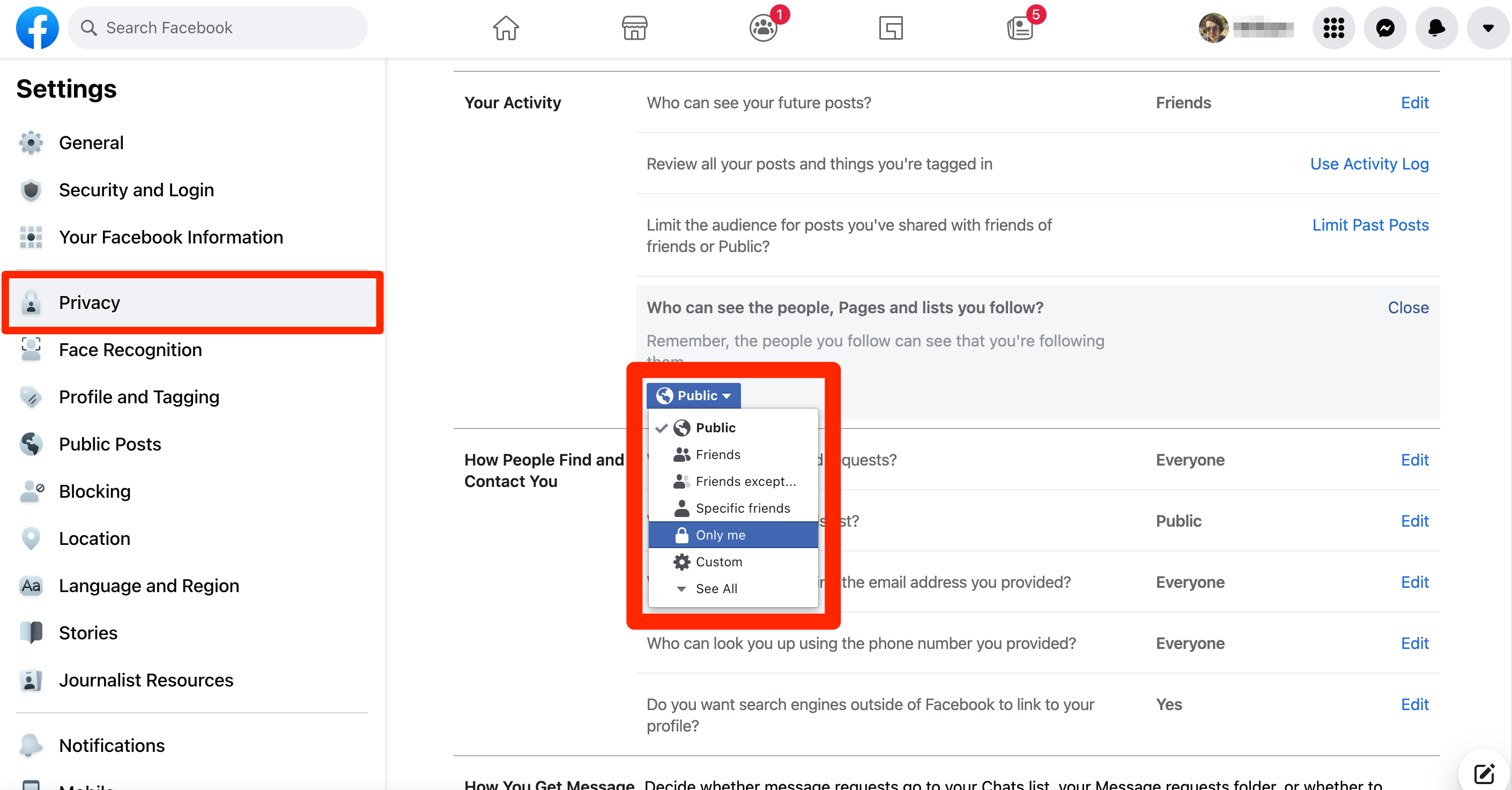
If you’ve made a post and want it to be shared, you need to change the privacy settings of your post. Facebook provides dropdowns for public, private, and unknown. By default, the settings are the same as they were the last time you made a post. To see also : How to Fix the “Content Not Available Right Now” Error on Facebook. However, you can adjust the settings by clicking the corresponding buttons in the dropdown menu. If you want to share a post with a limited audience, you need to change the privacy settings.

If you want a specific group of people to see a post, you can change the privacy settings for that category. You can do this in the privacy settings menu on the left side of your profile. To change the settings for a particular post, click on the three horizontal dots in the far right-hand corner of the post. The post will automatically update. This method is not recommended if you do not know who your friends are, as you might want to restrict sharing.
Read also :
How Do I See All Photos on Facebook?
How Do I See All Photos on Facebook? If you’ve ever wondered…

Copy the URL of a post

The URL of a post can be shared with your friends on Facebook. However, you must make sure that the post is public before sharing it. If you want to share a private post, there is a workaround. See the article : Can I See Who Viewed My Facebook Profile?. In the post’s URL, you will see an option to copy the URL of the post. Copy the URL and paste it into the Facebook box. The URL will be pasted into a new panel, along with a thumbnail preview.

Alternatively, you can go to the post’s page and copy the link directly from the source. To do this, click on the date that appears below the post creator’s name. In the bottom-right corner, click Share -> Copy link. You can also do this on the mobile app. Once you’ve copied the URL, you can paste it anywhere you want. In both cases, you don’t need to be signed in to copy the link.

This may interest you :
How to Remove Admin From Facebook Page
How to Remove Admin From Facebook Page If you are the sole…

Schedule a post

There are two ways to schedule a post on Facebook to make it share-worthy: by using the publish button or by manually choosing an optimal time. Once you have chosen the time, you must then share it in the specified period of time, which varies from 20 minutes to 75 days. On the same subject : How to Delete Story on Facebook. To do this, click the three dots icon at the bottom right of the window. If you’d like to make it shareable later, you can manually select the time and click “Schedule” again.

Another option to schedule a post is by using the “Scheduling” option in the calendar. If you’d rather avoid gaps in your social media calendar, this feature will automatically schedule your posts for optimal times of day, such as when your fans are most likely to see your post. Another way to schedule a post on Facebook is to turn on the AutoSchedule option, which will automatically schedule your posts for optimal times, such as during high-engagement times.
See the article :
How to Change Facebook Language
How to Change Facebook Language Are you wondering how to change Facebook…

Change the audience selector

When sharing something on Facebook, you can choose who can see it by changing the audience selector. You can choose to share it with friends, the general public, or groups. In addition to the general public, you can also choose to share it with custom friends lists. By default, Facebook will select your friends when you share something, but you can change this by changing the audience selector to a different list.

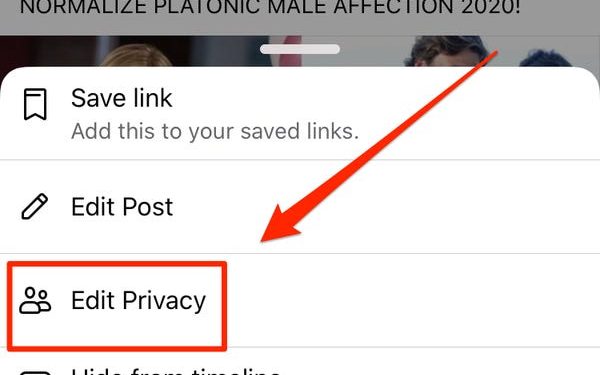
To make a post shareable on Facebook, use the “change audience selector” feature that appears when you edit the post. You can change the audience for a single post or select an entire group, or you can block certain people. Your privacy settings on Facebook may vary based on the platform that you’re using, so check them before making changes. To change the audience selector on a Facebook post, sign in and select Edit Privacy.


Related Posts:

  • How Do I Make a Post Shareable on Facebook?
  • How to Make Facebook Post Shareable
  • How Do You Make a Post Shareable on Facebook?
  • How to Make a Post Shareable on Facebook
  • How to Make a Facebook Post Shareable
  • How to Make Post Shareable on Facebook
Was this article helpful?
YesNo

You might also like

Troubleshooting Instagram Posting Issues

Troubleshooting Instagram Posting Issues

How to Post Multiple Photos on Instagram Without Cropping – The Ultimate Guide

How to Post Multiple Photos on Instagram Without Cropping – The Ultimate Guide

How Do I View My Instagram Likes on My PC?

How Do I View My Instagram Likes on My PC?

How to Pause Reels in Instagram

How to Pause Reels in Instagram

How to Make Instagram Bio Center

How to Get Verified on YouTube: How to Speed Up the Process

How to Get Verified on YouTube: How to Speed Up the Process

Categories

  • Facebook
  • General
  • Instagram
  • LinkedIn
  • Marketing
  • Pinterest
  • Social Media
  • TikTok
  • Twitter
  • YouTube


Making Your Brands Popular.

(347) 875-0972

[email protected]

© 2024 Zeru.
All Rights Reserved.

DMCA.com Protection Status

Instagram Services

  • Buy Instagram Followers
  • Buy Instagram Likes
  • Buy Instagram Views
  • Buy Instagram Comments

YouTube Services

  • Buy YouTube Views
  • Buy YouTube Subscribers
  • Buy YouTube Likes
  • Buy YouTube Comments

TikTok Services

  • Buy TikTok Followers
  • Buy TikTok Likes
  • Buy TikTok Views

Facebook Services

  • Buy Facebook Page Likes
  • Buy Facebook Followers
  • Buy Facebook Post Likes
  • Buy Facebook Views

Twitter Services

  • Buy Twitter Followers
  • Buy Twitter Likes
  • Buy Twitter Retweets

Quick Links

  • FAQ
  • Blog
  • Contact
  • About
  • Terms and Conditions
  • Privacy Policy
No Result
View All Result
  • Buy Followers
    • Instagram Services
      • Buy Instagram Followers
      • Buy Instagram Likes
      • Buy Instagram Views
      • Buy Instagram Comments
    • YouTube Services
      • Buy YouTube Views
      • Buy YouTube Subscribers
      • Buy YouTube Likes
      • Buy YouTube Comments
    • TikTok Services
      • Buy TikTok Followers
      • Buy TikTok Likes
      • Buy TikTok Views
    • Facebook Services
      • Buy Facebook Page Likes
      • Buy Facebook Followers
      • Buy Facebook Post Likes
      • Buy Facebook Views
    • Twitter Services
      • Buy Twitter Followers
      • Buy Twitter Likes
      • Buy Twitter Retweets
  • Blog
  • Categories
    • Instagram
    • YouTube
    • TikTok
    • Facebook
    • Twitter
  • Contact

© 2023 Zeru. All Rights Reserved.

Welcome Back!

Login to your account below

Forgotten Password?

Create New Account!

Fill the forms bellow to register

All fields are required. Log In

Retrieve your password

Please enter your username or email address to reset your password.

Log In





