






• Buy Followers
    • Instagram Services
      • Buy Instagram Followers
      • Buy Instagram Likes
      • Buy Instagram Views
      • Buy Instagram Comments
    • YouTube Services
      • Buy YouTube Views
      • Buy YouTube Subscribers
      • Buy YouTube Likes
      • Buy YouTube Comments
    • TikTok Services
      • Buy TikTok Followers
      • Buy TikTok Likes
      • Buy TikTok Views
    • Facebook Services
      • Buy Facebook Page Likes
      • Buy Facebook Followers
      • Buy Facebook Post Likes
      • Buy Facebook Views
    • Twitter Services
      • Buy Twitter Followers
      • Buy Twitter Likes
      • Buy Twitter Retweets
  • Blog
  • Categories
    • Instagram
    • YouTube
    • TikTok
    • Facebook
    • Twitter
  • Contact
No Result
View All Result
Zeru
  • Buy Followers
    • Instagram Services
      • Buy Instagram Followers
      • Buy Instagram Likes
      • Buy Instagram Views
      • Buy Instagram Comments
    • YouTube Services
      • Buy YouTube Views
      • Buy YouTube Subscribers
      • Buy YouTube Likes
      • Buy YouTube Comments
    • TikTok Services
      • Buy TikTok Followers
      • Buy TikTok Likes
      • Buy TikTok Views
    • Facebook Services
      • Buy Facebook Page Likes
      • Buy Facebook Followers
      • Buy Facebook Post Likes
      • Buy Facebook Views
    • Twitter Services
      • Buy Twitter Followers
      • Buy Twitter Likes
      • Buy Twitter Retweets
  • Blog
  • Categories
    • Instagram
    • YouTube
    • TikTok
    • Facebook
    • Twitter
  • Contact
No Result
View All Result
Zeru
No Result
View All Result

Popular Services

Buy YouTube Views
Buy TikTok Followers
Buy Twitter Followers
Buy Facebook Followers
Buy Instagram Likes
Buy TikTok Likes
Buy Instagram Views
Buy TikTok Views
Buy Instagram Comments
Buy YouTube Likes
Buy Twitter Likes
Buy YouTube Comments
Buy Facebook Views
Buy Facebook Page Likes
Buy Twitter Retweets
Buy Facebook Post Likes
Buy YouTube Subscribers
Buy Instagram Followers

How to Delete Facebook Account Permanently Without Waiting 14 Days

Lizzie Yates by Lizzie Yates
in Facebook
3 min read
66
How to Delete Facebook Account Permanently Without Waiting 14 Days
13
SHARES
1.3k
VIEWS
Share on FacebookShare on Twitter

Contents

  • How to Delete Facebook Account Permanently Without Waiting 14 Days
  • Cancel deletion request within 30 days of scheduling
  • Delete specific parts of your Facebook content manually
  • Delete specific parts of your Facebook content before deletion
  • Delete Snapchat
  • Delete Snapchat before deletion

How to Delete Facebook Account Permanently Without Waiting 14 Days

how to delete facebook account permanently without waiting 14 days

If you want to delete your Facebook account permanently, you need to know how to do it. You can do so by visiting the Settings page, and clicking Security. From here, you can edit the Apps and Websites section and uncheck the box for “Log in with your username and password”.

Cancel deletion request within 30 days of scheduling

If you’re not sure that you’d like to completely wipe your Facebook account, you can cancel it within 30 days of scheduling the deletion. After all, the site will no longer have any way to access your information if you ever decide to come back. Read also : How to Start a Facebook Business Page. While your deleted account won’t be searchable anymore, it isn’t completely gone. If you’re worried about data security, you can download your data before you make the request.

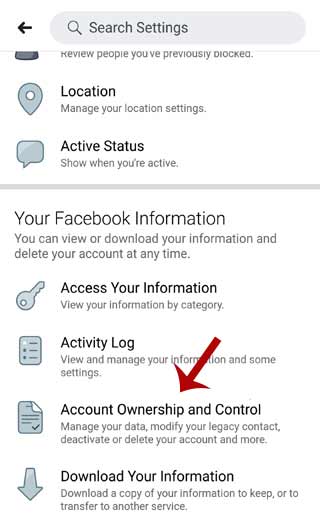
To cancel the deletion request, go to Settings and Privacy and scroll down to Account Ownership and Control. Once you’re in the section, tap on Settings and then Account Ownership and Control. After confirming this step, select Cancel deletion request. Facebook will then schedule your account deletion for a time frame that is 30 days. This is so you have time to think about your decision. If you’d rather not have your account permanently deleted, you can go back to it at any time within 30 days.

See the article :
How Do I Get My Facebook to Update?
How Do I Get My Facebook to Update? You might be asking,…

Delete specific parts of your Facebook content manually

There are a few ways to delete specific parts of your Facebook content and remove it from the public domain without waiting 14 days. If you have no wish to share your photos and videos with others, you can delete them manually. The most common method is to delete entire albums and collections from your profile. To see also : How to See Followers on Facebook. However, it takes a little longer, so be patient. This method is similar to deleting your browser history, but it takes longer.

Before you can permanently delete your Facebook account, you need to fill out a captcha code. The code is a jumble of letters and numbers that you need to type into a field below. If you can’t read the captcha, you can click on the “Try another text or audio captcha” link to try another. However, you should keep in mind that total account deletion may take up to 14 days. Then, your account will be deleted completely from Facebook.
To see also :
Which Facebook Ads Are Most Effective?
Which Facebook Ads Are Most Effective? There are many different types of…

Delete specific parts of your Facebook content before deletion

You may wonder how to Delete specific parts of your Facebook content before the site makes it private. While you can’t delete everything in one go, you can download specific parts of your Facebook content before deletion. First, open the “Your Posts” category on Facebook. See the article : How Do I See Who is Following Me on Facebook Mobile App?. Click the pencil icon to open the posting history. You can then select the item that you want to remove from Facebook. Then, click the “Delete” button to remove it from your profile.

Delete specific parts of your Facebook content before it’s permanently deleted by Facebook. You can download a copy of your data and store it in a safe place. However, you can’t filter your posts by keyword. Only people and date ranges work for that. Facebook says that it will add more filters in the future, but there’s no guarantee. The removal of old posts could take up to 90 days, meaning that some of your data may still exist in Facebook’s disaster recovery backups.
To see also :
How to Unhide a Post on Facebook
How to Unhide a Post on Facebook If you want to see…

Delete Snapchat

If you’re wondering how to delete Facebook account permanently without waiting 14 days, you’re not alone. Millions of people want to be rid of their accounts, and deleting your account permanently is the only way to achieve this. There are several steps to delete your account and avoid a lengthy waiting period. First, visit the settings page. Click on the “Deactivation and deletion” option. Enter your previous password or the password you use now, and then click “Submit.” Once you’ve successfully deleted your account, Facebook will notify you to delete all information and data.

If you’re wondering how to delete Facebook account permanently without waiting 14 days, there are a couple of methods to do so. One of these methods is to go to the help forum and look for a link. Click on this link, and you’ll see an image of a deletion confirmation. After clicking on the confirmation link, you’ll have to confirm your deletion by entering your password. Once you’ve confirmed the deletion, Facebook will send you an email containing a link that will let you log in again.

Delete Snapchat before deletion

If you are looking for a way to permanently delete your Snapchat account, you should first learn how to log in to the site in a web browser. After you have entered your username and password, click “Continue” to finalize the process. Your account will be deactivated for 30 days, but you can reactivate it after that time. If you do not want to wait that long, you can use the “reactivate” feature on the Snapchat website.

To delete Snapchat permanently, follow the steps below. Then, you’ll be sent an email that confirms the deletion. After you confirm your request, you’ll have 30 days to recover your account. If you change your mind before the time is up, you can always log in again using the app or the official website on your PC. If you’d rather not wait 14 days, here are some alternatives you can try.


Related Posts:

  • How to Permanently Delete Facebook From Your Device
  • How to Remove Your Facebook Account
  • How Do You Delete Facebook Account Permanently Immediately…
  • How to Deactivate Facebook Account Permanently
  • How to Delete Facebook Account Permanently Immediately in…
  • How to Delete Your Facebook Account
Was this article helpful?
YesNo

You might also like

Troubleshooting Instagram Posting Issues

Troubleshooting Instagram Posting Issues

How to Post Multiple Photos on Instagram Without Cropping – The Ultimate Guide

How to Post Multiple Photos on Instagram Without Cropping – The Ultimate Guide

How Do I View My Instagram Likes on My PC?

How Do I View My Instagram Likes on My PC?

How to Pause Reels in Instagram

How to Pause Reels in Instagram

How to Make Instagram Bio Center

How to Get Verified on YouTube: How to Speed Up the Process

How to Get Verified on YouTube: How to Speed Up the Process

Categories

  • Facebook
  • General
  • Instagram
  • LinkedIn
  • Marketing
  • Pinterest
  • Social Media
  • TikTok
  • Twitter
  • YouTube


Making Your Brands Popular.

(347) 875-0972

[email protected]

© 2024 Zeru.
All Rights Reserved.

DMCA.com Protection Status

Instagram Services

  • Buy Instagram Followers
  • Buy Instagram Likes
  • Buy Instagram Views
  • Buy Instagram Comments

YouTube Services

  • Buy YouTube Views
  • Buy YouTube Subscribers
  • Buy YouTube Likes
  • Buy YouTube Comments

TikTok Services

  • Buy TikTok Followers
  • Buy TikTok Likes
  • Buy TikTok Views

Facebook Services

  • Buy Facebook Page Likes
  • Buy Facebook Followers
  • Buy Facebook Post Likes
  • Buy Facebook Views

Twitter Services

  • Buy Twitter Followers
  • Buy Twitter Likes
  • Buy Twitter Retweets

Quick Links

  • FAQ
  • Blog
  • Contact
  • About
  • Terms and Conditions
  • Privacy Policy
No Result
View All Result
  • Buy Followers
    • Instagram Services
      • Buy Instagram Followers
      • Buy Instagram Likes
      • Buy Instagram Views
      • Buy Instagram Comments
    • YouTube Services
      • Buy YouTube Views
      • Buy YouTube Subscribers
      • Buy YouTube Likes
      • Buy YouTube Comments
    • TikTok Services
      • Buy TikTok Followers
      • Buy TikTok Likes
      • Buy TikTok Views
    • Facebook Services
      • Buy Facebook Page Likes
      • Buy Facebook Followers
      • Buy Facebook Post Likes
      • Buy Facebook Views
    • Twitter Services
      • Buy Twitter Followers
      • Buy Twitter Likes
      • Buy Twitter Retweets
  • Blog
  • Categories
    • Instagram
    • YouTube
    • TikTok
    • Facebook
    • Twitter
  • Contact

© 2023 Zeru. All Rights Reserved.

Welcome Back!

Login to your account below

Forgotten Password?

Create New Account!

Fill the forms bellow to register

All fields are required. Log In

Retrieve your password

Please enter your username or email address to reset your password.

Log In





