






• Buy Followers
    • Instagram Services
      • Buy Instagram Followers
      • Buy Instagram Likes
      • Buy Instagram Views
      • Buy Instagram Comments
    • YouTube Services
      • Buy YouTube Views
      • Buy YouTube Subscribers
      • Buy YouTube Likes
      • Buy YouTube Comments
    • TikTok Services
      • Buy TikTok Followers
      • Buy TikTok Likes
      • Buy TikTok Views
    • Facebook Services
      • Buy Facebook Page Likes
      • Buy Facebook Followers
      • Buy Facebook Post Likes
      • Buy Facebook Views
    • Twitter Services
      • Buy Twitter Followers
      • Buy Twitter Likes
      • Buy Twitter Retweets
  • Blog
  • Categories
    • Instagram
    • YouTube
    • TikTok
    • Facebook
    • Twitter
  • Contact
No Result
View All Result
Zeru
  • Buy Followers
    • Instagram Services
      • Buy Instagram Followers
      • Buy Instagram Likes
      • Buy Instagram Views
      • Buy Instagram Comments
    • YouTube Services
      • Buy YouTube Views
      • Buy YouTube Subscribers
      • Buy YouTube Likes
      • Buy YouTube Comments
    • TikTok Services
      • Buy TikTok Followers
      • Buy TikTok Likes
      • Buy TikTok Views
    • Facebook Services
      • Buy Facebook Page Likes
      • Buy Facebook Followers
      • Buy Facebook Post Likes
      • Buy Facebook Views
    • Twitter Services
      • Buy Twitter Followers
      • Buy Twitter Likes
      • Buy Twitter Retweets
  • Blog
  • Categories
    • Instagram
    • YouTube
    • TikTok
    • Facebook
    • Twitter
  • Contact
No Result
View All Result
Zeru
No Result
View All Result

Popular Services

Buy YouTube Views
Buy TikTok Followers
Buy Twitter Followers
Buy Facebook Followers
Buy Instagram Likes
Buy TikTok Likes
Buy Instagram Views
Buy TikTok Views
Buy Instagram Comments
Buy YouTube Likes
Buy Twitter Likes
Buy YouTube Comments
Buy Facebook Views
Buy Facebook Page Likes
Buy Twitter Retweets
Buy Facebook Post Likes
Buy YouTube Subscribers
Buy Instagram Followers

How to Message in TikTok

Lizzie Yates by Lizzie Yates
in TikTok
3 min read
75
How to Message in TikTok
16
SHARES
1.6k
VIEWS
Share on FacebookShare on Twitter

Contents

  • How to Message in TikTok
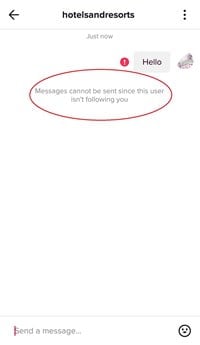
  • You can’t send a message unless you are following someone
  • You can customize your preferences
  • You can block a user from sending an inappropriate message
  • You can see comments on your uploads

How to Message in TikTok

To learn how to message on TikTok, you need to know how to navigate the app. The home screen will have two tabs: All Activity and Direct Message. Below these tabs are other options for browsing and communicating with friends. TikTok also features a search bar, chat screen, sharing links, and emojis. Listed below are some tips to make your experience with TikTok more enjoyable.

You can’t send a message unless you are following someone

When you sign into TikTok, you can only send messages to your friends, not random people. To send a message to a friend, you must first follow them. This may interest you : Why Am I Permanently Banned From TikTok?. Once you’re following them, you’ll see a chat button on their profile. If they aren’t following you back, you can’t send them a message.

If you don’t know why someone won’t let you send them a message, you can try asking them to change their setting. If you can’t send a message to a friend, you can also try following them so you’ll be able to send them a message. You can only follow friends who have similar interests as you, but you must follow them first.

The good news is that you can send messages to friends or contacts in TikTok. To send a message, you must be following someone to have access to their messages. You can also choose who you want to send messages to by selecting a contact’s profile icon. If you’re following someone, you’ll be able to see a message from the person you’re following. If you don’t want to receive the messages, you can set your privacy level to “friends only.”

This may interest you :
How to Get 10k Followers on TikTok For Free
How to Get 10k Followers on TikTok For Free If you are…

You can customize your preferences

While you can’t control who sees your videos and who doesn’t, you can customize your settings and preferences on the TikTok app. For example, you can choose whether you want videos that feature certain sound effects to be displayed. You can also hide videos from a particular creator or category. Read also : How to Do the TED Talk Filter on TikTok. TikTok users can even report videos that violate their guidelines. You can also customize your settings so that you don’t receive a message from someone who doesn’t share your interests.

To make sure your messages stay within your own personal space, you can set filters for inappropriate content. You can also restrict the number of messages you receive from certain users. If a user is making harassing comments, you can report them. By blocking a user, the user won’t be able to view your videos, reply to their messages, or interact with your content. You can also add comment filters, set privacy settings, or limit the types of comments you receive. These features will help you manage your TikTok messaging account.
This may interest you :
What Does it Mean to Be Verified on TikTok?
What Does it Mean to Be Verified on TikTok? You’ve probably heard…

You can block a user from sending an inappropriate message

You can block a user from sending an offensive message on TikTok by reporting the person in question. This action will send the problematic message to moderation. Blocking the person will prevent the user from interacting with your content and viewing your videos. There are some additional methods of blocking the user. Read also : What is That Filter That Everyone is Using on TikTok?. The first is to go to your account settings and select Privacy and Safety. From there, choose Blocked accounts. Select the profile you wish to unblock and press the long press button.

To block a user, tap the three-dot menu at the top of the screen. Next, click the name of the user. If the name doesn’t appear in the list, you can try searching for the person in the search bar. You can also check their comments to see if they have already been blocked. You can also check the comments and mentions section to see if the person is still blocking you.

To see also :
Is TikTok Harmful?
Is TikTok Harmful? In this article, I will examine the addictive nature…

You can see comments on your uploads

If you have uploaded a video on TikTok and you’d like to see comments on it, you’ll need to know how to view the comments on your video. You can log out of TikTok and reload it to see the comments. Sometimes, comments won’t load properly, and you will have to wait a while for them to appear. If you’re using a slow internet connection, you can try restarting your wifi to fix the issue.

While in the beta stage, TikTok has added a feature called “Liked by Creator.” This feature enables users to engage with their audience. When someone likes your comment on TikTok, the app will send you a push notification. You can then view your notifications in the “inbox” section of the app. You can also view the comments of friends on your videos by enabling notification settings.


Related Posts:

  • How to Message People on Tik Tok
  • How to DM on TikTok
  • Why Can't I Message on TikTok?
  • What Does DTB Mean to You?
  • How to Turn on Direct Messages on TikTok
  • How to Make a Group Chat on TikTok
Was this article helpful?
YesNo

You might also like

Troubleshooting Instagram Posting Issues

Troubleshooting Instagram Posting Issues

How to Post Multiple Photos on Instagram Without Cropping – The Ultimate Guide

How to Post Multiple Photos on Instagram Without Cropping – The Ultimate Guide

How Do I View My Instagram Likes on My PC?

How Do I View My Instagram Likes on My PC?

How to Pause Reels in Instagram

How to Pause Reels in Instagram

How to Make Instagram Bio Center

How to Get Verified on YouTube: How to Speed Up the Process

How to Get Verified on YouTube: How to Speed Up the Process

Categories

  • Facebook
  • General
  • Instagram
  • LinkedIn
  • Marketing
  • Pinterest
  • Social Media
  • TikTok
  • Twitter
  • YouTube


Making Your Brands Popular.

(347) 875-0972

[email protected]

© 2024 Zeru.
All Rights Reserved.

DMCA.com Protection Status

Instagram Services

  • Buy Instagram Followers
  • Buy Instagram Likes
  • Buy Instagram Views
  • Buy Instagram Comments

YouTube Services

  • Buy YouTube Views
  • Buy YouTube Subscribers
  • Buy YouTube Likes
  • Buy YouTube Comments

TikTok Services

  • Buy TikTok Followers
  • Buy TikTok Likes
  • Buy TikTok Views

Facebook Services

  • Buy Facebook Page Likes
  • Buy Facebook Followers
  • Buy Facebook Post Likes
  • Buy Facebook Views

Twitter Services

  • Buy Twitter Followers
  • Buy Twitter Likes
  • Buy Twitter Retweets

Quick Links

  • FAQ
  • Blog
  • Contact
  • About
  • Terms and Conditions
  • Privacy Policy
No Result
View All Result
  • Buy Followers
    • Instagram Services
      • Buy Instagram Followers
      • Buy Instagram Likes
      • Buy Instagram Views
      • Buy Instagram Comments
    • YouTube Services
      • Buy YouTube Views
      • Buy YouTube Subscribers
      • Buy YouTube Likes
      • Buy YouTube Comments
    • TikTok Services
      • Buy TikTok Followers
      • Buy TikTok Likes
      • Buy TikTok Views
    • Facebook Services
      • Buy Facebook Page Likes
      • Buy Facebook Followers
      • Buy Facebook Post Likes
      • Buy Facebook Views
    • Twitter Services
      • Buy Twitter Followers
      • Buy Twitter Likes
      • Buy Twitter Retweets
  • Blog
  • Categories
    • Instagram
    • YouTube
    • TikTok
    • Facebook
    • Twitter
  • Contact

© 2023 Zeru. All Rights Reserved.

Welcome Back!

Login to your account below

Forgotten Password?

Create New Account!

Fill the forms bellow to register

All fields are required. Log In

Retrieve your password

Please enter your username or email address to reset your password.

Log In





