






• Buy Followers
    • Instagram Services
      • Buy Instagram Followers
      • Buy Instagram Likes
      • Buy Instagram Views
      • Buy Instagram Comments
    • YouTube Services
      • Buy YouTube Views
      • Buy YouTube Subscribers
      • Buy YouTube Likes
      • Buy YouTube Comments
    • TikTok Services
      • Buy TikTok Followers
      • Buy TikTok Likes
      • Buy TikTok Views
    • Facebook Services
      • Buy Facebook Page Likes
      • Buy Facebook Followers
      • Buy Facebook Post Likes
      • Buy Facebook Views
    • Twitter Services
      • Buy Twitter Followers
      • Buy Twitter Likes
      • Buy Twitter Retweets
  • Blog
  • Categories
    • Instagram
    • YouTube
    • TikTok
    • Facebook
    • Twitter
  • Contact
No Result
View All Result
Zeru
  • Buy Followers
    • Instagram Services
      • Buy Instagram Followers
      • Buy Instagram Likes
      • Buy Instagram Views
      • Buy Instagram Comments
    • YouTube Services
      • Buy YouTube Views
      • Buy YouTube Subscribers
      • Buy YouTube Likes
      • Buy YouTube Comments
    • TikTok Services
      • Buy TikTok Followers
      • Buy TikTok Likes
      • Buy TikTok Views
    • Facebook Services
      • Buy Facebook Page Likes
      • Buy Facebook Followers
      • Buy Facebook Post Likes
      • Buy Facebook Views
    • Twitter Services
      • Buy Twitter Followers
      • Buy Twitter Likes
      • Buy Twitter Retweets
  • Blog
  • Categories
    • Instagram
    • YouTube
    • TikTok
    • Facebook
    • Twitter
  • Contact
No Result
View All Result
Zeru
No Result
View All Result

Popular Services

Buy YouTube Views
Buy TikTok Followers
Buy Twitter Followers
Buy Facebook Followers
Buy Instagram Likes
Buy TikTok Likes
Buy Instagram Views
Buy TikTok Views
Buy Instagram Comments
Buy YouTube Likes
Buy Twitter Likes
Buy YouTube Comments
Buy Facebook Views
Buy Facebook Page Likes
Buy Twitter Retweets
Buy Facebook Post Likes
Buy YouTube Subscribers
Buy Instagram Followers

Where Do I Find My Saved Playlists on YouTube?

Lizzie Yates by Lizzie Yates
in YouTube
3 min read
78
Where Do I Find My Saved Playlists on YouTube?
16
SHARES
1.6k
VIEWS
Share on FacebookShare on Twitter

Contents

  • Where Do I Find My Saved Playlists on YouTube?
  • Your YouTube library
  • Your Hootsuite account
  • Search results
  • YouList

Where Do I Find My Saved Playlists on YouTube?

Where do I find my saved playlists on YouTube

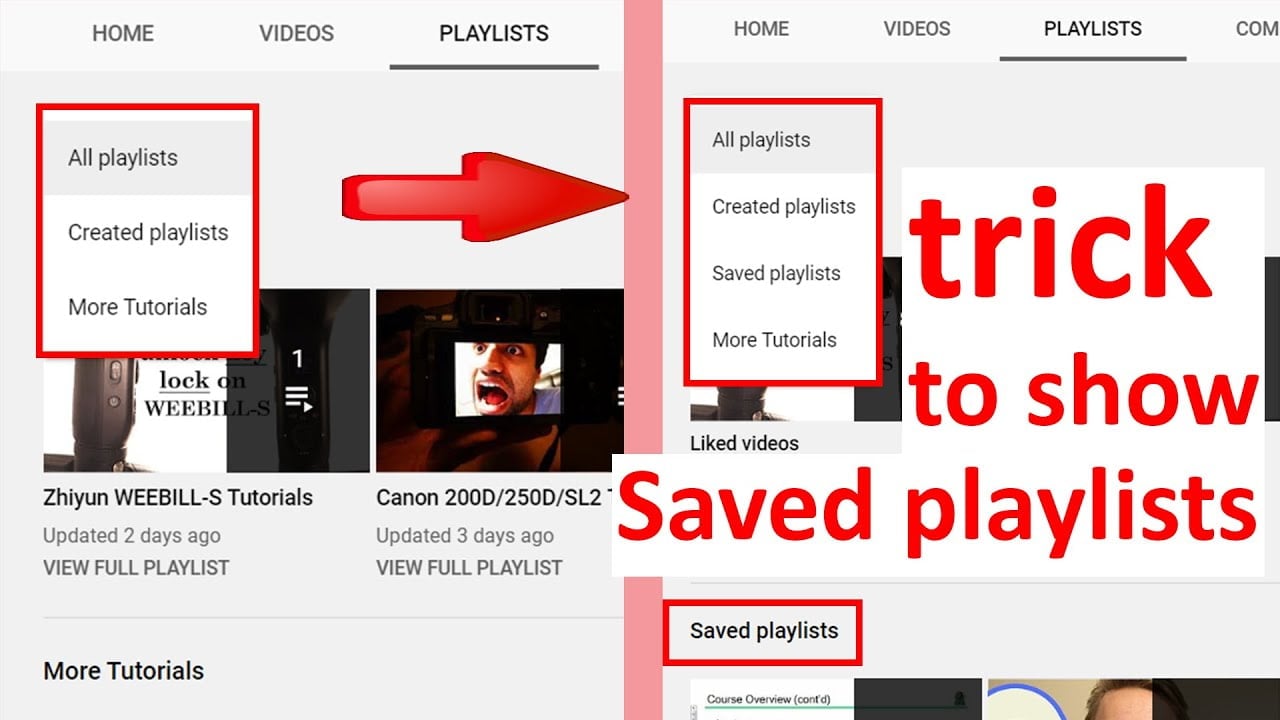
You can find your saved YouTube playlists in a couple of places: your Hootsuite account, Your YouTube library, and your Search results. You can also add them to your library from within YouTube. In order to add more playlists to your library, just go to the “Add a new playlist” link on the YouTube homepage. You can edit your saved playlists at any time, including while playing videos.

Your YouTube library

If you want to delete a YouTube video, you should first know how to merge the playlists. Most people don’t realize that merging playlists can result in the merging of all videos. However, there are a few simple steps to merge playlists, which you can follow in order to achieve the goal. On the same subject : What Are the New YouTube Rules for 2022?. Here are some steps to merge playlists on YouTube. You must delete the first playlist before you can move the rest. Delete all the videos from one playlist and then add them to another.

Using the search bar, you can browse by genre, attribution, mood, or title. You can also star tracks that you like and download them as mp3 files. Once you have uploaded your songs, you will be able to see the playlists that you have recently watched or saved for later. If you have a desktop, iPad, or Android device, you can access the YouTube library feature. It’s free to use and will save you a ton of time.

On the same subject :
How to Make a YouTube Banner For Your Videos
How to Make a YouTube Banner For Your Videos If you’re wondering…

Your Hootsuite account

You can save playlists on YouTube from your Hootsuite account and share them across the web. The app makes it easy to stay in touch with your fans wherever you go. You can even receive notifications for your tweets on Twitter. These notifications show up in the toolbar of your phone, just like text messages or missed calls. Unfortunately, the app doesn’t let you save Facebook interactions, but it’s easy to check the Facebook tab in your Hootsuite account.

Another great feature of Hootsuite is its ability to manage the workflow of YouTube videos. This makes it possible to schedule videos, share them across platforms, and manage a team of YouTube channels. It also allows you to view engagement metrics and generate reports about your YouTube channel. To see also : How to Turn on Comments in YouTube. You can assign different tasks to your employees, and you can even have separate accounts for each person. Hootsuite also allows you to manage multiple YouTube channels and save playlists. You can even moderate comments on desktop.
Read also :
How to Get 1,000 Subscribers on YouTube
How to Get 1,000 Subscribers on YouTube Can you get 1,000 subscribers…

Search results

Many YouTube users are asking the same question: Where do I find my saved playlists? While the question is not terribly complicated, it is frustrating to find a playlist that you’ve created on the site and then realize that it’s not showing up in search results. If you’re facing this problem, try clearing your browser cache or switching to another browser. On the same subject : Is YouTube Free to Download?. If none of those work, try reinstalling the YouTube app.

First, remember to name your playlist using the keywords that best describe the content of the video. Next, you need to decide which privacy settings you want your videos to be seen by. The privacy options are available in the “Settings” tab. By default, unlisted playlists won’t appear in search results, but you can make them private to share with friends, colleagues, customers, and prospects. If you don’t want your videos to be seen by the general public, choose “private” instead.

This may interest you :
How to Verify Your YouTube Channel
How to Verify Your YouTube Channel If you want to apply for…

YouList

YouTube users can create and save playlists to keep their favorite videos in one place. These lists can consist of many videos and can be accessed from the “Library” section of the main YouTube website. A YouTube playlist automatically plays other videos in a sequence. Users can save playlists they have created, as well as other people’s playlists. Playlists are also visible in YouTube searches and can be viewed by entering specific search operators.

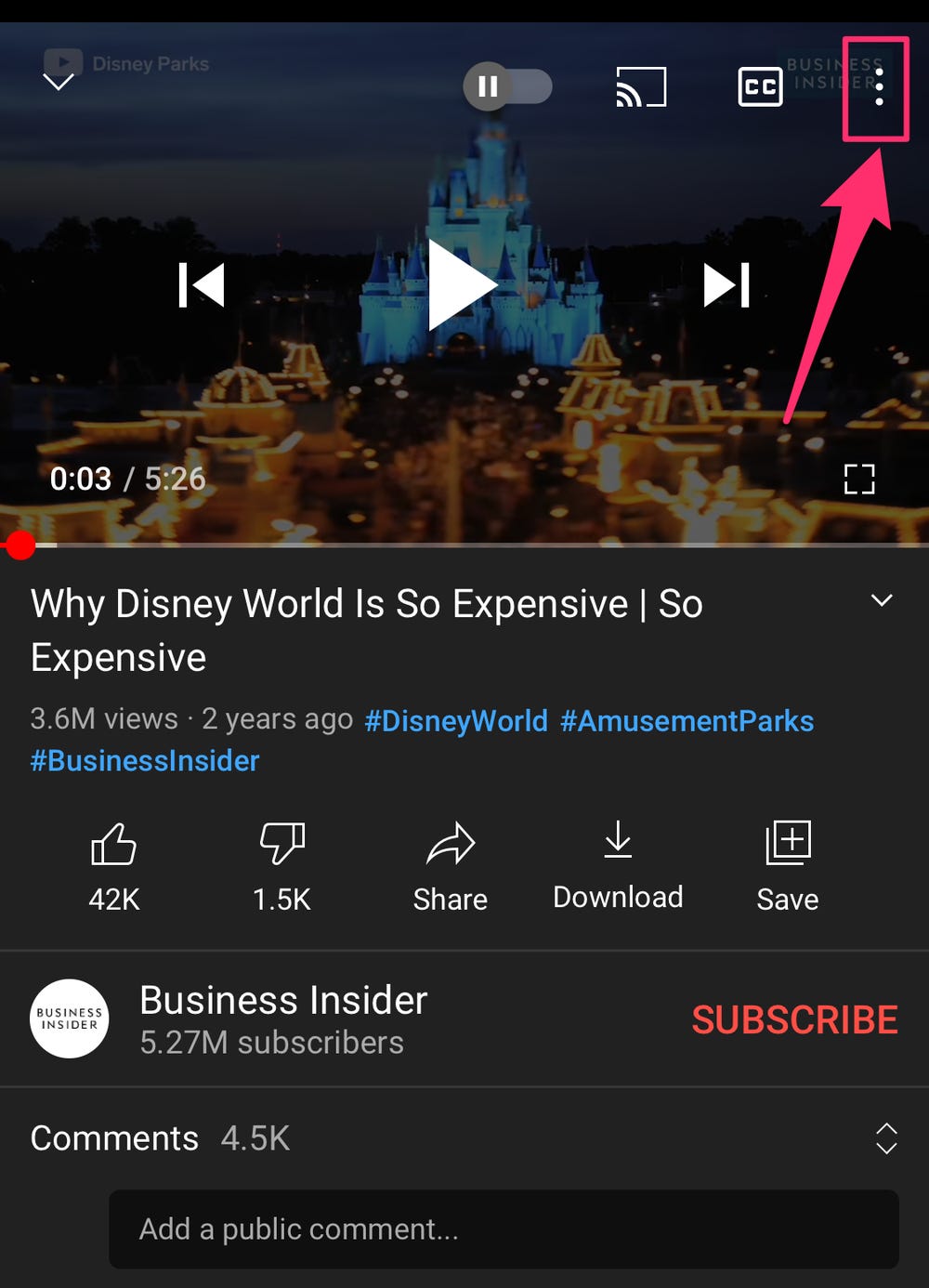
To create a new playlist, tap the “Save” option at the top of the screen. You will then see a pop-up that allows you to customize the playlist’s privacy options. Select “Create” to create a playlist with queue. Then, click “Save” again. The new playlist will appear in your browser with a queue and your chosen name. Once you’ve added a title and description, you can share the link on social media.


Related Posts:

  • How to Delete a YouTube Playlist
  • How to Delete a YouTube Playlist
  • How to Delete Playlists on YouTube
  • How to Delete a Playlist on YouTube
  • How to Delete a YouTube Playlist
  • How to Delete a YouTube Playlist
Was this article helpful?
YesNo

You might also like

Troubleshooting Instagram Posting Issues

Troubleshooting Instagram Posting Issues

How to Post Multiple Photos on Instagram Without Cropping – The Ultimate Guide

How to Post Multiple Photos on Instagram Without Cropping – The Ultimate Guide

How Do I View My Instagram Likes on My PC?

How Do I View My Instagram Likes on My PC?

How to Pause Reels in Instagram

How to Pause Reels in Instagram

How to Make Instagram Bio Center

How to Get Verified on YouTube: How to Speed Up the Process

How to Get Verified on YouTube: How to Speed Up the Process

Categories

  • Facebook
  • General
  • Instagram
  • LinkedIn
  • Marketing
  • Pinterest
  • Social Media
  • TikTok
  • Twitter
  • YouTube


Making Your Brands Popular.

(347) 875-0972

[email protected]

© 2024 Zeru.
All Rights Reserved.

DMCA.com Protection Status

Instagram Services

  • Buy Instagram Followers
  • Buy Instagram Likes
  • Buy Instagram Views
  • Buy Instagram Comments

YouTube Services

  • Buy YouTube Views
  • Buy YouTube Subscribers
  • Buy YouTube Likes
  • Buy YouTube Comments

TikTok Services

  • Buy TikTok Followers
  • Buy TikTok Likes
  • Buy TikTok Views

Facebook Services

  • Buy Facebook Page Likes
  • Buy Facebook Followers
  • Buy Facebook Post Likes
  • Buy Facebook Views

Twitter Services

  • Buy Twitter Followers
  • Buy Twitter Likes
  • Buy Twitter Retweets

Quick Links

  • FAQ
  • Blog
  • Contact
  • About
  • Terms and Conditions
  • Privacy Policy
No Result
View All Result
  • Buy Followers
    • Instagram Services
      • Buy Instagram Followers
      • Buy Instagram Likes
      • Buy Instagram Views
      • Buy Instagram Comments
    • YouTube Services
      • Buy YouTube Views
      • Buy YouTube Subscribers
      • Buy YouTube Likes
      • Buy YouTube Comments
    • TikTok Services
      • Buy TikTok Followers
      • Buy TikTok Likes
      • Buy TikTok Views
    • Facebook Services
      • Buy Facebook Page Likes
      • Buy Facebook Followers
      • Buy Facebook Post Likes
      • Buy Facebook Views
    • Twitter Services
      • Buy Twitter Followers
      • Buy Twitter Likes
      • Buy Twitter Retweets
  • Blog
  • Categories
    • Instagram
    • YouTube
    • TikTok
    • Facebook
    • Twitter
  • Contact

© 2023 Zeru. All Rights Reserved.

Welcome Back!

Login to your account below

Forgotten Password?

Create New Account!

Fill the forms bellow to register

All fields are required. Log In

Retrieve your password

Please enter your username or email address to reset your password.

Log In





