






• Buy Followers
    • Instagram Services
      • Buy Instagram Followers
      • Buy Instagram Likes
      • Buy Instagram Views
      • Buy Instagram Comments
    • YouTube Services
      • Buy YouTube Views
      • Buy YouTube Subscribers
      • Buy YouTube Likes
      • Buy YouTube Comments
    • TikTok Services
      • Buy TikTok Followers
      • Buy TikTok Likes
      • Buy TikTok Views
    • Facebook Services
      • Buy Facebook Page Likes
      • Buy Facebook Followers
      • Buy Facebook Post Likes
      • Buy Facebook Views
    • Twitter Services
      • Buy Twitter Followers
      • Buy Twitter Likes
      • Buy Twitter Retweets
  • Blog
  • Categories
    • Instagram
    • YouTube
    • TikTok
    • Facebook
    • Twitter
  • Contact
No Result
View All Result
Zeru
  • Buy Followers
    • Instagram Services
      • Buy Instagram Followers
      • Buy Instagram Likes
      • Buy Instagram Views
      • Buy Instagram Comments
    • YouTube Services
      • Buy YouTube Views
      • Buy YouTube Subscribers
      • Buy YouTube Likes
      • Buy YouTube Comments
    • TikTok Services
      • Buy TikTok Followers
      • Buy TikTok Likes
      • Buy TikTok Views
    • Facebook Services
      • Buy Facebook Page Likes
      • Buy Facebook Followers
      • Buy Facebook Post Likes
      • Buy Facebook Views
    • Twitter Services
      • Buy Twitter Followers
      • Buy Twitter Likes
      • Buy Twitter Retweets
  • Blog
  • Categories
    • Instagram
    • YouTube
    • TikTok
    • Facebook
    • Twitter
  • Contact
No Result
View All Result
Zeru
No Result
View All Result

Popular Services

Buy YouTube Views
Buy TikTok Followers
Buy Twitter Followers
Buy Facebook Followers
Buy Instagram Likes
Buy TikTok Likes
Buy Instagram Views
Buy TikTok Views
Buy Instagram Comments
Buy YouTube Likes
Buy Twitter Likes
Buy YouTube Comments
Buy Facebook Views
Buy Facebook Page Likes
Buy Twitter Retweets
Buy Facebook Post Likes
Buy YouTube Subscribers
Buy Instagram Followers

How to Put Emojis and Other Characters in Your Twitter Name

Lizzie Yates by Lizzie Yates
in Twitter
3 min read
112
How to Put Emojis and Other Characters in Your Twitter Name
23
SHARES
2.3k
VIEWS
Share on FacebookShare on Twitter

Contents

  • How to Put Emojis and Other Characters in Your Twitter Name
  • Adding emojis
  • Adding underscores
  • Adding check marks
  • Adding @ symbol

How to Put Emojis and Other Characters in Your Twitter Name

How do you put symbols in your twitter name

Have you ever wondered how to put emojis and other characters in your Twitter name? There are a few different ways to do this, and we’ll cover each one. Emojis, underscores, check marks, and @ symbols are all possible. To add symbols to your Twitter name, simply select them in the “Characters to copy” field, then click “Copy”.

Adding emojis

If you’re one of the many people who use Twitter as a marketing tool, you’ll want to consider adding emojis to your Twitter handle. While you won’t be banned for using emojis in your handle, Twitter will take action if your name crosses the line into hateful conduct. Read also : The Main Purpose of Twitter. However, Twitter is not concerned about the hidden meaning of your handle. For instance, the frog emoji, which was previously called twttr, became political when a Pepe revival was spotted.

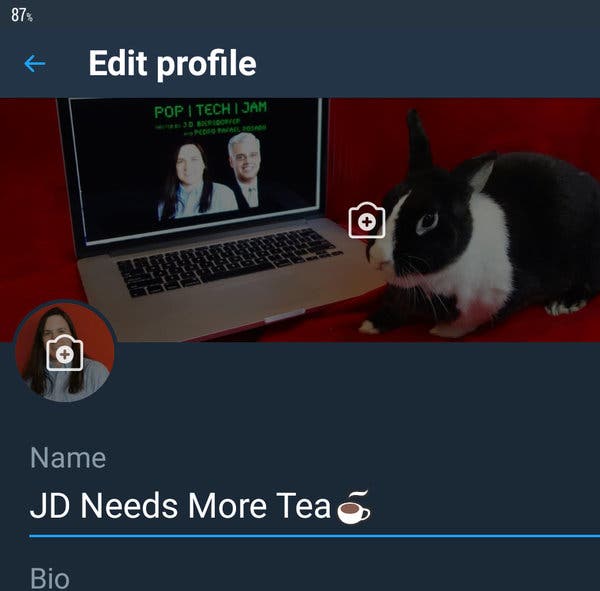
To add emojis to your bio or name, you can tap the emoji key at the top right of your Twitter page and choose an emoji. Once you’ve selected an emoji, tap on ‘Save’ in the top right corner of the tweet box. Once your bio is saved, you can insert the emoji. Once you’ve added an emoji, you’ll be able to reply to people and post on their wall.

See the article :
What Does LLC Mean on Social Media?
What Does LLC Mean on Social Media? What does LLC mean? It’s…

Adding underscores

Adding underscores to your Twitter name is an excellent way to separate words in your username. For example, “TheTechGuy” becomes @thetechguy. To see also : Can You See Who Views Your Twitter 2022?. Just make sure that you don’t use more than two underscores in a row, as doing so can take up valuable characters. Moreover, if you have other social media accounts with thousands of followers, you should also use the same username for Twitter.

In addition to using underscores, you can also add other symbols and emojis to your username. However, these characters are only allowed in your Twitter username if you’re using the app on your mobile. The character limit for a username is 30 characters, including underscores. If you want to get a longer username, you can try using an abbreviation such as @. On the other hand, underscores are not allowed in your name if you’re using Twitter on your PC.

Read also :
Why Musk Wants Twitter to Be More Monetizable Than TikTok and WeChat
Why Musk Wants Twitter to Be More Monetizable Than TikTok and WeChat…

Adding check marks

If you are interested in getting the checkmarks in your Twitter name, you can follow these steps. First, sign in to Twitter. You’ll have to enter your name, birth date, and appropriate picture. Next, complete the bio. This may interest you : How Do You Post a Three Minute Video on Twitter?. Fill out all of these fields. This information will help you develop your Twitter marketing strategy. You can also enable the birth date lock feature and uncheck the privacy setting. To verify your account, you must have a verified email address and phone number.

If you’re wondering why Twitter would add a blue checkmark in your name, you should first understand what that blue checkmark represents. A verified Twitter account displays a blue checkmark next to its name. This checkmark is always the same color and position. It helps people distinguish between verified accounts and fake ones. However, the blue checkmark is only useful if your name has been published in a reputable outlet.

To see also :
Is 500 Followers on Twitter Good?
Is 500 Followers on Twitter Good? Getting a certain number of followers…

Adding @ symbol

Adding @ symbol to your Twitter name is relatively easy. First of all, you need to know what @ symbol stands for. The “@” symbol is a symbol that indicates deliberate mention or tagging. Usually, it is associated with social media platforms such as Twitter. You can find a list of all the codes for @ symbol on the Internet. After you have the codes, click on them and copy them to your Twitter account.

Alternatively, you can use an underscore before or after your first and last name. A PayPal customer support account uses the handle @AskPayPal. After you have chosen your Twitter username, you can insert your new handle. If your desired handle is already taken, you will receive an alert message when trying to use it. If you cannot find it, simply delete it and try again. Then, follow the steps outlined in the article.


Related Posts:

  • How Do I Change My Twitter Handle?
  • How to Use Emojis on Twitter
  • How to Change My @ Name on Twitter
  • How to Change Twitter User Names
  • How Do I Change My Twitter @?
  • How Many Characters Are in Emojis and GIFs for Twitter?
Was this article helpful?
YesNo

You might also like

Troubleshooting Instagram Posting Issues

Troubleshooting Instagram Posting Issues

How to Post Multiple Photos on Instagram Without Cropping – The Ultimate Guide

How to Post Multiple Photos on Instagram Without Cropping – The Ultimate Guide

How Do I View My Instagram Likes on My PC?

How Do I View My Instagram Likes on My PC?

How to Pause Reels in Instagram

How to Pause Reels in Instagram

How to Make Instagram Bio Center

How to Get Verified on YouTube: How to Speed Up the Process

How to Get Verified on YouTube: How to Speed Up the Process

Categories

  • Facebook
  • General
  • Instagram
  • LinkedIn
  • Marketing
  • Pinterest
  • Social Media
  • TikTok
  • Twitter
  • YouTube


Making Your Brands Popular.

(347) 875-0972

[email protected]

© 2024 Zeru.
All Rights Reserved.

DMCA.com Protection Status

Instagram Services

  • Buy Instagram Followers
  • Buy Instagram Likes
  • Buy Instagram Views
  • Buy Instagram Comments

YouTube Services

  • Buy YouTube Views
  • Buy YouTube Subscribers
  • Buy YouTube Likes
  • Buy YouTube Comments

TikTok Services

  • Buy TikTok Followers
  • Buy TikTok Likes
  • Buy TikTok Views

Facebook Services

  • Buy Facebook Page Likes
  • Buy Facebook Followers
  • Buy Facebook Post Likes
  • Buy Facebook Views

Twitter Services

  • Buy Twitter Followers
  • Buy Twitter Likes
  • Buy Twitter Retweets

Quick Links

  • FAQ
  • Blog
  • Contact
  • About
  • Terms and Conditions
  • Privacy Policy
No Result
View All Result
  • Buy Followers
    • Instagram Services
      • Buy Instagram Followers
      • Buy Instagram Likes
      • Buy Instagram Views
      • Buy Instagram Comments
    • YouTube Services
      • Buy YouTube Views
      • Buy YouTube Subscribers
      • Buy YouTube Likes
      • Buy YouTube Comments
    • TikTok Services
      • Buy TikTok Followers
      • Buy TikTok Likes
      • Buy TikTok Views
    • Facebook Services
      • Buy Facebook Page Likes
      • Buy Facebook Followers
      • Buy Facebook Post Likes
      • Buy Facebook Views
    • Twitter Services
      • Buy Twitter Followers
      • Buy Twitter Likes
      • Buy Twitter Retweets
  • Blog
  • Categories
    • Instagram
    • YouTube
    • TikTok
    • Facebook
    • Twitter
  • Contact

© 2023 Zeru. All Rights Reserved.

Welcome Back!

Login to your account below

Forgotten Password?

Create New Account!

Fill the forms bellow to register

All fields are required. Log In

Retrieve your password

Please enter your username or email address to reset your password.

Log In





