






• Buy Followers
    • Instagram Services
      • Buy Instagram Followers
      • Buy Instagram Likes
      • Buy Instagram Views
      • Buy Instagram Comments
    • YouTube Services
      • Buy YouTube Views
      • Buy YouTube Subscribers
      • Buy YouTube Likes
      • Buy YouTube Comments
    • TikTok Services
      • Buy TikTok Followers
      • Buy TikTok Likes
      • Buy TikTok Views
    • Facebook Services
      • Buy Facebook Page Likes
      • Buy Facebook Followers
      • Buy Facebook Post Likes
      • Buy Facebook Views
    • Twitter Services
      • Buy Twitter Followers
      • Buy Twitter Likes
      • Buy Twitter Retweets
  • Blog
  • Categories
    • Instagram
    • YouTube
    • TikTok
    • Facebook
    • Twitter
  • Contact
No Result
View All Result
Zeru
  • Buy Followers
    • Instagram Services
      • Buy Instagram Followers
      • Buy Instagram Likes
      • Buy Instagram Views
      • Buy Instagram Comments
    • YouTube Services
      • Buy YouTube Views
      • Buy YouTube Subscribers
      • Buy YouTube Likes
      • Buy YouTube Comments
    • TikTok Services
      • Buy TikTok Followers
      • Buy TikTok Likes
      • Buy TikTok Views
    • Facebook Services
      • Buy Facebook Page Likes
      • Buy Facebook Followers
      • Buy Facebook Post Likes
      • Buy Facebook Views
    • Twitter Services
      • Buy Twitter Followers
      • Buy Twitter Likes
      • Buy Twitter Retweets
  • Blog
  • Categories
    • Instagram
    • YouTube
    • TikTok
    • Facebook
    • Twitter
  • Contact
No Result
View All Result
Zeru
No Result
View All Result

Popular Services

Buy YouTube Views
Buy TikTok Followers
Buy Twitter Followers
Buy Facebook Followers
Buy Instagram Likes
Buy TikTok Likes
Buy Instagram Views
Buy TikTok Views
Buy Instagram Comments
Buy YouTube Likes
Buy Twitter Likes
Buy YouTube Comments
Buy Facebook Views
Buy Facebook Page Likes
Buy Twitter Retweets
Buy Facebook Post Likes
Buy YouTube Subscribers
Buy Instagram Followers

How Do I Post to Facebook Instagram and Twitter at the Same Time?

Lizzie Yates by Lizzie Yates
in Twitter
3 min read
63
How Do I Post to Facebook Instagram and Twitter at the Same Time?
13
SHARES
1.3k
VIEWS
Share on FacebookShare on Twitter

Contents

  • How Do I Post to Facebook Instagram and Twitter at the Same Time?
  • Analyze
  • Publish
  • OneUp
  • Cross-posting to Instagram
  • FS Poster

How Do I Post to Facebook Instagram and Twitter at the Same Time?

How do I post to Facebook Instagram and Twitter at the same time

If you’re asking yourself, “How do I post to Facebook Instagram and Twitter at once?” you’ve come to the right place. Cross-posting is a brilliant way to promote your brand and increase your followers on both platforms. By analyzing your social media posts and adding hashtags, you can increase your reach and increase your followers on both platforms. It’s easy, too. Read on to discover how to do it.

Analyze

To analyze the impact of posting to Facebook, Instagram, and Twitter, we used Google’s geocoded web search data. Using self-report data instead of region-level aggregates, we found that higher Instagram usage was associated with greater depression diagnoses in most sociodemographic groups. These findings were shared with Hootsuite’s social media team. For each social media network, different posting times are appropriate for a particular audience, but we’ve found that certain times are better than others.

On the same subject :
Why Did Trump Get Suspended From Twitter?
Why Did Trump Get Suspended From Twitter? Elon Musk and Democratic politicians…

Publish

Publish to Facebook Instagram and Twitter at the exact same time is not always possible. Fortunately, a number of tools exist that make this process as easy as possible. Circleboom Publish is one such tool that offers several tools to help you manage all your social profiles at the same time. You can attach a blog post or landing page from HubSpot, or enter the link directly into the platform. The software will create a post preview based on the content metadata and generate a title and picture. You can even include a meta description if you like.

Using this tool, you can create multiple posts and customize them for the various social media platforms. With the option to share URLs and hashtags, for instance, Facebook and Twitter both offer similar functionality. Using hashtags, however, is not as effective as using URLs on Facebook and Instagram. This may interest you : What is the S Word on Twitter?. You can customize your posts for each platform by using the appropriate tools and scheduling them. Once you’ve completed your posts, you can then share them to Facebook and Twitter at the same time.

See the article :
What Does MAP Stand For on Twitter?
What Does MAP Stand For on Twitter? MAP stands for ‘Age of…

OneUp

OneUp is a great tool for automating social media posting. You can schedule multiple posts, repeat them and even resurface old ones. You can even automate Facebook Group themes and resurface older posts. This may interest you : How to Report a Twitter Account. Despite the clunky interface, OneUp is still the most powerful social media management software on the market. With a few exceptions, OneUp does not work for large companies that manage multiple social networks. However, it is worth a look if you are running a small business or need a simple solution for your social media marketing.

Once you set up your accounts, you can begin posting right away. You can post to Facebook, Instagram, and Twitter simultaneously with OneUp. You can schedule posts for as many social networks as you want. It’s also a great time-saver because you don’t have to spend a lot of time each day scheduling multiple posts. Plus, OneUp has a free trial and is available for a year.
This may interest you :
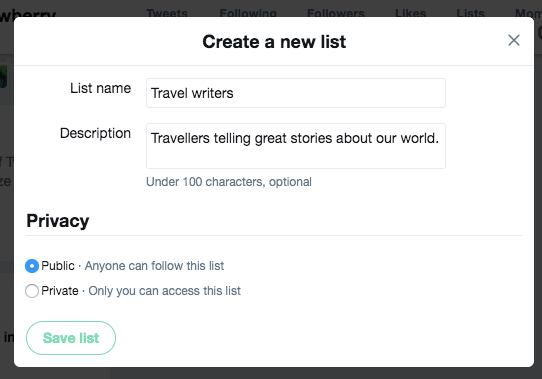
What is a List on Twitter?
What is a List on Twitter? What is a list on Twitter?…

Cross-posting to Instagram

Social media marketing is becoming an increasingly important part of a business’ overall presence. But how do you cross-post from Facebook to Instagram? While Facebook’s mobile app offers the best functionality, you can cross-post from your computer, too. To see also : What Happens When You Mute Someone on Twitter?. Most marketers work from a computer, so this functionality is a major plus. Airdropping or emailing a photo to your Instagram account is a hassle that makes the process less efficient.

When cross-posting to different social media networks, it is important to tailor your content for each platform. For example, a link in your bio on Instagram may be ignored or only appear once a day. In addition, the content must be optimized for each network and be tailored to its features. You can also use specific tools to optimize the content for each network. When cross-posting to Facebook, don’t forget to include the hashtag in the caption.

FS Poster

FS Poster is a powerful WordPress plugin that allows you to post to multiple social networks at once. You can choose to schedule your posts once or repeat them over time. The plugin also supports all custom post types, including photos and videos. To get started, you can sign up for the free trial and then start posting right away. The paid version includes six months of support and updates. The developers have provided a comprehensive manual and a dedicated FAQ section to answer any questions you might have.

FS Poster has two versions, the free and premium, so you can choose the one that meets your specific needs. The FS Poster Lite version is suitable for small businesses, while the Premium version is ideal for larger companies with multiple social accounts. Both versions come with a dashboard for tracking social media statistics and insights. It saves you hours of time in planning, scheduling, analyzing and reporting. In addition to that, you can also check which platform gets more engagement from your audience.


Related Posts:

  • How to Link Facebook and Instagram
  • How to Link Facebook and Instagram
  • How to Link Facebook and Instagram
  • How to Link Instagram With Facebook
  • How to Link Instagram to Facebook
  • How to Post From Facebook to Instagram
Was this article helpful?
YesNo

You might also like

Troubleshooting Instagram Posting Issues

Troubleshooting Instagram Posting Issues

How to Post Multiple Photos on Instagram Without Cropping – The Ultimate Guide

How to Post Multiple Photos on Instagram Without Cropping – The Ultimate Guide

How Do I View My Instagram Likes on My PC?

How Do I View My Instagram Likes on My PC?

How to Pause Reels in Instagram

How to Pause Reels in Instagram

How to Make Instagram Bio Center

How to Get Verified on YouTube: How to Speed Up the Process

How to Get Verified on YouTube: How to Speed Up the Process

Categories

  • Facebook
  • General
  • Instagram
  • LinkedIn
  • Marketing
  • Pinterest
  • Social Media
  • TikTok
  • Twitter
  • YouTube


Making Your Brands Popular.

(347) 875-0972

[email protected]

© 2024 Zeru.
All Rights Reserved.

DMCA.com Protection Status

Instagram Services

  • Buy Instagram Followers
  • Buy Instagram Likes
  • Buy Instagram Views
  • Buy Instagram Comments

YouTube Services

  • Buy YouTube Views
  • Buy YouTube Subscribers
  • Buy YouTube Likes
  • Buy YouTube Comments

TikTok Services

  • Buy TikTok Followers
  • Buy TikTok Likes
  • Buy TikTok Views

Facebook Services

  • Buy Facebook Page Likes
  • Buy Facebook Followers
  • Buy Facebook Post Likes
  • Buy Facebook Views

Twitter Services

  • Buy Twitter Followers
  • Buy Twitter Likes
  • Buy Twitter Retweets

Quick Links

  • FAQ
  • Blog
  • Contact
  • About
  • Terms and Conditions
  • Privacy Policy
No Result
View All Result
  • Buy Followers
    • Instagram Services
      • Buy Instagram Followers
      • Buy Instagram Likes
      • Buy Instagram Views
      • Buy Instagram Comments
    • YouTube Services
      • Buy YouTube Views
      • Buy YouTube Subscribers
      • Buy YouTube Likes
      • Buy YouTube Comments
    • TikTok Services
      • Buy TikTok Followers
      • Buy TikTok Likes
      • Buy TikTok Views
    • Facebook Services
      • Buy Facebook Page Likes
      • Buy Facebook Followers
      • Buy Facebook Post Likes
      • Buy Facebook Views
    • Twitter Services
      • Buy Twitter Followers
      • Buy Twitter Likes
      • Buy Twitter Retweets
  • Blog
  • Categories
    • Instagram
    • YouTube
    • TikTok
    • Facebook
    • Twitter
  • Contact

© 2023 Zeru. All Rights Reserved.

Welcome Back!

Login to your account below

Forgotten Password?

Create New Account!

Fill the forms bellow to register

All fields are required. Log In

Retrieve your password

Please enter your username or email address to reset your password.

Log In





