






• Buy Followers
    • Instagram Services
      • Buy Instagram Followers
      • Buy Instagram Likes
      • Buy Instagram Views
      • Buy Instagram Comments
    • YouTube Services
      • Buy YouTube Views
      • Buy YouTube Subscribers
      • Buy YouTube Likes
      • Buy YouTube Comments
    • TikTok Services
      • Buy TikTok Followers
      • Buy TikTok Likes
      • Buy TikTok Views
    • Facebook Services
      • Buy Facebook Page Likes
      • Buy Facebook Followers
      • Buy Facebook Post Likes
      • Buy Facebook Views
    • Twitter Services
      • Buy Twitter Followers
      • Buy Twitter Likes
      • Buy Twitter Retweets
  • Blog
  • Categories
    • Instagram
    • YouTube
    • TikTok
    • Facebook
    • Twitter
  • Contact
No Result
View All Result
Zeru
  • Buy Followers
    • Instagram Services
      • Buy Instagram Followers
      • Buy Instagram Likes
      • Buy Instagram Views
      • Buy Instagram Comments
    • YouTube Services
      • Buy YouTube Views
      • Buy YouTube Subscribers
      • Buy YouTube Likes
      • Buy YouTube Comments
    • TikTok Services
      • Buy TikTok Followers
      • Buy TikTok Likes
      • Buy TikTok Views
    • Facebook Services
      • Buy Facebook Page Likes
      • Buy Facebook Followers
      • Buy Facebook Post Likes
      • Buy Facebook Views
    • Twitter Services
      • Buy Twitter Followers
      • Buy Twitter Likes
      • Buy Twitter Retweets
  • Blog
  • Categories
    • Instagram
    • YouTube
    • TikTok
    • Facebook
    • Twitter
  • Contact
No Result
View All Result
Zeru
No Result
View All Result

Popular Services

Buy YouTube Views
Buy TikTok Followers
Buy Twitter Followers
Buy Facebook Followers
Buy Instagram Likes
Buy TikTok Likes
Buy Instagram Views
Buy TikTok Views
Buy Instagram Comments
Buy YouTube Likes
Buy Twitter Likes
Buy YouTube Comments
Buy Facebook Views
Buy Facebook Page Likes
Buy Twitter Retweets
Buy Facebook Post Likes
Buy YouTube Subscribers
Buy Instagram Followers

How to Download a Facebook Messenger Conversation

Lizzie Yates by Lizzie Yates
in Facebook
3 min read
69
How to Download a Facebook Messenger Conversation
15
SHARES
1.5k
VIEWS
Share on FacebookShare on Twitter

Contents

  • How to Download a Facebook Messenger Conversation
  • Does Facebook allow you to download a conversation?
  • How do you do it?
  • Third-party tools available to help
  • How long does it take to download a conversation?

How to Download a Facebook Messenger Conversation

Can I download a Facebook Messenger conversation

The first step in downloading a Facebook Messenger conversation is to extract the zip file you downloaded and then open a folder named after the person you wish to view. Inside the folder you’ll find HTML files that list each conversation from the most recent to the oldest. After the file is extracted, you should log in to your Facebook account using a browser. Select the Account option and click Settings. Once the conversation has finished downloading, you can view it in HTML format.

Does Facebook allow you to download a conversation?

How can you download a Facebook Messenger conversation? Downloading this information is possible with third-party apps. First, you’ll need to log in to your Facebook account. Next, go to Account Settings and click on “Download a copy. To see also : How to Post on Facebook Marketplace.” Once you’ve made the request, Facebook will send you a notification. Then, all you have to do is wait for the conversation to process. Once it has, you can view and download the conversation as an HTML file.

Once you’ve done that, you’ll need to choose the file you’d like to download. You can either choose to download all of the conversation history or select to download specific messages. You can even choose when you want to download certain data, such as a specific day or entire week. Once you’ve chosen which data you’d like to download, you can choose to uncheck the rest. The file will be saved in your “available copies” folder.

To see also :
How to Contact Facebook in the UK
How to Contact Facebook in the UK If you’ve tried online methods…

How do you do it?

How do you download a Facebook Messenger conversation? Thankfully, Facebook provides a simple solution. You can download the conversation in the format you need by downloading it to your mobile device. Then, you can open the conversation file on any computer and copy all of the text. This may interest you : How to Deactivate Facebook on iPhone. But you can’t download the conversations from other users unless you have access to a computer. Luckily, there are some third-party apps you can download a Facebook Messenger conversation from.

To download a Facebook Messenger conversation, you must navigate to the conversation in which you want to save the message. To do this, go to the top of the conversation thread and press and hold the CTRL key while scrolling. The text will be copied into the clipboard. After that, you need to paste the text into your recipient’s program and then click on the “Save” button. Once you have saved the conversation, you can now view it whenever you want.

See the article :
How Do I Create a Unique Name on Facebook?
How Do I Create a Unique Name on Facebook? If you want…

Third-party tools available to help

If you’ve been missing out on conversations on Facebook, you can now download all or part of them using a third-party tool. While navigating the web application, you will first need to download a file from your local computer. To see also : How to Earn From Facebook. After the file has been downloaded, you can use it in a word processor to find specific text. You can then use that file to relive the conversation.

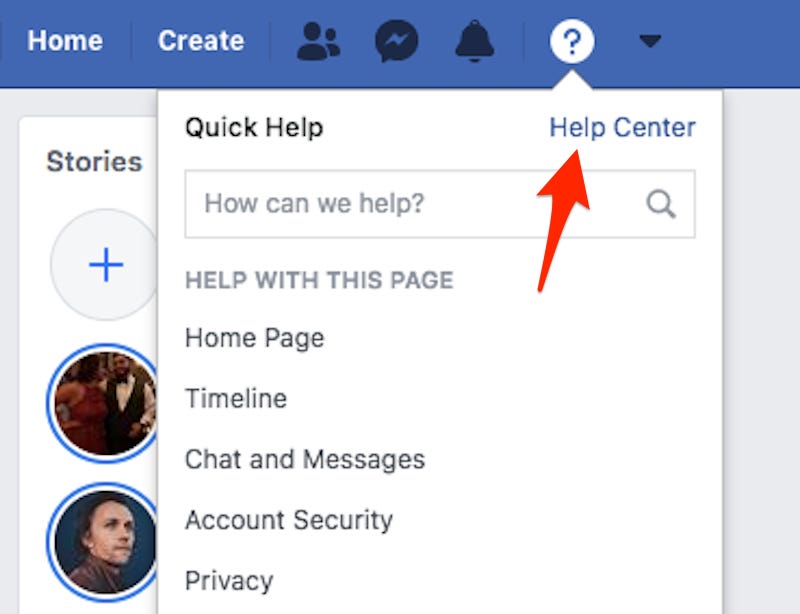
To view the conversation, you’ll need to download a zip file from the app’s website. Once you’ve done this, find the folder containing the name of the person you’d like to download the conversation from. Within this folder, you’ll find the HTML files of the conversation, in chronological order from newest to oldest messages. To download a Facebook Messenger conversation, sign in via the browser and click on the Account option. Then, click on Settings and then click on “Download Conversations.”
Read also :
How to Deactivate Facebook Mobile
How to Deactivate Facebook Mobile There are several reasons to deactivate your…

How long does it take to download a conversation?

Facebook allows you to download a Messenger conversation in three different quality levels. Depending on the type of download you wish to perform, this can take anywhere from 15 minutes to 48 hours. Facebook will then notify you via email that your download is complete and ready to be viewed. From there, you can view and download the conversation from your computer. Alternatively, you can use zapptales to turn your Facebook Messenger conversations into books.

Facebook allows you to download your Facebook Messenger conversation history for a variety of reasons, including archiving it outside the website. There are also ways to download specific information or everything, depending on your needs. Once you choose which type of information you want to download, you can choose a time period and location. The only downside is that the process of downloading is sometimes slow, so this option may not be right for you.


Related Posts:

  • How to Find Archived Messages on Facebook
  • Does Downloading Your Facebook Data Show Deleted Messages?
  • How to Find Deleted Messages on Facebook
  • How to Retrieve Deleted Messages From Facebook Messenger
  • How to Recover Permanently Deleted Messages From Facebook…
  • How to Recover Deleted Facebook Messages
Was this article helpful?
YesNo

You might also like

Troubleshooting Instagram Posting Issues

Troubleshooting Instagram Posting Issues

How to Post Multiple Photos on Instagram Without Cropping – The Ultimate Guide

How to Post Multiple Photos on Instagram Without Cropping – The Ultimate Guide

How Do I View My Instagram Likes on My PC?

How Do I View My Instagram Likes on My PC?

How to Pause Reels in Instagram

How to Pause Reels in Instagram

How to Make Instagram Bio Center

How to Get Verified on YouTube: How to Speed Up the Process

How to Get Verified on YouTube: How to Speed Up the Process

Categories

  • Facebook
  • General
  • Instagram
  • LinkedIn
  • Marketing
  • Pinterest
  • Social Media
  • TikTok
  • Twitter
  • YouTube


Making Your Brands Popular.

(347) 875-0972

[email protected]

© 2024 Zeru.
All Rights Reserved.

DMCA.com Protection Status

Instagram Services

  • Buy Instagram Followers
  • Buy Instagram Likes
  • Buy Instagram Views
  • Buy Instagram Comments

YouTube Services

  • Buy YouTube Views
  • Buy YouTube Subscribers
  • Buy YouTube Likes
  • Buy YouTube Comments

TikTok Services

  • Buy TikTok Followers
  • Buy TikTok Likes
  • Buy TikTok Views

Facebook Services

  • Buy Facebook Page Likes
  • Buy Facebook Followers
  • Buy Facebook Post Likes
  • Buy Facebook Views

Twitter Services

  • Buy Twitter Followers
  • Buy Twitter Likes
  • Buy Twitter Retweets

Quick Links

  • FAQ
  • Blog
  • Contact
  • About
  • Terms and Conditions
  • Privacy Policy
No Result
View All Result
  • Buy Followers
    • Instagram Services
      • Buy Instagram Followers
      • Buy Instagram Likes
      • Buy Instagram Views
      • Buy Instagram Comments
    • YouTube Services
      • Buy YouTube Views
      • Buy YouTube Subscribers
      • Buy YouTube Likes
      • Buy YouTube Comments
    • TikTok Services
      • Buy TikTok Followers
      • Buy TikTok Likes
      • Buy TikTok Views
    • Facebook Services
      • Buy Facebook Page Likes
      • Buy Facebook Followers
      • Buy Facebook Post Likes
      • Buy Facebook Views
    • Twitter Services
      • Buy Twitter Followers
      • Buy Twitter Likes
      • Buy Twitter Retweets
  • Blog
  • Categories
    • Instagram
    • YouTube
    • TikTok
    • Facebook
    • Twitter
  • Contact

© 2023 Zeru. All Rights Reserved.

Welcome Back!

Login to your account below

Forgotten Password?

Create New Account!

Fill the forms bellow to register

All fields are required. Log In

Retrieve your password

Please enter your username or email address to reset your password.

Log In





