






• Buy Followers
    • Instagram Services
      • Buy Instagram Followers
      • Buy Instagram Likes
      • Buy Instagram Views
      • Buy Instagram Comments
    • YouTube Services
      • Buy YouTube Views
      • Buy YouTube Subscribers
      • Buy YouTube Likes
      • Buy YouTube Comments
    • TikTok Services
      • Buy TikTok Followers
      • Buy TikTok Likes
      • Buy TikTok Views
    • Facebook Services
      • Buy Facebook Page Likes
      • Buy Facebook Followers
      • Buy Facebook Post Likes
      • Buy Facebook Views
    • Twitter Services
      • Buy Twitter Followers
      • Buy Twitter Likes
      • Buy Twitter Retweets
  • Blog
  • Categories
    • Instagram
    • YouTube
    • TikTok
    • Facebook
    • Twitter
  • Contact
No Result
View All Result
Zeru
  • Buy Followers
    • Instagram Services
      • Buy Instagram Followers
      • Buy Instagram Likes
      • Buy Instagram Views
      • Buy Instagram Comments
    • YouTube Services
      • Buy YouTube Views
      • Buy YouTube Subscribers
      • Buy YouTube Likes
      • Buy YouTube Comments
    • TikTok Services
      • Buy TikTok Followers
      • Buy TikTok Likes
      • Buy TikTok Views
    • Facebook Services
      • Buy Facebook Page Likes
      • Buy Facebook Followers
      • Buy Facebook Post Likes
      • Buy Facebook Views
    • Twitter Services
      • Buy Twitter Followers
      • Buy Twitter Likes
      • Buy Twitter Retweets
  • Blog
  • Categories
    • Instagram
    • YouTube
    • TikTok
    • Facebook
    • Twitter
  • Contact
No Result
View All Result
Zeru
No Result
View All Result

Popular Services

Buy YouTube Views
Buy TikTok Followers
Buy Twitter Followers
Buy Facebook Followers
Buy Instagram Likes
Buy TikTok Likes
Buy Instagram Views
Buy TikTok Views
Buy Instagram Comments
Buy YouTube Likes
Buy Twitter Likes
Buy YouTube Comments
Buy Facebook Views
Buy Facebook Page Likes
Buy Twitter Retweets
Buy Facebook Post Likes
Buy YouTube Subscribers
Buy Instagram Followers

How Do I Stop Someone From Seeing My Posts on Facebook Without Blocking Them?

Lizzie Yates by Lizzie Yates
in Facebook
3 min read
73
How Do I Stop Someone From Seeing My Posts on Facebook Without Blocking Them?
16
SHARES
1.6k
VIEWS
Share on FacebookShare on Twitter

Contents

  • How Do I Stop Someone From Seeing My Posts on Facebook Without Blocking Them?
  • Unfollow a user to stop seeing their posts on Facebook
  • Unfriend a user to stop seeing their posts on Facebook
  • Use Facebook’s Restricted list to hide your posts from people you’re friends with

How Do I Stop Someone From Seeing My Posts on Facebook Without Blocking Them?

How do I stop someone seeing my posts on Facebook without blocking them

Facebook offers several ways to block certain users from seeing your posts. You can unfollow or block them by going to your settings and selecting them. Alternatively, you can use the Facebook Restricted list to hide your posts from people you’re friends with. Here are the steps involved:

Unfollow a user to stop seeing their posts on Facebook

Using the “Unfollow” feature on Facebook will hide a user’s updates from your timeline. While their posts won’t show up automatically in your feed, you can still see them if you’ve set your privacy settings to allow others to see them. Unlike blocking someone, though, unfollowing them won’t change your status on the site. Read also : How to Create a Facebook Page For Your Business. Rather, it will hide their posts from your feed and timeline for anyone else who is following you. To take a break from being bombarded by a user’s posts, you can use the “Take a break” feature. This option will hide the posts of people who you’re not following from your timeline.

You can also use the “Unfollow” feature to stop seeing a user’s posts by simply clicking the three dots in the top right-hand corner of their profile. Unfollowing a user won’t hurt your friendship with them and you can reverse the action if you change your mind later. Another useful feature of unfollowing a user is that it is easy to unfollow multiple users or things at once.

Unfollowing someone on Facebook does not prevent them from seeing your posts. It only prevents you from seeing their posts on your timeline, but it also does not block them. Simply click the three dots in the top right corner of their post to reveal a drop-down menu. There you can select “Unfollow” to unfollow that user. Then, click Done again to reconnect with them.

Read also :
How Do I Get My Facebook App Back?
How Do I Get My Facebook App Back? When your iPhone or…

Unfriend a user to stop seeing their posts on Facebook

If a friend is annoying you by making their posts appear too often, you can unfriend them from Facebook. You can unfollow a user without blocking them, and their posts will no longer show up in your news feed. Read also : How to Connect Facebook Page and Instagram. The process is simple and can be done at any time. Simply choose “Unfriend” from the drop-down menu, and select the option to hide some of their posts.

When you unfriend someone on Facebook, you won’t receive a notification. They won’t know that they’ve been unfriended, but they’ll catch on eventually. After you unfriend a person, you’ll have to re-friend them, just like you would if you had blocked them. Just remember to follow the instructions carefully so you don’t block yourself.

Once you’ve unfriended someone, you won’t see their posts on Facebook anymore, but you will no longer be able to contact them. However, if you don’t want to share your private information with them, you can still contact them through Facebook. Just remember, unfriending someone doesn’t mean that you block them completely, since they may still be able to see their posts on your Timeline.

Read also :
How Do I Send a Birthday Greeting on Facebook?
How Do I Send a Birthday Greeting on Facebook? If your friend…

Use Facebook’s Restricted list to hide your posts from people you’re friends with

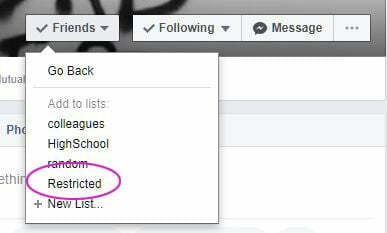
If you’ve accidentally posted something that you don’t want other people to see, you can use Facebook’s Restricted list to hide these posts. This feature allows you to limit who can see your posts by limiting the interaction you have with your friends. Read also : What Is Facebook Pixel and How Can It Help Increase Your Advertising ROI?. Creating a restricted list is easy – all you have to do is open your Facebook profile and click “Edit Friend Lists.” Once you’ve selected the Restricted list, you can remove the friends you’ve added.

You can also use Facebook’s “Restricted list” to hide your posts from people you’re friend with. You can add a group of friends, or even a few people, to the list. The list is also searchable, so you can find people by name. You can also set a timeframe for restricting certain posts. You’ll want to check this list regularly to ensure you’re only putting your most sensitive information there.

When you restrict someone, they won’t know what you’re doing. They won’t see your posts unless you tag them, but they will still see the posts made by friends who don’t have the restricted list. And if you’d like to restore the restricted list to your Facebook profile, you can do it manually. Just be sure to change your Friends privacy settings if the restriction isn’t working for you.

To see also :
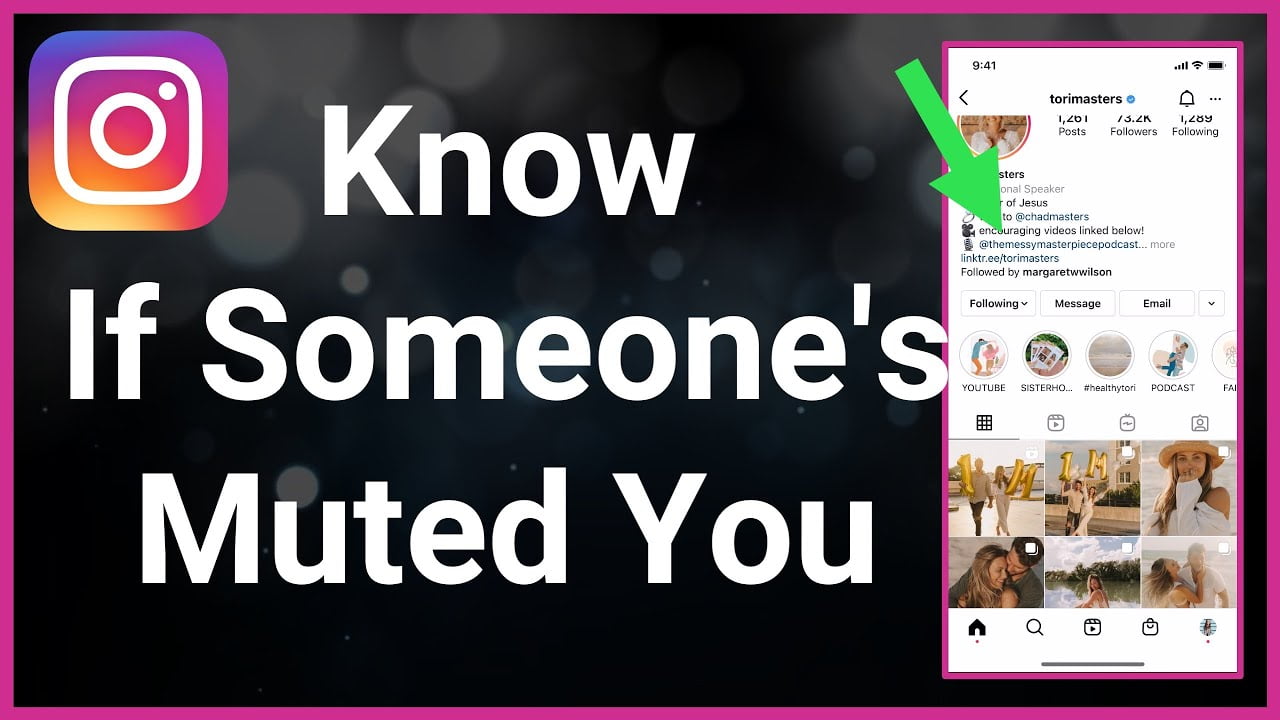
How to Tell If Someone Has Restricted You on Facebook and Instagram
How to Tell If Someone Has Restricted You on Facebook and Instagram…

Related Posts:

  • How to Hide My Friends on Facebook
  • How Do You Hide Posts From Someone Without Unfriending Them…
  • How to Unfollow in Facebook
  • How to Unfollow People on Facebook
  • How to Unfollow Someone on Facebook
  • How Do You Unfollow Someone on Instagram?
Was this article helpful?
YesNo

You might also like

Troubleshooting Instagram Posting Issues

Troubleshooting Instagram Posting Issues

How to Post Multiple Photos on Instagram Without Cropping – The Ultimate Guide

How to Post Multiple Photos on Instagram Without Cropping – The Ultimate Guide

How Do I View My Instagram Likes on My PC?

How Do I View My Instagram Likes on My PC?

How to Pause Reels in Instagram

How to Pause Reels in Instagram

How to Make Instagram Bio Center

How to Get Verified on YouTube: How to Speed Up the Process

How to Get Verified on YouTube: How to Speed Up the Process

Categories

  • Facebook
  • General
  • Instagram
  • LinkedIn
  • Marketing
  • Pinterest
  • Social Media
  • TikTok
  • Twitter
  • YouTube


Making Your Brands Popular.

(347) 875-0972

[email protected]

© 2024 Zeru.
All Rights Reserved.

DMCA.com Protection Status

Instagram Services

  • Buy Instagram Followers
  • Buy Instagram Likes
  • Buy Instagram Views
  • Buy Instagram Comments

YouTube Services

  • Buy YouTube Views
  • Buy YouTube Subscribers
  • Buy YouTube Likes
  • Buy YouTube Comments

TikTok Services

  • Buy TikTok Followers
  • Buy TikTok Likes
  • Buy TikTok Views

Facebook Services

  • Buy Facebook Page Likes
  • Buy Facebook Followers
  • Buy Facebook Post Likes
  • Buy Facebook Views

Twitter Services

  • Buy Twitter Followers
  • Buy Twitter Likes
  • Buy Twitter Retweets

Quick Links

  • FAQ
  • Blog
  • Contact
  • About
  • Terms and Conditions
  • Privacy Policy
No Result
View All Result
  • Buy Followers
    • Instagram Services
      • Buy Instagram Followers
      • Buy Instagram Likes
      • Buy Instagram Views
      • Buy Instagram Comments
    • YouTube Services
      • Buy YouTube Views
      • Buy YouTube Subscribers
      • Buy YouTube Likes
      • Buy YouTube Comments
    • TikTok Services
      • Buy TikTok Followers
      • Buy TikTok Likes
      • Buy TikTok Views
    • Facebook Services
      • Buy Facebook Page Likes
      • Buy Facebook Followers
      • Buy Facebook Post Likes
      • Buy Facebook Views
    • Twitter Services
      • Buy Twitter Followers
      • Buy Twitter Likes
      • Buy Twitter Retweets
  • Blog
  • Categories
    • Instagram
    • YouTube
    • TikTok
    • Facebook
    • Twitter
  • Contact

© 2023 Zeru. All Rights Reserved.

Welcome Back!

Login to your account below

Forgotten Password?

Create New Account!

Fill the forms bellow to register

All fields are required. Log In

Retrieve your password

Please enter your username or email address to reset your password.

Log In






