






• Buy Followers
    • Instagram Services
      • Buy Instagram Followers
      • Buy Instagram Likes
      • Buy Instagram Views
      • Buy Instagram Comments
    • YouTube Services
      • Buy YouTube Views
      • Buy YouTube Subscribers
      • Buy YouTube Likes
      • Buy YouTube Comments
    • TikTok Services
      • Buy TikTok Followers
      • Buy TikTok Likes
      • Buy TikTok Views
    • Facebook Services
      • Buy Facebook Page Likes
      • Buy Facebook Followers
      • Buy Facebook Post Likes
      • Buy Facebook Views
    • Twitter Services
      • Buy Twitter Followers
      • Buy Twitter Likes
      • Buy Twitter Retweets
  • Blog
  • Categories
    • Instagram
    • YouTube
    • TikTok
    • Facebook
    • Twitter
  • Contact
No Result
View All Result
Zeru
  • Buy Followers
    • Instagram Services
      • Buy Instagram Followers
      • Buy Instagram Likes
      • Buy Instagram Views
      • Buy Instagram Comments
    • YouTube Services
      • Buy YouTube Views
      • Buy YouTube Subscribers
      • Buy YouTube Likes
      • Buy YouTube Comments
    • TikTok Services
      • Buy TikTok Followers
      • Buy TikTok Likes
      • Buy TikTok Views
    • Facebook Services
      • Buy Facebook Page Likes
      • Buy Facebook Followers
      • Buy Facebook Post Likes
      • Buy Facebook Views
    • Twitter Services
      • Buy Twitter Followers
      • Buy Twitter Likes
      • Buy Twitter Retweets
  • Blog
  • Categories
    • Instagram
    • YouTube
    • TikTok
    • Facebook
    • Twitter
  • Contact
No Result
View All Result
Zeru
No Result
View All Result

Popular Services

Buy YouTube Views
Buy TikTok Followers
Buy Twitter Followers
Buy Facebook Followers
Buy Instagram Likes
Buy TikTok Likes
Buy Instagram Views
Buy TikTok Views
Buy Instagram Comments
Buy YouTube Likes
Buy Twitter Likes
Buy YouTube Comments
Buy Facebook Views
Buy Facebook Page Likes
Buy Twitter Retweets
Buy Facebook Post Likes
Buy YouTube Subscribers
Buy Instagram Followers

How Do I Change My Name on Facebook?

Lizzie Yates by Lizzie Yates
in Facebook
3 min read
68
How Do I Change My Name on Facebook?
14
SHARES
1.4k
VIEWS
Share on FacebookShare on Twitter

Contents

  • How Do I Change My Name on Facebook?
  • Can I make a nickname public on Facebook?
  • Can I make my real name invisible on Facebook?

How Do I Change My Name on Facebook?

How do I change my name on Facebook

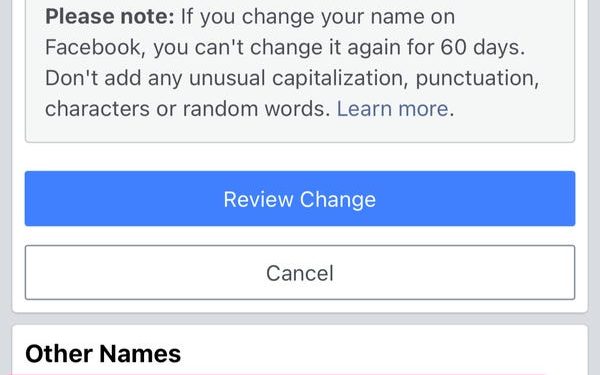
If you’re wondering, “How do I change my name on Facebook?” you’re not alone. Over one billion people use Facebook, and you probably want to avoid being associated with the wrong person or using a fake name. Fortunately, there are some ways to make your real name invisible or hidden, and this article will explain how to do both. Here are the basics:

Can I make a nickname public on Facebook?

To change the name of your Facebook account, go to the Settings page. In the left navigation pane, click “General Account Settings.” From here, you’ll want to click “Edit. See the article : How to Create a Facebook Page for Business.” In the Name field, enter the nickname instead of your full name. For example, “Beth” would work instead of “Beth Smith.” Next, select the format for your identity from the drop-down list.

To change your name on Facebook, you should use the Alternate Name field. Once you’ve done this, click the “Include this in my timeline” check box. Women often use this field to list their maiden names, but it works just as well for a nickname. You will need your Facebook password to change the name, and it may take up to 24 hours for Facebook to confirm the change.

The only restrictions on making a nickname public on Facebook are privacy concerns. Because the social network wants to encourage interaction on a more personal level, it allows users to use their nicknames. A public nickname appears next to the original profile name, and you can change it anytime from the web or mobile. Just remember to follow Facebook’s rules when making changes to your name, or risk losing access to some of the services.

As a general rule, Facebook encourages its users to use their real names. However, many people use nicknames when they go to work, and it can be difficult to distinguish yourself among all of them. To make a nickname public on Facebook, you must update your profile. Then, you can enter it in the Alternate Name field under the First and Middle name fields. Just make sure that your name does not violate Facebook’s Community Standards.

To see also :
How to Find Your Facebook Password on an Android Device
How to Find Your Facebook Password on an Android Device For those…

Can I make my real name invisible on Facebook?

You can hide your real name on Facebook, but this requires a little more effort. You will need to go into your account settings to find the option that allows you to change your name. In the settings menu, find the dropdown menu that is located in the top right corner, directly below the Help icon. To see also : Which is the Best Meme Page on Facebook?. Once you’ve found the menu, enter your password and submit the name change request. You may have to change your language preferences as well.

In addition to your profile name, you can also choose to use a nickname. Changing your username is not impossible, but you have to remember it or scroll through recent messages to see the changes. Facebook has strict rules for changing names and you can get banned if you change it the wrong way. If you want to keep your real name hidden on Facebook, you can use a nickname or your email address.

However, you should be careful about using fake names. Facebook’s software isn’t sophisticated enough to distinguish between a fake and a real name. You might be asked to verify your real identity in order to use a pseudonym. This may not be feasible in some cases, but it’s a safe and secure option. Just be sure to keep in mind that your privacy will be compromised if you don’t change your name.

Another way to hide your real name on Facebook is to use a mononym. Indonesians often only use their first name, so their surnames are not common. If you want to use a mononym on Facebook, you’ll have to fill out a special form. To make sure your mononym is unique, use the same name for both your first and last name. You can also fake your location to Indonesia.


See the article :
How Do I Delete My Facebook Account 2022?
How Do I Delete My Facebook Account 2022? How do I delete…

Related Posts:

  • How Can I Change My Name on Facebook?
  • How Do I Change My Name on Facebook?
  • How Do I Edit My Name on Facebook?
  • How to Change Your Name in Facebook
  • How to Change My Name on Facebook
  • How to Edit Your Name on Facebook
Was this article helpful?
YesNo

You might also like

Troubleshooting Instagram Posting Issues

Troubleshooting Instagram Posting Issues

How to Post Multiple Photos on Instagram Without Cropping – The Ultimate Guide

How to Post Multiple Photos on Instagram Without Cropping – The Ultimate Guide

How Do I View My Instagram Likes on My PC?

How Do I View My Instagram Likes on My PC?

How to Pause Reels in Instagram

How to Pause Reels in Instagram

How to Make Instagram Bio Center

How to Get Verified on YouTube: How to Speed Up the Process

How to Get Verified on YouTube: How to Speed Up the Process

Categories

  • Facebook
  • General
  • Instagram
  • LinkedIn
  • Marketing
  • Pinterest
  • Social Media
  • TikTok
  • Twitter
  • YouTube


Making Your Brands Popular.

(347) 875-0972

[email protected]

© 2024 Zeru.
All Rights Reserved.

DMCA.com Protection Status

Instagram Services

  • Buy Instagram Followers
  • Buy Instagram Likes
  • Buy Instagram Views
  • Buy Instagram Comments

YouTube Services

  • Buy YouTube Views
  • Buy YouTube Subscribers
  • Buy YouTube Likes
  • Buy YouTube Comments

TikTok Services

  • Buy TikTok Followers
  • Buy TikTok Likes
  • Buy TikTok Views

Facebook Services

  • Buy Facebook Page Likes
  • Buy Facebook Followers
  • Buy Facebook Post Likes
  • Buy Facebook Views

Twitter Services

  • Buy Twitter Followers
  • Buy Twitter Likes
  • Buy Twitter Retweets

Quick Links

  • FAQ
  • Blog
  • Contact
  • About
  • Terms and Conditions
  • Privacy Policy
No Result
View All Result
  • Buy Followers
    • Instagram Services
      • Buy Instagram Followers
      • Buy Instagram Likes
      • Buy Instagram Views
      • Buy Instagram Comments
    • YouTube Services
      • Buy YouTube Views
      • Buy YouTube Subscribers
      • Buy YouTube Likes
      • Buy YouTube Comments
    • TikTok Services
      • Buy TikTok Followers
      • Buy TikTok Likes
      • Buy TikTok Views
    • Facebook Services
      • Buy Facebook Page Likes
      • Buy Facebook Followers
      • Buy Facebook Post Likes
      • Buy Facebook Views
    • Twitter Services
      • Buy Twitter Followers
      • Buy Twitter Likes
      • Buy Twitter Retweets
  • Blog
  • Categories
    • Instagram
    • YouTube
    • TikTok
    • Facebook
    • Twitter
  • Contact

© 2023 Zeru. All Rights Reserved.

Welcome Back!

Login to your account below

Forgotten Password?

Create New Account!

Fill the forms bellow to register

All fields are required. Log In

Retrieve your password

Please enter your username or email address to reset your password.

Log In






