






• Buy Followers
    • Instagram Services
      • Buy Instagram Followers
      • Buy Instagram Likes
      • Buy Instagram Views
      • Buy Instagram Comments
    • YouTube Services
      • Buy YouTube Views
      • Buy YouTube Subscribers
      • Buy YouTube Likes
      • Buy YouTube Comments
    • TikTok Services
      • Buy TikTok Followers
      • Buy TikTok Likes
      • Buy TikTok Views
    • Facebook Services
      • Buy Facebook Page Likes
      • Buy Facebook Followers
      • Buy Facebook Post Likes
      • Buy Facebook Views
    • Twitter Services
      • Buy Twitter Followers
      • Buy Twitter Likes
      • Buy Twitter Retweets
  • Blog
  • Categories
    • Instagram
    • YouTube
    • TikTok
    • Facebook
    • Twitter
  • Contact
No Result
View All Result
Zeru
  • Buy Followers
    • Instagram Services
      • Buy Instagram Followers
      • Buy Instagram Likes
      • Buy Instagram Views
      • Buy Instagram Comments
    • YouTube Services
      • Buy YouTube Views
      • Buy YouTube Subscribers
      • Buy YouTube Likes
      • Buy YouTube Comments
    • TikTok Services
      • Buy TikTok Followers
      • Buy TikTok Likes
      • Buy TikTok Views
    • Facebook Services
      • Buy Facebook Page Likes
      • Buy Facebook Followers
      • Buy Facebook Post Likes
      • Buy Facebook Views
    • Twitter Services
      • Buy Twitter Followers
      • Buy Twitter Likes
      • Buy Twitter Retweets
  • Blog
  • Categories
    • Instagram
    • YouTube
    • TikTok
    • Facebook
    • Twitter
  • Contact
No Result
View All Result
Zeru
No Result
View All Result

Popular Services

Buy YouTube Views
Buy TikTok Followers
Buy Twitter Followers
Buy Facebook Followers
Buy Instagram Likes
Buy TikTok Likes
Buy Instagram Views
Buy TikTok Views
Buy Instagram Comments
Buy YouTube Likes
Buy Twitter Likes
Buy YouTube Comments
Buy Facebook Views
Buy Facebook Page Likes
Buy Twitter Retweets
Buy Facebook Post Likes
Buy YouTube Subscribers
Buy Instagram Followers

How to Send a Direct Message on Twitter

Lizzie Yates by Lizzie Yates
in Twitter
3 min read
74
How to Send a Direct Message on Twitter
15
SHARES
1.5k
VIEWS
Share on FacebookShare on Twitter

Contents

  • How to Send a Direct Message on Twitter
  • Message requests
  • Sharing tweets
  • Adding a photo or video
  • Delete DMs
  • Getting a read receipt

How to Send a Direct Message on Twitter

When sending a DM on Twitter, you are creating a connection between two people. DMs allow you to connect with a specific person and may be the best way to reach out to someone you want to communicate with. Twitter allows users to connect with each other and share their opinions, but they can also be used to ask for advice. To send a DM on Twitter, follow these steps.

Message requests

In order to deal with abusive behavior on Twitter, you can now see DMs from people you don’t follow in a new tab called Message Requests. Just like Facebook‘s Other inbox, you can view and accept or decline message requests. DMs are good for you if you receive a lot of messages but bad for those who are inattentive. To keep messages from becoming spam, Twitter has implemented a number of security measures.

Message requests on Twitter are messages sent by people you don’t follow. These DMs appear as messages requiring your approval. This is because you don’t receive read receipts for message requests, so you don’t know if the recipient actually reads them. See the article : Who Owns Twitter?. To continue communicating with people, you need to accept DMs. This will prevent messages from being sent to your inbox when you don’t accept them.

This may interest you :
How to Deactivate Twitter on Mobile
How to Deactivate Twitter on Mobile If you’ve forgotten how to deactivate…

Sharing tweets

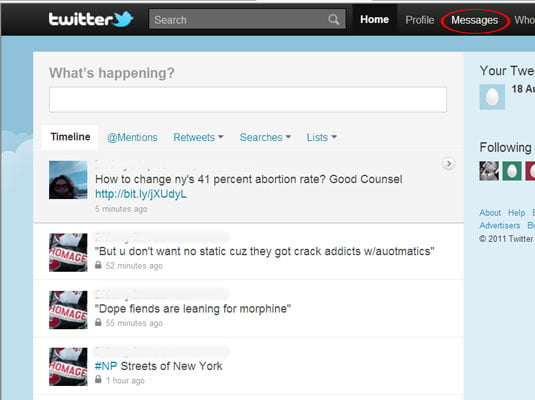
If you’ve ever wondered how to send a direct message on Twitter, this quick guide is for you. First, you’ll need to sign in to Twitter. Once signed in, you’ll be able to see a compose box on your profile. See the article : How Does Twitter Work?. From here, you can type whatever you want to say. Once you’ve finished typing, click the right-pointing arrow, then tap the enter key to send your message. If you’re using Twitter on mobile, you can click on the blue circle containing an envelope.

To send a DM on Twitter, you’ll first need to know the name of the person you want to contact. You can search for this person in Twitter’s search bar. This is useful if you’re trying to contact someone privately, and you don’t want them to see the message. Once you’ve done that, you’ll be able to find them in the DM list by scrolling down.
Read also :
How Many Characters Does Twitter Allow You to Write?
How Many Characters Does Twitter Allow You to Write? You may be…

Adding a photo or video

To add a photo or video to a DM, follow the instructions outlined below. You can use up to 50 people to send a DM to. To attach media to your message, tap the ‘Media’ option. This may interest you : How Does Twitter Make Money Advertising?. Tap ‘Add GIF or photo’. Once your DM is sent, the recipient will see it. If you’d like to include more media, you can create multiple groups and assign them to one DM.

If you’re over 18 and want to send someone an explicit picture, it’s okay. Just remember not to include any sensitive information in your DM. While it is legal to send pictures via Twitter, it’s not recommended. Pictures and videos are only permitted in Twitter if they are smaller than 512 MB and are shorter than 140 seconds. You can also add a caption to your picture, which will be visible for the recipient.

Read also :
How to Change @ in Twitter
How to Change @ in Twitter Are you wondering how to change…

Delete DMs

How do you delete a direct message on Twitter? Well, you can, but not the recipient. A security researcher identified a problem with the way Twitter handles DMs. Although you can delete a DM on Twitter, the recipient will still have a copy of it in their outbox. In fact, the deleted message will always be available if the other person downloads the archived data. It is best to delete DMs as quickly as possible.

To delete a direct message, first open the conversation you want to delete. Then, swipe left to select the trash can icon. After that, tap the information icon. From the resulting page, tap the Delete conversation option to remove the DM. Once the DM is deleted, you can log in and view it again. You can delete as many DMs as you want. Just keep in mind that this method may take a few minutes, so don’t wait too long before using it.

Getting a read receipt

If you are wondering how to get a read receipt for a Direct Message (DM) on Twitter, then this article is for you. Twitter has just announced a new feature for its Direct Messages (DMs) feature. DMs are private conversations that allow users to interact with each other in private, rather than public, spaces. When a DM is sent, it will display a blue checkmark with a “read” badge. The check mark will fill in when the person has read it.

However, if you don’t want to receive a read receipt, you can disable the feature. If you want to disable the read receipt feature, you can turn off the check mark on your DMs. Additionally, Twitter is currently rolling out a typing indicator and expanded preview for web links that resemble the tweet preview. Hopefully these new features will deter DM spammers.


Related Posts:

  • How to DM People on Twitter
  • How to Send a Direct Message on Twitter
  • What is DM on Twitter?
  • How to DM on Twitter
  • How to Send a Private Message on Twitter to Someone Who is…
  • Can You Direct Message on Twitter Without Them Following…
Was this article helpful?
YesNo

You might also like

Troubleshooting Instagram Posting Issues

Troubleshooting Instagram Posting Issues

How to Post Multiple Photos on Instagram Without Cropping – The Ultimate Guide

How to Post Multiple Photos on Instagram Without Cropping – The Ultimate Guide

How Do I View My Instagram Likes on My PC?

How Do I View My Instagram Likes on My PC?

How to Pause Reels in Instagram

How to Pause Reels in Instagram

How to Make Instagram Bio Center

How to Get Verified on YouTube: How to Speed Up the Process

How to Get Verified on YouTube: How to Speed Up the Process

Categories

  • Facebook
  • General
  • Instagram
  • LinkedIn
  • Marketing
  • Pinterest
  • Social Media
  • TikTok
  • Twitter
  • YouTube


Making Your Brands Popular.

(347) 875-0972

[email protected]

© 2024 Zeru.
All Rights Reserved.

DMCA.com Protection Status

Instagram Services

  • Buy Instagram Followers
  • Buy Instagram Likes
  • Buy Instagram Views
  • Buy Instagram Comments

YouTube Services

  • Buy YouTube Views
  • Buy YouTube Subscribers
  • Buy YouTube Likes
  • Buy YouTube Comments

TikTok Services

  • Buy TikTok Followers
  • Buy TikTok Likes
  • Buy TikTok Views

Facebook Services

  • Buy Facebook Page Likes
  • Buy Facebook Followers
  • Buy Facebook Post Likes
  • Buy Facebook Views

Twitter Services

  • Buy Twitter Followers
  • Buy Twitter Likes
  • Buy Twitter Retweets

Quick Links

  • FAQ
  • Blog
  • Contact
  • About
  • Terms and Conditions
  • Privacy Policy
No Result
View All Result
  • Buy Followers
    • Instagram Services
      • Buy Instagram Followers
      • Buy Instagram Likes
      • Buy Instagram Views
      • Buy Instagram Comments
    • YouTube Services
      • Buy YouTube Views
      • Buy YouTube Subscribers
      • Buy YouTube Likes
      • Buy YouTube Comments
    • TikTok Services
      • Buy TikTok Followers
      • Buy TikTok Likes
      • Buy TikTok Views
    • Facebook Services
      • Buy Facebook Page Likes
      • Buy Facebook Followers
      • Buy Facebook Post Likes
      • Buy Facebook Views
    • Twitter Services
      • Buy Twitter Followers
      • Buy Twitter Likes
      • Buy Twitter Retweets
  • Blog
  • Categories
    • Instagram
    • YouTube
    • TikTok
    • Facebook
    • Twitter
  • Contact

© 2023 Zeru. All Rights Reserved.

Welcome Back!

Login to your account below

Forgotten Password?

Create New Account!

Fill the forms bellow to register

All fields are required. Log In

Retrieve your password

Please enter your username or email address to reset your password.

Log In





